Viewing and Restoring Project Snapshots
21/08//2026
You can access project snapshots via the Snapshot Dashboard. The Projects Snapshots tab (1) opens by default. The autosave function is enabled by default for all projects during project creation. Snapshots, i.e. backups, of the project are then automatically generated at a specified interval (default: every 10 minutes). Automatically created backups are indicated on the list of all snapshots by showing system in the User column (2).
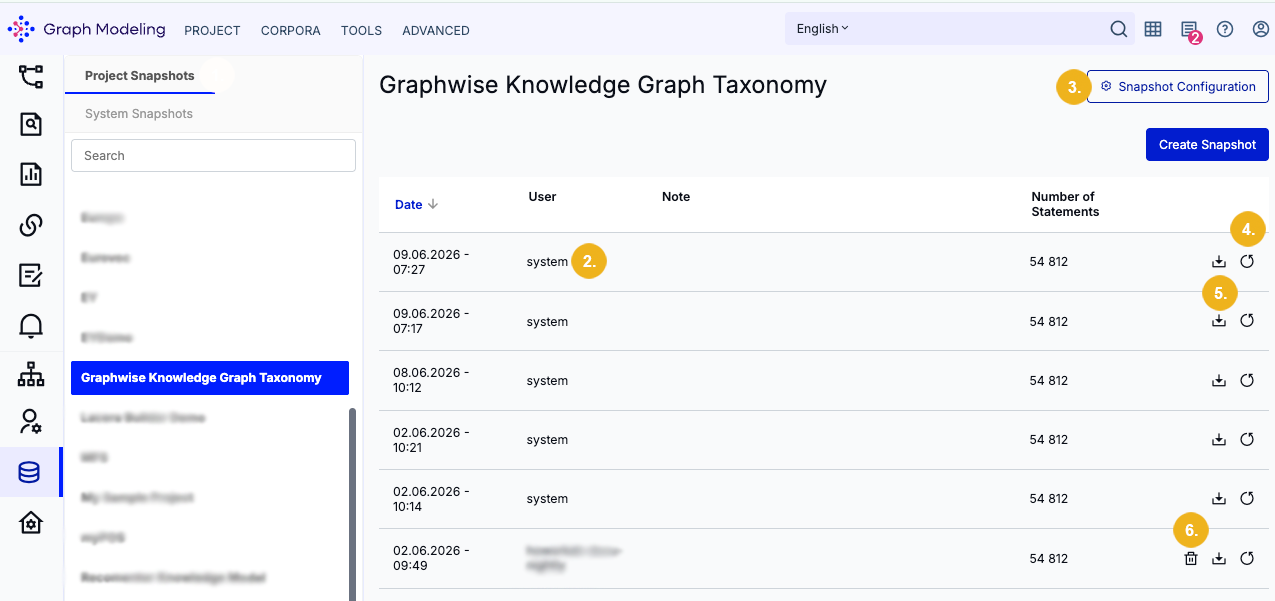
You can adjust the backup intervals for Project Snapshots using the Snapshot Configuration button (3). Refer to The Snapshot Configuration Dialog for more details.
On the Snapshot Dashboard you can restore a selected backup (4). You can also download a project snapshot in TriG format by clicking the corresponding Download button (5). Only manual snapshots can be deleted with a click on the bin icon (6).
Note
When a user opens a project, the current in-memory project is compared with the most recent backup file in the snapshot directory. If there are any inconsistencies, an error message appears saying that the project data might be outdated or corrupt. An inconsistency may occur for instance if the project data has been programmatically modified via API without being completed with a snapshot triggered via the Create Project Snapshot API call.
All backups (snapshots) are saved to the snapshots directory under /var/lib/poolparty/data/snapshotRoot. This snapshot directory should be included in the backup strategy for any Graph Modeling server. You can always restore projects from a snapshot should data loss or corruption occur.
Caution
Be aware that restoring a snapshot will overwrite your current data with the saved backup.