How to Mirror a Project with the Mirror App
23/04/2026
You can use the Mirror App for a one-way synchronization, or mirroring, of a project from a source server (the authoring / development server) to one or more target servers. The existing content of the target project will be deleted and replaced with an exact copy of the source project. The synchronization does not include ontologies and custom schemes, but you can update them manually.
Note
The user interface for the Mirror App has evolved with the release of Graph Modeling 10.2. Screen shots in this section of the documentation may not exactly match the current appearance of these screens in the software.
The target servers and synchronization settings are specified by a configuration file. The user interface allows an authenticated PoolParty user to trigger execution of the configured synchronization process.
Synchronization does not include ontologies and custom schemes. If there are changes in these resources, copy them manually to the target servers. Note that ontologies and custom schemes are shared resources: Before updating, ensure that there are no projects on the target server that require the older version.
The Mirror App is installed on the source server and correctly configured.
Note
These instructions assume default configuration of the Mirror App.
The project to be synchronized exists on all the servers with the same project ID keyword. For more information, refer to the Set up a Project for Synchronization section below.
An API service user exists on all the servers and has at least one group in common with the project you want to synchronize. For more information, refer to Create a New User and User Groups in PoolParty.
Tip
To manage which projects can be synchronized, assign the API service user to a single group, for example Mirror. It will be possible to synchronize only projects that are added to this user group.
Before a project can be synchronized for the first time using the App, it must be manually created on the source and target servers. For synchronization to work, the project ID keyword must be the same in the source and target projects. The simplest way to ensure this is to manually copy the project from the source to the target server(s) as follows. This allows for the configuration of the copy to most closely match the original. Once this preliminary work is done, the project can be synchronized at any time using the Mirror App.
Download the source project from the source server as a
.ppararchive. Leaving all options at defaults is sufficient.On the target server, create a new project from the exported archive by using the menu options Create new project > From ppar archive.
The Synchronization App relies on an "API service user" to interact with each PoolParty server. Ensure that this service user has at least one group membership in common with the project to be synchronized.
Once this preliminary work is done, the project can be synchronized at any time using the Mirroring App.
Note
It is possible to configure the app so that projects are synchronized to a target with a different project key. This is occasionally useful for specialized applications, which are not covered in this guide.
Log in to Graph Modeling on the source server.
Open the Graph Modeling project that you want to synchronize.
Note
As an alternative to the next two steps, you can send your browser directly to https://<your-server>/PoolParty/mirror/ui
Click on the Applications grid on the top right corner to expand Applications dropdown, and select "Project Sync" (see image 1 below) Click Applications.
Select Mirror App.
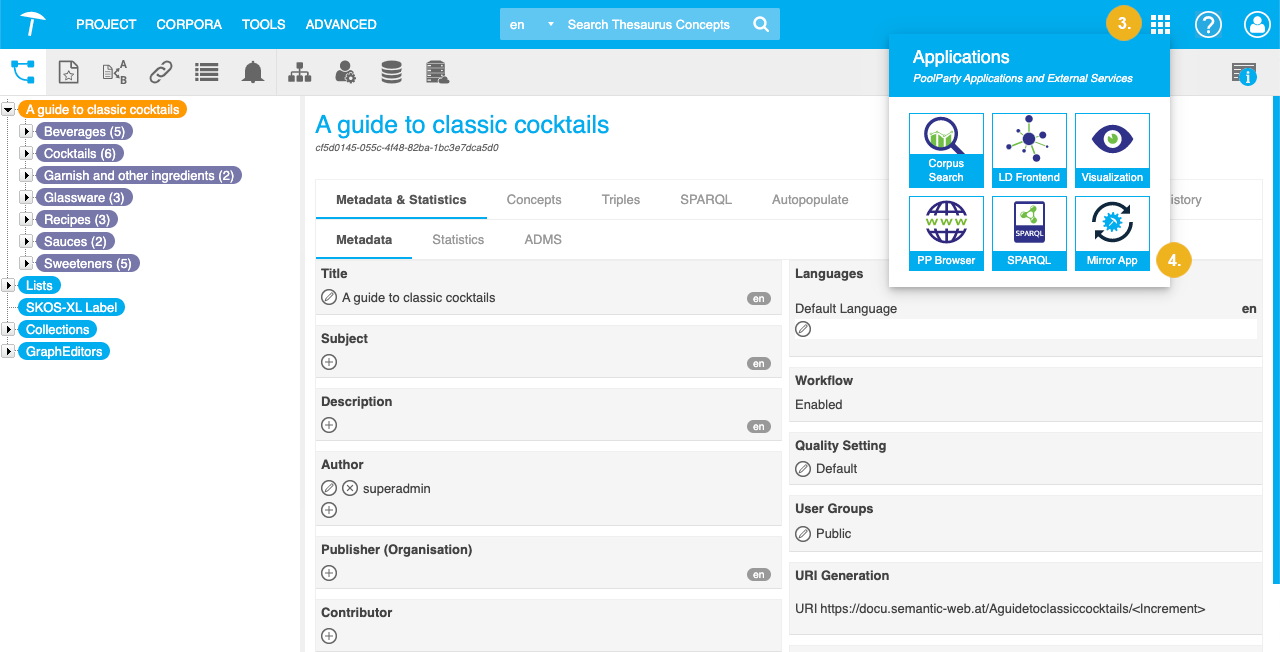
The Mirror App opens in a new browser tab.
Click Start Synchronization.
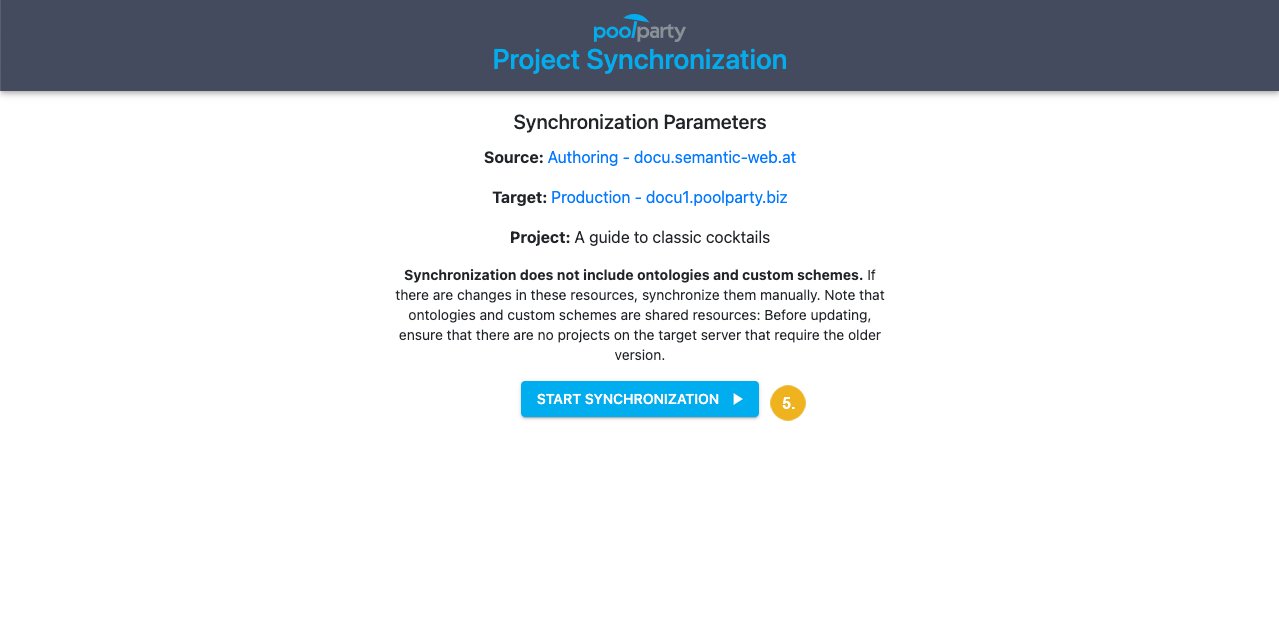
Caution
If you log out of Graph Modeling or open a different project after opening the Mirror App, you will not be able to start synchronization.
After a while, a message and a short summary confirm successful synchronization.
Tip
Since a single ontology or custom scheme can be used in multiple projects, they are not updated on the target server by the Mirror App. If you are sure that no project on the target server requires the old version of the ontology or custom scheme, you can update them by copying them over from the source server.