Graph Modeling's User Interface
13/03/2026
This section guides you through the Graph Modeling user interface, briefly describing items, menus and buttons you may come across when using the Graph Modeling UI.
Note
Despite our diligent efforts to maintain updated screenshots, some images from previous versions may appear. Feel free to contact us using the Feedback button located at the bottom of each page.
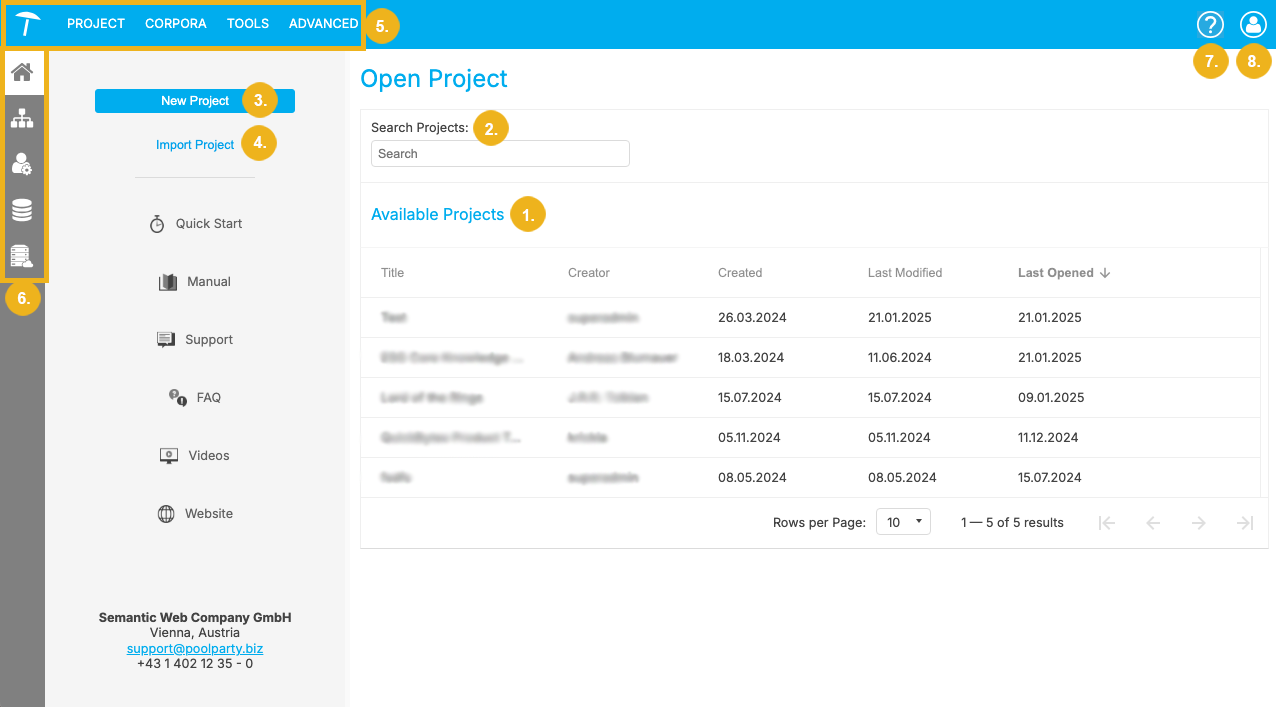
UI before a project has been opened.
When you log in to Graph Modeling, you will either see a blank screen if there are no projects saved in your Graph Modeling instance or if you have no rights to any of the existing projects; or the main area of the screen (Open Project) will show a list of all available projects.
The image above shows Graph Modeling's graphical user interface in the latter case, before a project has been opened.
The Open Project section serves as an overview over all your projects. All Available Projects (1) are shown in a list, which displays the Title of the project, its Creator, the date on which the project was Created, as well as the time at which it was Last Modified or Last Opened. You can click on each these headings to sort the respective column entries in ascending or descending order. Alternatively, you can use the Search Projects (2) search bar to find a project.
You can add a project to this list via the New Project (3) or Import Project (4) button, depending on whether you want to create a new project from scratch or already have a file available.
The Main Menu (5) on top of the page contains all major Graph Modeling functions and settings.
The icons on the Toolbar (6) on the left allow you to switch between the different project processing and management tools Graph Modeling provides, such as Ontology Management, User Management, the Snapshot Dashboard, and the Semantic Middleware Configurator.
Note
The visibility of the icons on the Toolbar depends on whether or not a project is opened as well as user access rights. The screenshot above shows the icons available for users with the SuperAdmin user role. Otherwise, only the first two icons (Home and Ontology Management) are visible.
On the top right side of the page, a Help icon (7) opens a drop-down menu where you can select Documentation, the Developer Guide or Support.
The User icon (8) opens a menu with two items: Settings and Log out.
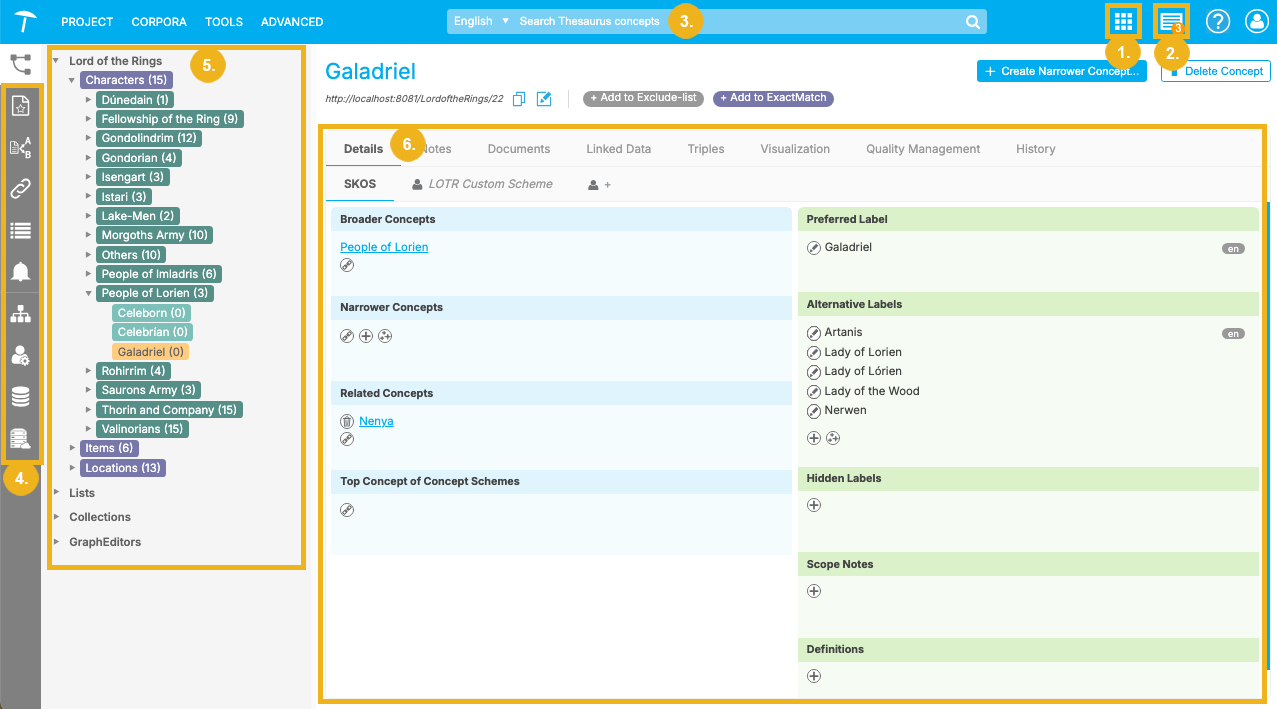
UI after a project has been opened and a concept has been selected.
After a project has been selected, the UI changes accordingly and reveals the following features:
Applications menu (1): Contains a number of linked buttons you can use to access functions such as the CorpusSearch interface, the Linked Data Frontend, Graph Modeling's browser, or any external visualizations you may have configured.
Notifications icon (2): Shows the most recent warning messages and notifications.
An autosave function is enabled by default for all projects which creates automatic snapshots of the whole project at a specified interval. Clicking on the notification icon provides information on whether the autosave function works correctly, snapshots of the project have been created manually, or the extraction model is out of date.
Search bar (3): Use the Graph Modeling search bar to search through concepts in a project.
Toolbar (4): The Home icon has been replaced by Thesaurus, Corpus, and Document Classification Management, the Project Linking icon, as well as the Workflow and Notifications Dashboards.
Hierarchy tree (5): Displays the hierarchical structure of your project. Click on the entries to select a concept scheme or concept.
Details View (6): Shows detailed information available for the selected project, concept scheme or concept. The available information is grouped in tabs. Click on the desired tab to display the corresponding view or function.
Tip
If the text length exceeds the maximum number of displayable characters on the UI then the text is truncated and replaced with three dots (…). Hover over the three dots to see the full text.