Edit Triggers for an Existing Webhook Notification
08/01/2026
You can edit Triggers for notifications in the Notifications or Webhook nodes' Details View.
After you have created webhook notifications, you find them below the Notifications node and on activating either the Webhook or Notifications node.
In your opened PoolParty project, open the Notifications Dashboard by clicking its icon in the toolbar.
Activate the Webhook node.
Expand the Arrow icon to the left of the notification.
The Triggers and their check boxes will be expanded below the notification entry. Activate or deactivate triggers of your choice.
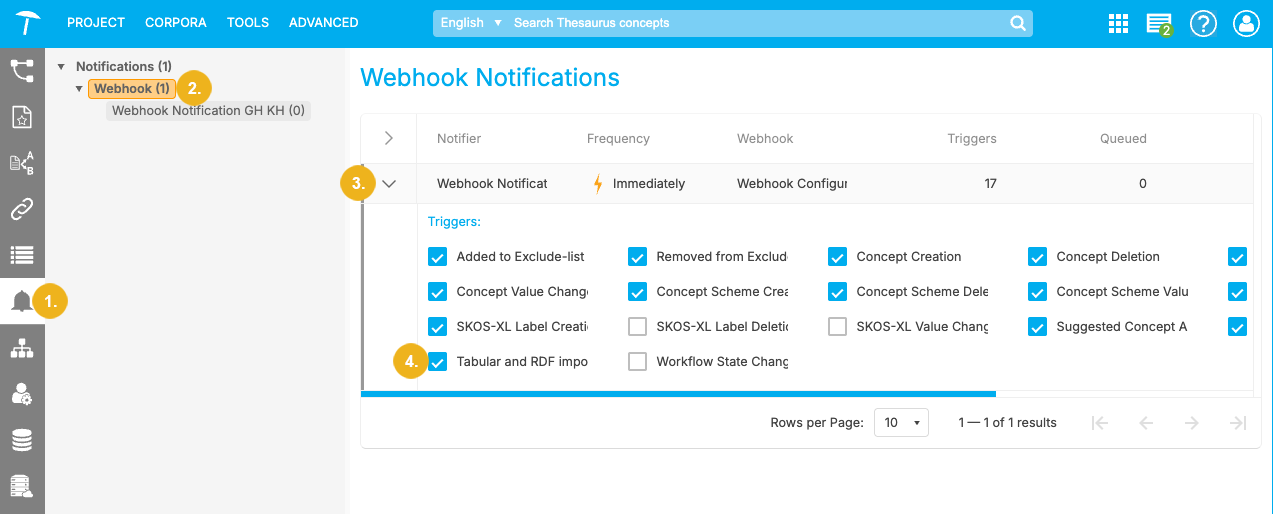
Your changes will take effect at once for the next notification in the queue or the next one to be sent, in case Frequency has been set to Immediately.
Note
When Tabular and RDF Import is enabled, the system sends notifications whenever a tabular or RDF import causes changes to the project. The possible types of notifications are: Concept Creation, Concept Deletion, Concept Value Change, Concept Scheme Creation, Concept Scheme Deletion, or Concept Scheme Value Change. This means that both Tabular and RDF Import and at least one of the aforementioned notification types need to be checked in order for it to take effect. If multiple changes have occurred, these changes will be bundled into one notification message.