Custom User Roles - Custom Ontology User Role
20/01/2025
This section guides you through creating a custom user role with the same permissions as the system PoolPartyUser role and ontology management permissions, without any project-specific restrictions.
Use
GET /roles apito check the system PoolPartyUser role first: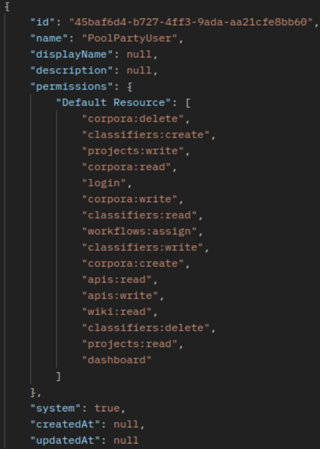
Now we will execute
POST /roles api; where for theDefault Resourcewe copy all the scopes from the PoolPartyUser role and then add the ontology related scopes to it. To do so we add everything by inserting`ontologies:${action_type}`pattern to this custom role.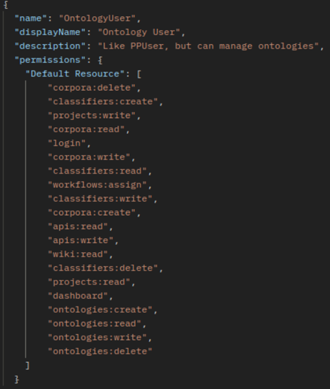
Tip
The scopes can be looked up in the authorization scopes description table or by comparing in our example the authorization scopes granted to the PoolPartyUser role with those assinged to the PoolPartyAdmin role, which includes ontology management rights.
From this point on you can assign this new custom user role (Ontology User) to any PoolParty user.
To do so log in to your PoolParty instance and assign this role to a specific user.
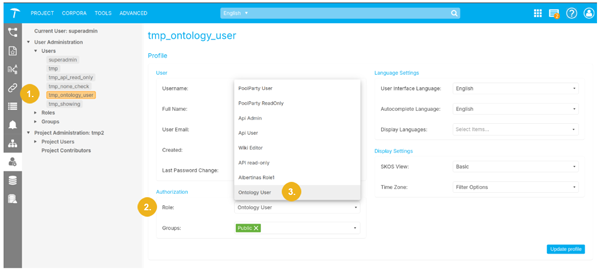
Select the desired user from the list of available users (1), then in the Authorization section click on the small arrow symbol in the Role field to open the pulldown where you can select the role you wish to assign to the selected user - in our example it is Ontology User (3).
Note
You must be assigned appropriate permissions to be able to perform user administration tasks.
If you want to see that you have correctly assigned the permissions to the newly created user role proceed as follows:
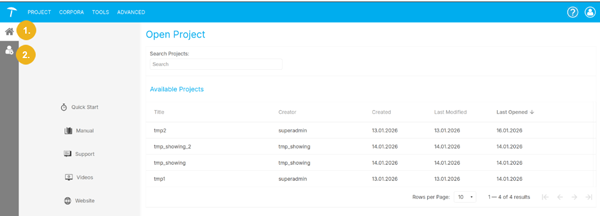
If the user role assigned to the selected user is PoolPartyUser then they will not be allowed to carry out any ontology management operations and will only see the following items on the left navigation bar - the open project page (1) and user management (2):
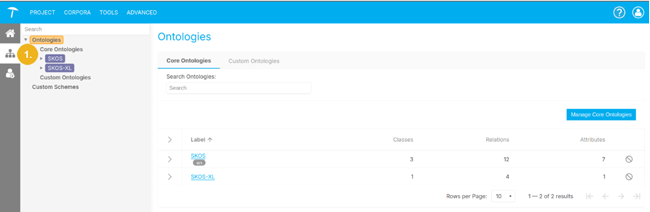
If however we have assigned the Ontology User role to the selected user they now can see and access Ontology Management (1) and perform any operation there (since they have all permissions).