Custom User Roles - Custom API read-only User Role
14/01/2025
In this section we will guide you through creation of a customized user role with API read-only permissions set for the Default Resource and all permissions configured for the system API read-only role applicable only to one specific project.
We want to define a custom user role granting a user read-only permissions to all projects except one specific project for which we want this new role to have the same permissions as those normally granted to the system ApiUser role. In our example this will be the project ee20c10e-5ea8-4c9b-b5ce-427b160cdd76.
Use
GET /roles apito check the system ApiUser role first: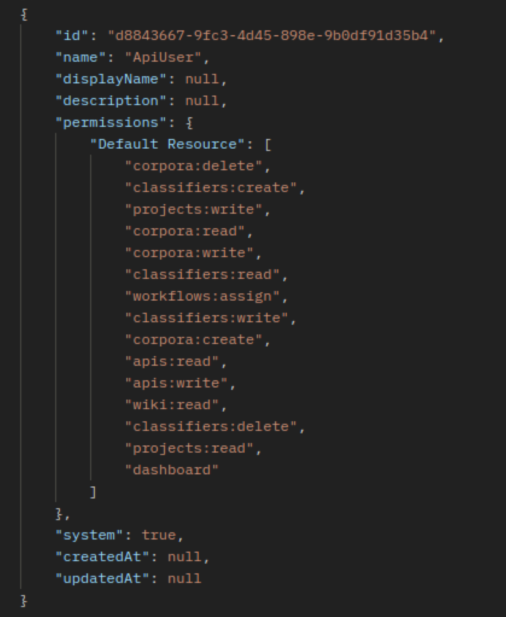
Now we will execute
POST /roles api; where for theDefault Resourcewe only keep thereadpermissions, e.g."corpora:read"and for the project used in our example (ee20c10e-5ea8-4c9b-b5ce-427b160cdd76) we copy all permissions (read, write, createanddelete) from the system ApiUser role.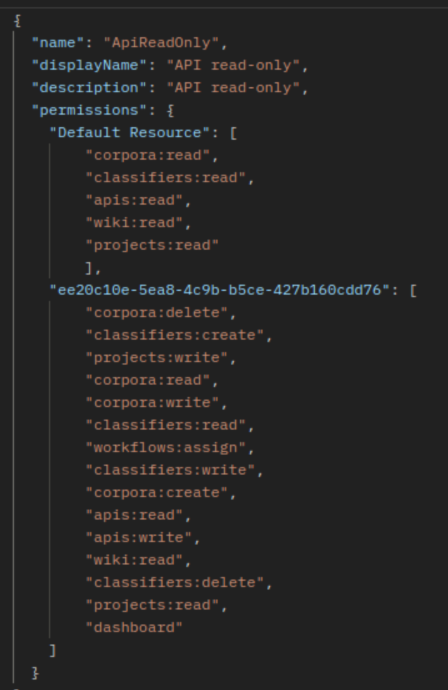
From this point on you can assign this new custom user role to any PoolParty user.
To do so log in to your PoolParty instance and assign this role to a specific user.
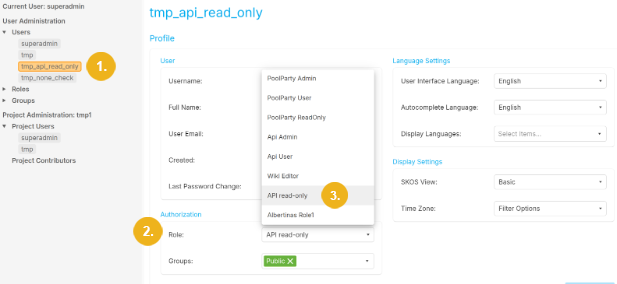
Select the desired user from the list of available users (1), then in the Authorization section click on the small arrow symbol in the Role field to open the pulldown where you can select the role you wish to assign to the selected user - in our example it is API read-only (3).
Note
You must be assigned appropriate permissions to be able to perform user administration tasks.
If you want to see that you have correctly assigned the permissions to the newly created user role proceed as follows:
To see that a user assigned our new custom role "API read-only" indeed only has read access to all resources except for the single project we specified in our example (
ee20c10e-5ea8-4c9b-b5ce-427b160cdd76) we will try to run the classifier on all but the project specified in our example (ee20c10e-5ea8-4c9b-b5ce-427b160cdd76). Such a request will return 403 (1) with a corresponding message (2):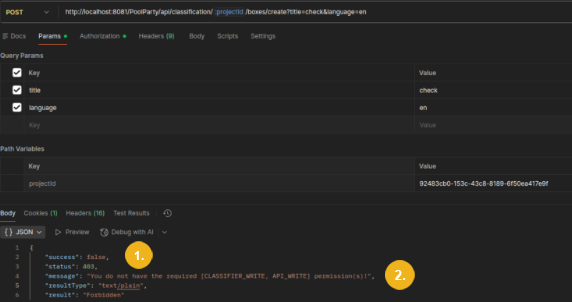
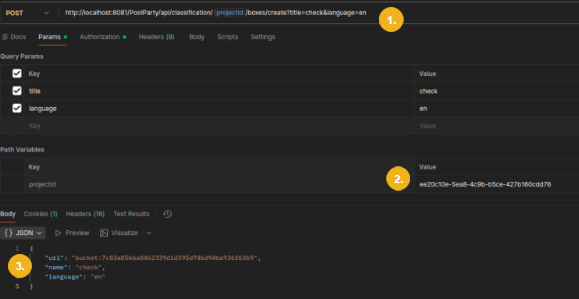
However if we execute the same request (1) for the project specified in our example (
ee20c10e-5ea8-4c9b-b5ce-427b160cdd76(2)) this operation will be performed (3) since this user role includes these rights for this particular project: