Configuring Term Store Synchronization Logging in the Administration Application
23/06/2026
The Graph Modeling for SharePoint Administration application supports logging of Term Store synchronizations on two levels:
On the process level (the Sync result column) – a Term Store synchronization process may end with an error, warning or success
On the concept level (the Log details column) – synchronization of each concept may end with an error, warning or information
Process level is enabled by default. You can enable logging on the concept level in the configuration of the Term Store Synchronization function app as described below. You can also specify the severity levels of the events you want to log.
Access the settings of the app hosting the Azure functions of the Term Store Synchronization module. For more information, refer to the Microsoft Azure documentation.
Select New application setting. For more information, refer to the Microsoft Azure documentation.
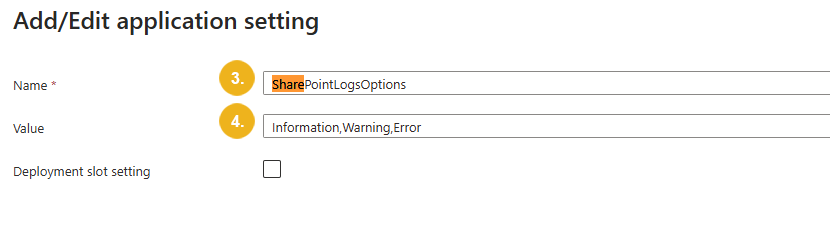
The Add/edit application setting dialog opens.
Name the new setting
SharePointLogsOptions.In the Value field, specify the severity levels you want to log as comma-separated values. Choose from the following severity levels:
Information– the synchronization was successful.Warning– the synchronization was partially successful. The log provides further details, including the reason.Error– the synchronization failed. The log provides further details, including the reason.
Confirm with OK.