Synchronize Term Store Taxonomy to Graph Modeling
17/06/2026
Important
This feature is currently in beta and will be updated in future releases. We apologize for any inconvience.
You can use the Graphwise for SharePoint Administration application to upload a copy of a Term Store term group to an existing Graph Modeling project.
Note
Ensure that the Graph Modeling project to which you want to synchronize the Term Store term group already exists and you know its name. You can use an empty or populated project and later decide if you want to delete, keep, or overwrite existing content of the project.
During synchronization, Graphwise for SharePoint populates an existing Graph Modeling project with concept schemes (term sets) and concepts (terms) together with their preferred (names) and alternative labels (synonyms) from a selected Term Store term group. If the Graph Modeling projects has a dedicated termGUID attribute configured, you can also import the term GUIDs.
Term Store | Graph Modeling |
|---|---|
Term group | Project |
Term set | Concept scheme |
Term
| Concept
|
Term name | Preferred label |
Term synonym | Alternative label |
GUID | Literal in the The |
Tip
To understand the role of ontologies and concept schemes in Graph Modeling and their relationship to custom attributes, refer to the Graph Modeling documentation.
The termGUID attribute is available for concepts and concept schemes in your project.
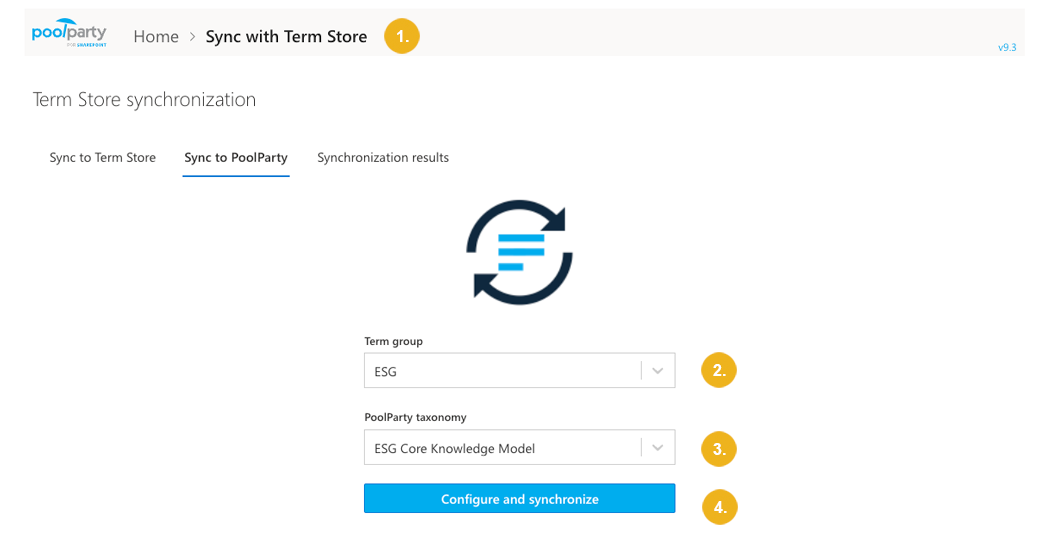
On the Graphwise for SharePoint Administration page, select Sync with Term store.
On the Sync to Graph Modeling tab, select the Term store term group you want to synchronize to Graph Modeling.
Select the Graph Modeling project to populate with concepts from the selected term group.
Confirm with Configure and synchronize.
Select the synchronization mode:
Delete all existing content: Existing concepts and concept schemes of the Graph Modeling project will be deleted and replaced with content from Term Store.
Keep existing content: Existing concepts and concept schemes in the Graph Modeling project are preserved. New concepts are added, based on GUID matching. Alternative and preferred labels of concepts present in both Graph Modeling and Term store are NOT updated based on the information coming from Term Store.
Overwrite existing content: New concepts and concept schemes not already in the Graph Modeling project are added. Alternative and preferred labels of concepts already present in Graph Modeling (matched by GUID) will be overwritten based on the information coming from Term Store.
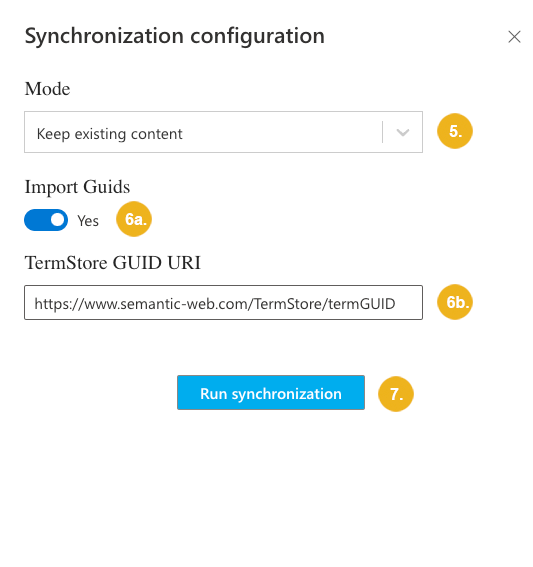
To import concepts together with their GUIDs:
Select Import GUIDs.
Specify the URI of the
termGUIDattribute in Graph Modeling or keep the default value if you have used the template custom ontology from the Optional: Enable termGUID Attributes in Graph Modeling section above.
Start the synchronization with Run synchronization.
Depending on the size of the taxonomy, synchronization may take a significant amount of time to complete. You can safely navigate away or close the browser window while it is in progress.
You can check the status of the synchronization on the Synchronization results tab or in the Term store synchronization logs.
Note
When a taxonomy synchronized to Graph Modeling changes, there is no built-in way to reflect those changes in the Term Store while preserving mappings between Graph Modeling URIs and Term Store GUIDs.
Tip
For more information on how to access and interpret complete synchronization logs, refer to Term Store Synchronization Reports and Logs.