Update Graph Modeling Taxonomy in Term Store
17/06/2026
Important
This feature is currently in beta and will be updated in future releases. We apologize for any inconvience.
Once you synchronize a Graph Modeling taxonomy to the Term store and make changes to it on the Graph Modeling Thesaurus Server, you can update the corresponding term group to reflect those changes while preserving the mapping between Term Store IDs and concept URIs in Graph Modeling. You might also need to update a term group if you attempt to synchronize it for the first time and the process ends with an error or warning.
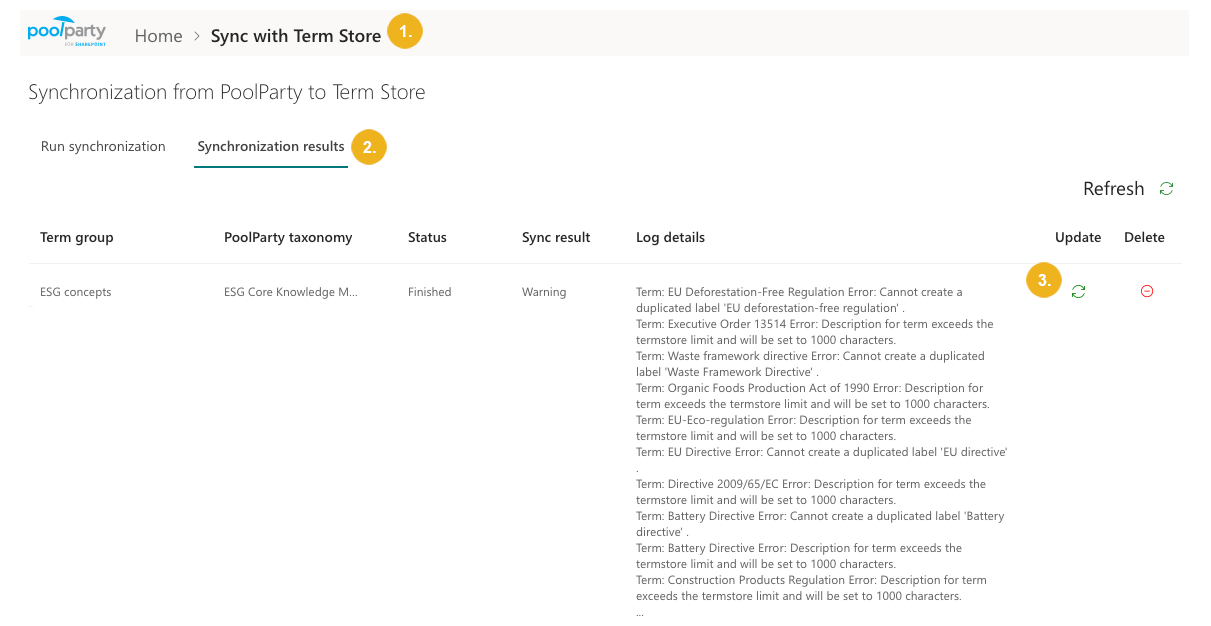
On the Graphwise for SharePoint Administration page, select Sync with Term store.
Go to the Synchronization results tab.
Select the Update icon next to the term group you want to update.
The synchronization's status changes to In progress.
Tip
The synchronization status is updated. To view it, select the Refresh button.
For more information on how to access, delete, and interpret complete synchronization logs, refer to Term Store Synchronization Reports and Logs.