- Graphwise Platform Documentation
- Graphwise GraphRAG
- GraphRAG
- GraphRAG Configuration Guide
- GraphRAG Configuration Guide - Architectural Overview
- GraphRAG Configuration Guide - The Two-Layer Configuration Model
GraphRAG Configuration Guide - The Two-Layer Configuration Model
23/06/2026
GraphRAG version 1.2.0
The GraphRAG platform utilizes a Two-Layer Configuration Model designed to decouple underlying cloud infrastructure management from real-time pipeline behavior and behavioral tuning. This separation of concerns ensures that DevOps teams can maintain strict infrastructural controls while data scientists and domain experts dynamically optimize orchestration logic.
These two layers are the Deploy Time and the Runtime as illustrated below:
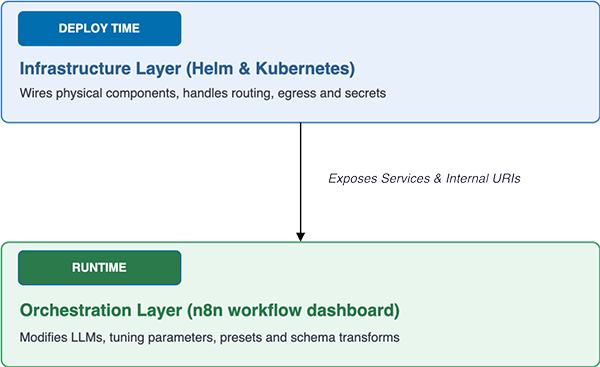
The Infrastructure Layer builds the physical framework of the GraphRAG application. It manages core networking boundaries, security handshakes, volume persistence, and system resource specifications.
Configuration Mechanisms: Managed through Helm charts (values.yaml), Kubernetes ConfigMaps, and encrypted Kubernetes Secrets.
Lifecycle Boundary: Static configuration. Any changes made at this layer require a Kubernetes rolling update or pod redeployment to take effect.
Primary Scope
Container configurations (image tags, resource limits, readiness and liveness probes determining the health status of the application running inside of the container)
Ingress, TLS terminates, and network policies
Internal JVM/Spring properties for Java-based sub-services (such as
conversation.configuration.properties)Cluster-level credentials and secrets (such as Keycloak master database keys, internal storage volume mounts)
The Runtime Layer dictates the behavioral intelligence, processing thresholds, data transformations and model pathways of the GraphRAG orchestration loop.
Configuration Mechanisms: Managed directly inside the n8n UI via the centralized Configuration sub-workflow code node (JavaScript object properties) and the n8n Credentials Sidebar.
Lifecycle Boundary: Fully dynamic. Published changes are saved directly to the orchestrator's backing database and executed on the very next API request transaction without system downtime or pod recycles.
Primary Scope
Service Endpoint Targets: Instructing the workflow where to route internal components (e.g.,
backendUrl,graphDBMcpUrl)LLM Layout Engine Mappings: Active hot-swapping underlying generative and embedding models
Vector Database Mappings: Defining presets and custom property transforms
Execution Timeouts: Fine-tuning parallel phase boundaries based on specific model latencies
To modify the runtime layer proceed as follows:
Access the Workflows UI at
https://<your-host>/graphrag/workflows.Locate and open the sub-workflow named Configuration.
Open the Configuration Code node and edit the key-value pairs within the JavaScript
returnstatement.Save/Publish the workflow.
Manage sensitive keys or API secrets via the Credentials section of the GraphRAG Workflows Dashboard (n8n) Sidebar.
For more information on how to manage credentials in the Workflows Engine Dashboard, refer to the n8n documentation.
It also supports and integrates with numerous data systems and sources; for more details refer to the n8n documentation.
Warning
The n8n credentials are encrypted and managed in the Credentials sidebar. The shipped workflows include empty definition placeholders by design; you need to fill them during the post-deployment.
The following common operational tasks illustrate how these layers communicate.
Scenario A: Synchronizing the Conversations Service Endpoint
When the Conversations Service is deployed inside a cluster, its routing must be configured at both layers to allow bidirectional communication:
Infrastructure Step (Helm)
Inform the service where n8n lives by setting
n8n.base.urlto your internal workflows service cluster address.Runtime Step (n8n)
Update the JavaScript code snippet within the Configuration workflow to expose the matching location
const backendUrl = "http://conversation-service:8080";// Internal cluster DNS name.
Scenario B: Migrating Vector Storage Providers (e.g., OpenSearch to Elasticsearch)
Changing underlying storage backends requires a synchronized update across both administrative planes:
Infrastructure Layer (Helm)
Update your Kubernetes Secrets values with the new cluster's physical connection endpoint strings and run a Helm upgrade to let the Components Service reconnect.
Runtime Layer (n8n)
Update your parsing logic instantly by switching your execution preset flag inside the Configuration workflow
"vectorStorePreset": "elasticsearch_native"Credentials Layer (n8n Sidebar)
Update the access authentication tokens in the workflows dashboard sidebar to ensure credentials are smoothly propagated across downstream indexing nodes.
Scenario C: Computing Execution Timeouts
When managing multi-hop orchestration sequences, ensure that your timeout boundaries appropriately scale between layers.
Runtime Layer (
parallelStepsMaxTiemout)Caps parallel retrieval execution tracks within the orchestrator node using the following mathematical guideline
parallelStepsMaxTiemout= max(timeouts of parallel steps) + Δtwhere Δt represents a buffer value between 1 and 5 seconds.
Infrastructure Layer (
sse.timeout.n8n.milliseconds)Must always be set higher than the runtime workflow limits to ensure the underlying network channel remains open for the entire duration of the transaction.