Common Parallel Step Details
03/07/2026
GraphRAG version 1.2.0
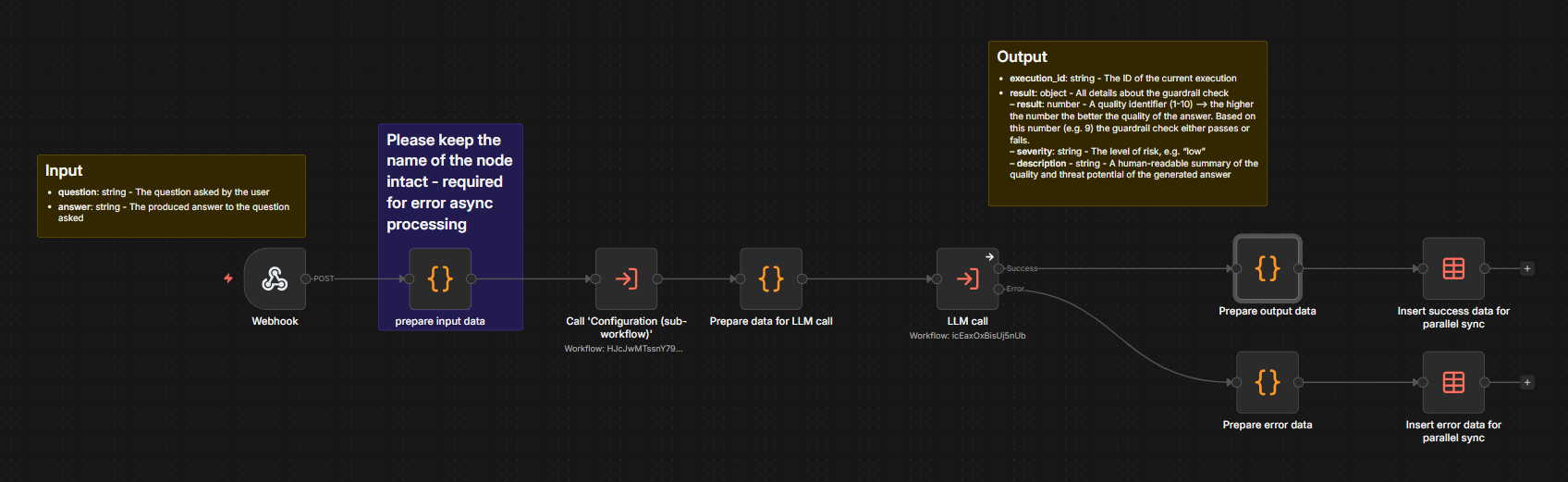
Although each parallel step can be quite different, they all share some common characteristics:
Naming “Step - [short desc] - Async”
Workflow trigger – a webhook with the following properties:
Respond -
ImmediatelyPath -
internal/[desc]-internal; prefix is required
The next node after the webhook must be a prepare input data code node:
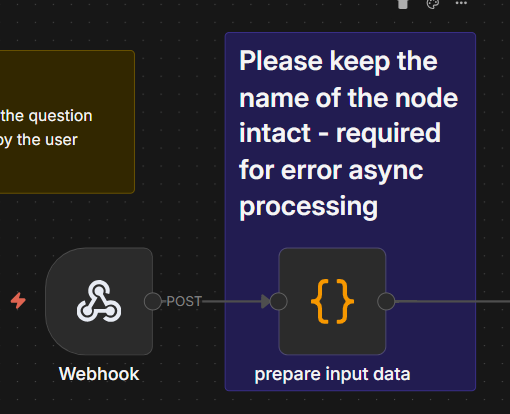 |
This node is used to extract input data for the workflow should the Error - Async workflow throw an error.
Please check the stepTag JSON property in prepare input data. It will be used to generate the appropriate message.
The third node is usually (although not required to be) the call to the Configuration workflow to get some connection configurations.
At the end of the workflow there are two paths, success and failure:
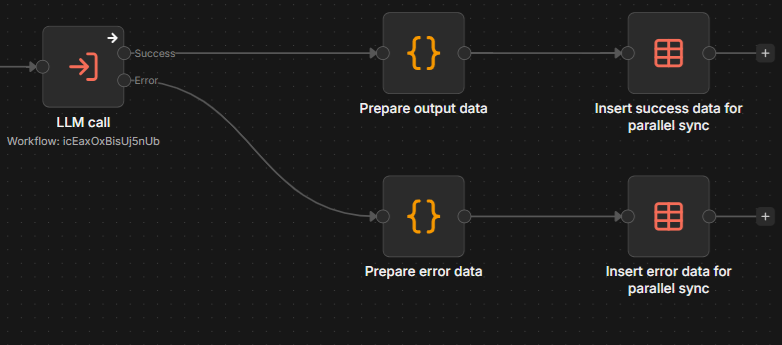
Each path should write the results to PARALLEL_DATA_SYNC data table.
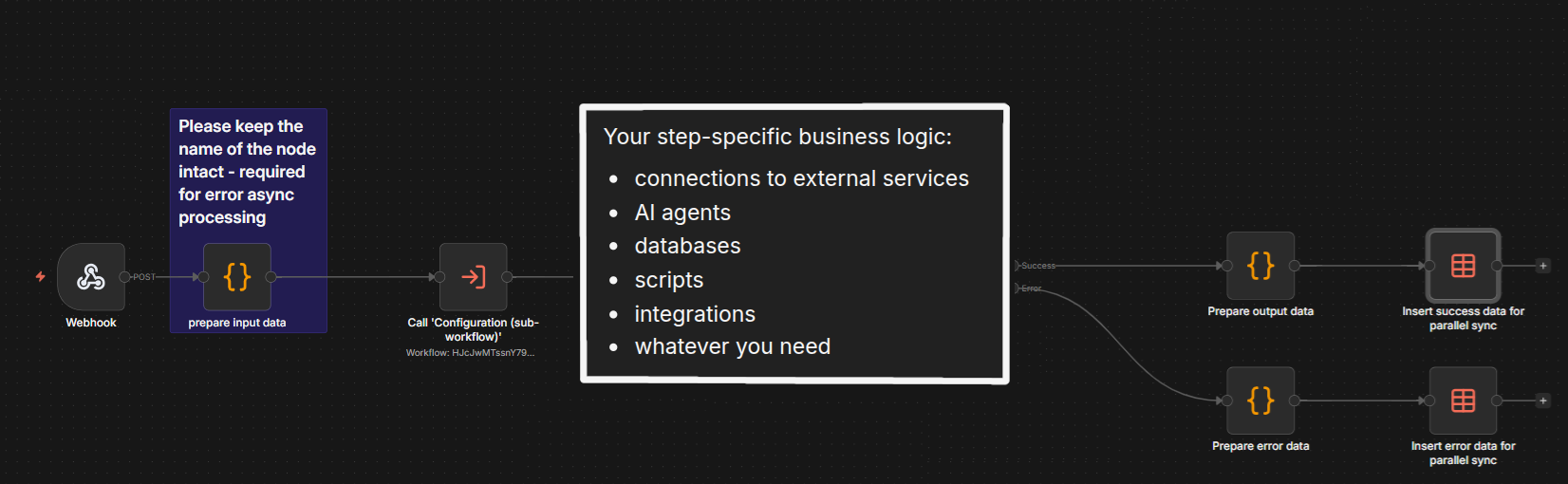
In general, each such step should follow the pattern shown here: the triggering of the webhook leads to the preparation of the input data and the configuration; then, the logic specific to your workflow is executed — for example, connection to external services, the use of AI agents, and the execution of specialized scripts. Once these are done, final cleanup consists of preparing and then storing both output and error data.
The Concept Enrichment step enriches any given text input (parameter chatInput) with extracted concepts. It also prepares outputs for any follow-up workflow, potentially using the concepts as part of their context. This includes:
LLM context (for final answer LLM injection)
Query rewriting context
Queries and text for dense vector retrieval queries
Keywords
UI concepts (including information about relations used)
By default, concept enrichment is performed on the question asked by the user and on the answer generated by the LLM.
Concept enrichment starts in Step - Graph Modeling Concept Enricher - Async, allowing Step - Graph Modeling Concept Enricher - Sync to be run in parallel. As the first step, the Graph Modeling API is used to extract concepts from the text. For this to work the URL of the Graph Modeling instance as well as the ID of the project used must be set in the Configuration workflow.
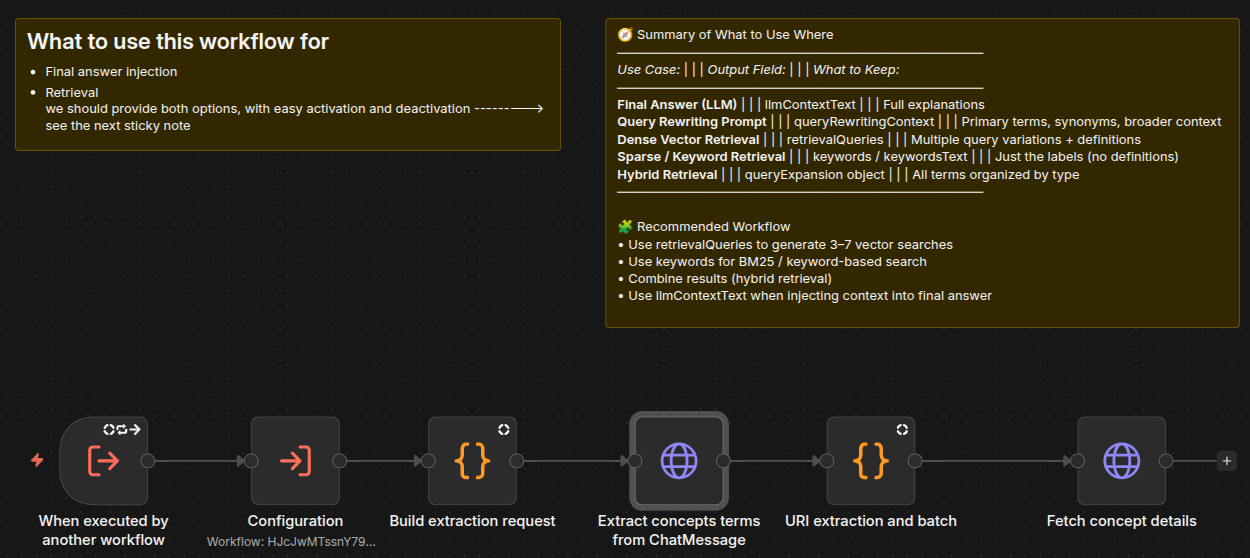
For the enrichment of the concepts itself the extraction result is forwarded to the Fetch Concept Details workflow, which is shown here in two parts:
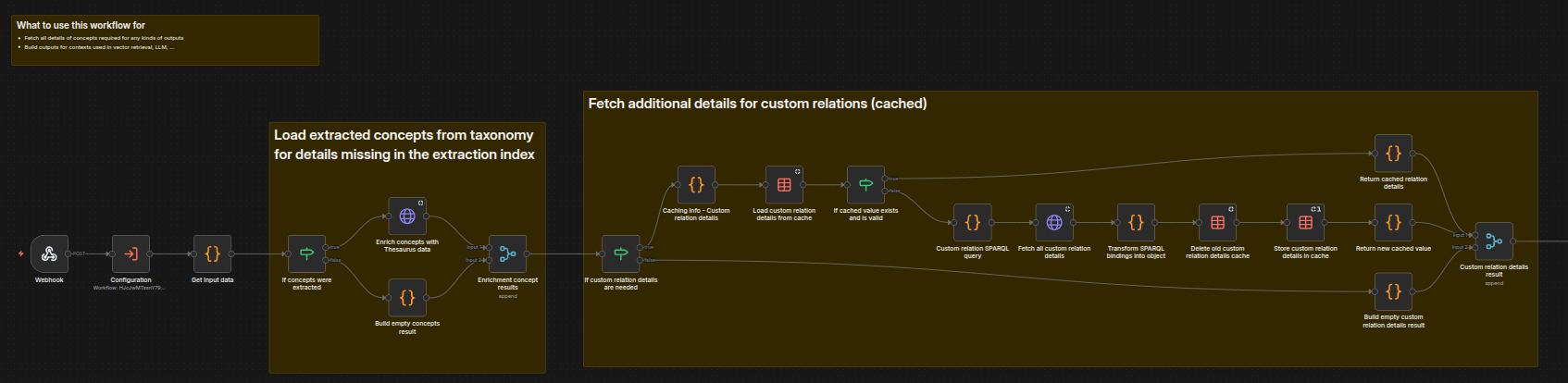
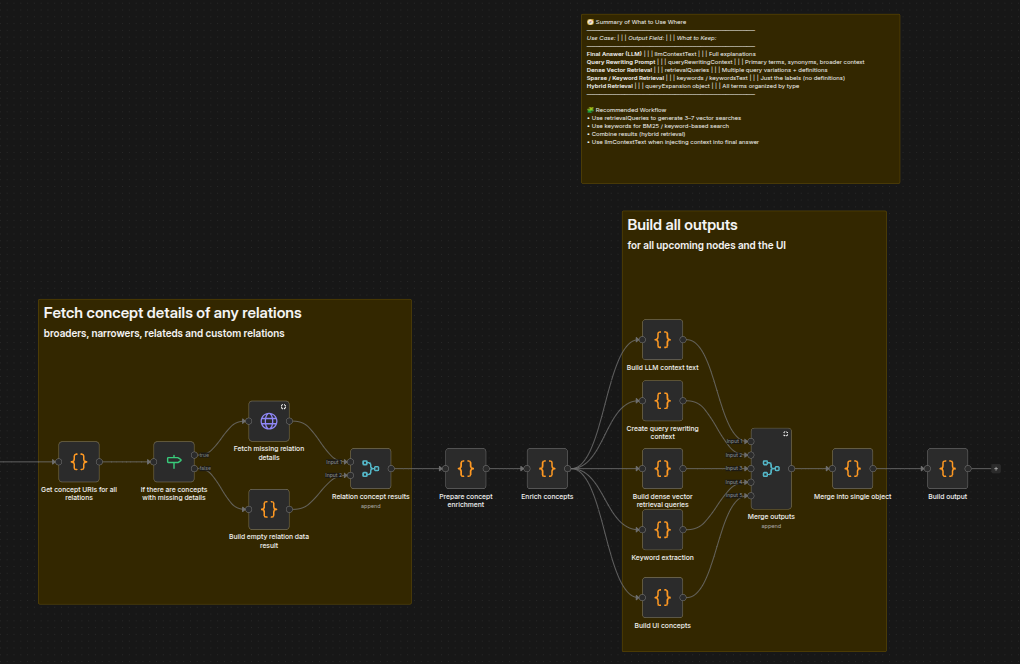
This workflow canbe used as part of the question answering project and as a standalone API to enrich any list of concepts via the URL https://[your-GraphRAG-server]/graphrag/workflows/webhook/fetch-concept-details.
Concept enrichment can be broken down into the following sub-steps:
Enrichment of all the originally extracted concepts based on a list of properties that the user is interested in. This list of properties can be set in the Configuration workflow (property
conceptProperties). As shown in the part 1 screenshot above, this is done by the Enrich concepts with Thesaurus data node.Fetching additional information such as labels for all related concepts, as the original enrichment response only contains their URIs. As shown in the part 1 screenshot above, this is done using a custom SPARQL query that retrieves data that is then used to replace data in the cache.
Fetching labels of any non-SKOS relation requested by the user. This is shown in the part 2 screenshot above.
The generation of the outputs. As shown in the part 2 screenshot above, this takes advantage of LLM context, query rewriting, vector data, and keyword extraction to build a single object that is then passed along as the output.
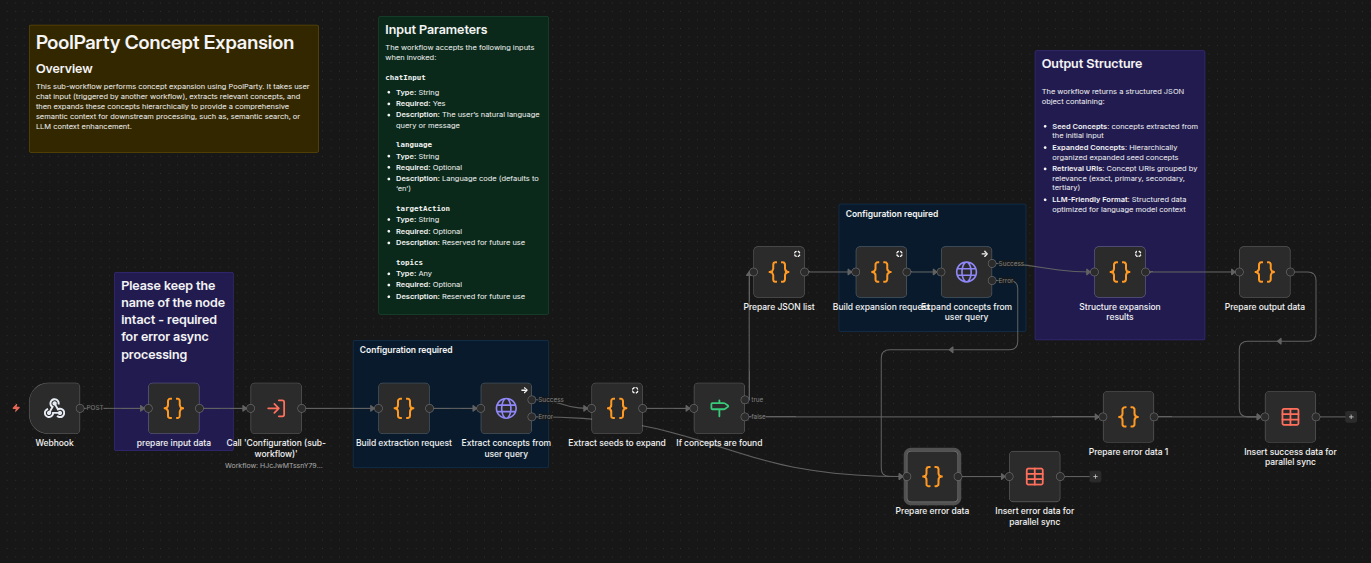
As input, the concept expansion sub-workflow takes a text string of user input, along with an optional code indicating the language of the text string. It then extracts relevant concepts and expands them to provide a semantic context for downstream processing such as semantic search and LLM context enhancement. The workflow then returns a JSON object with seed concepts, expanded concepts, and concept URIs in an LLM-friendly format.
The expansion query is currently statically set in the node Build expansion request. It will be made configurable in the future.
Vector search uses the configured vector store to determine which paragraphs of which documents to use as context for answering the question asked by the user.
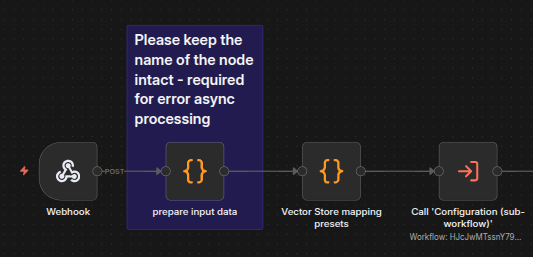
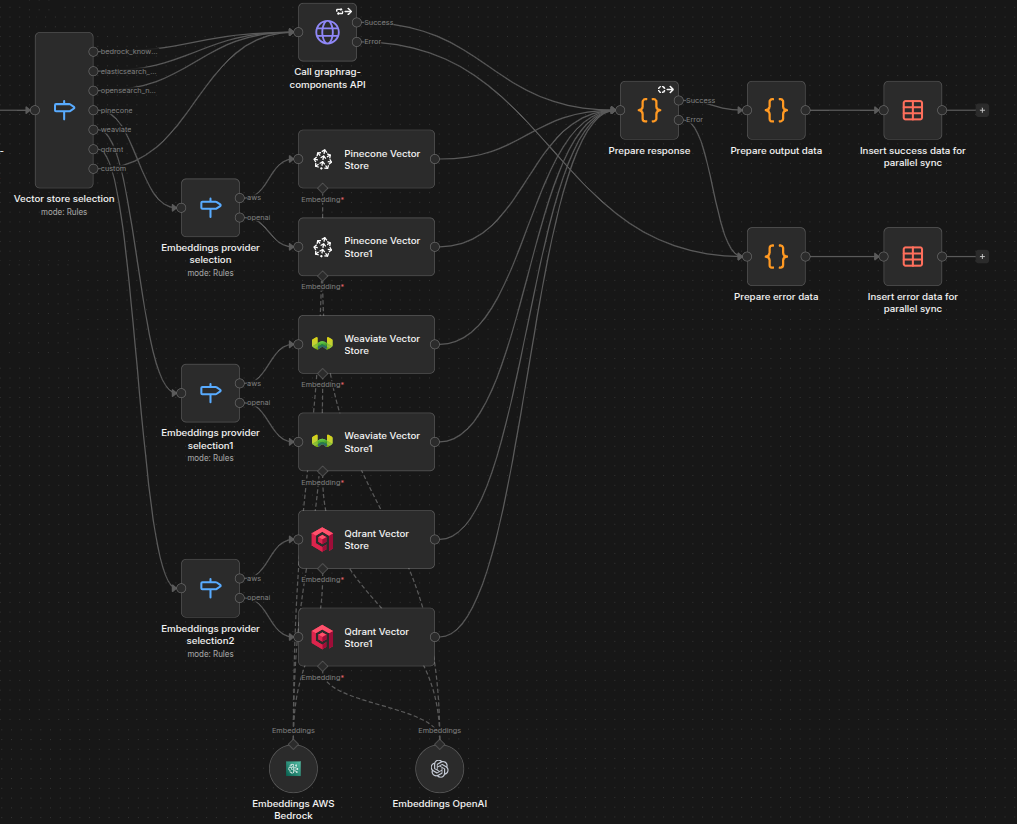
In order for the vector search to work, several things must be set in the Configuration workflow first:
vectorSearchUrl: The URL to the internal vector search endpoint (components service)vectorStorePreset: The mappings preset to use for the vector storeembeddingsModelId: The model used for the embeddingsvectorSearchTopK: Controls the numer of returned documents from the vector search
Several other properties might need to be set depending on which vector store preset is used:
Pinecone, Qdrant or Weaviate is used as the vector store:
vectorIndex: For Qdrant and Weaviate, the collection ID valueembeddingsProvider: Possible values are "aws" or "openai"
custom is used as the vector store preset:
vectorStoreCustomMappins: Vector store mappings to use
The vector store preset decides which service is used to query the vector store. For vector stores natively supported by GraphRAG (Pinecone, Weaviate, and Qdrant) their dedicated service node is used. For everything else GraphRAG's components API is called, which takes care of calling the right endpoints with the right queries and returning the output in the correct format.
GraphDB query tools are connected via MCP (Model Context Protocol) and called via GraphRAG workflows for structured data retrieval. This enables hybrid retrieval strategies combining vector search with graph-based queries.
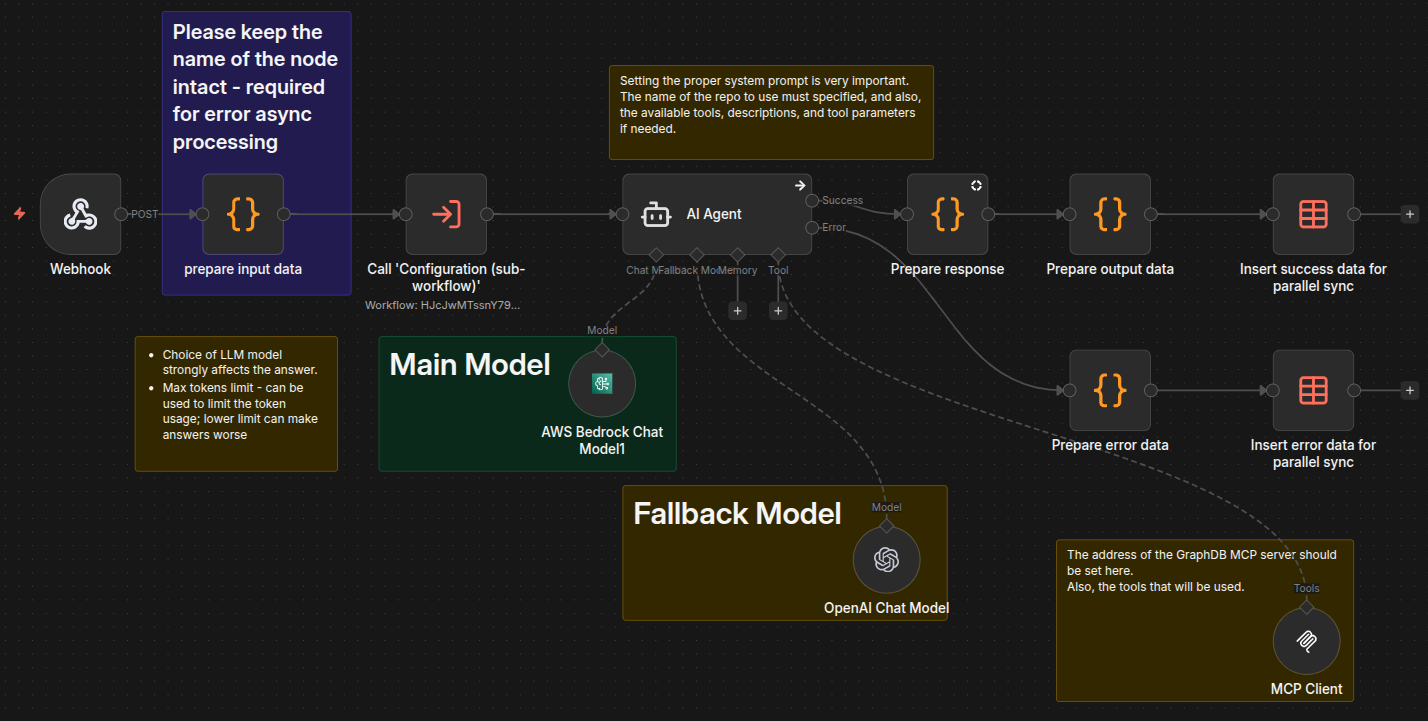
In order for the MCP workflow to work, several things must be set in the Configuration workflow first:
graphDBMcpUrl: URL of the GraphDB MCP endpointgraphDBMcpRepository: The main repository in GraphDBgraphDBMcpOntologyGraph: The name of the graph containing the ontologymcpLLMModel: The LLM model only used in the MCP step
The choice of MCP tools that are available to the agent is set in the field Tools to include of the MCP Client node. Altering the tools might also require adapting the prompt of the AI agent. Tools included by default are:
fts_search: Full-text search in the graph. When using this tool the maximum number of triples returned can be configured in the propertygraphDBMcpFtsSearchTriplesLimitof the Configuration workflow.ontology_schema: Extracts ontology schemas used by clients to build structured queriessparql_query: Execute SPARQL queriesautocomplete_iri_discovery_search: Uses GraphDB’s autocomplete index to fetch relevant IRIs by searching their names
In this step follow-up questions are generated by the LLM. These take into account the question originally asked by the user and the answer generated by the LLM to help users to more easily explore a topic in greater depth.
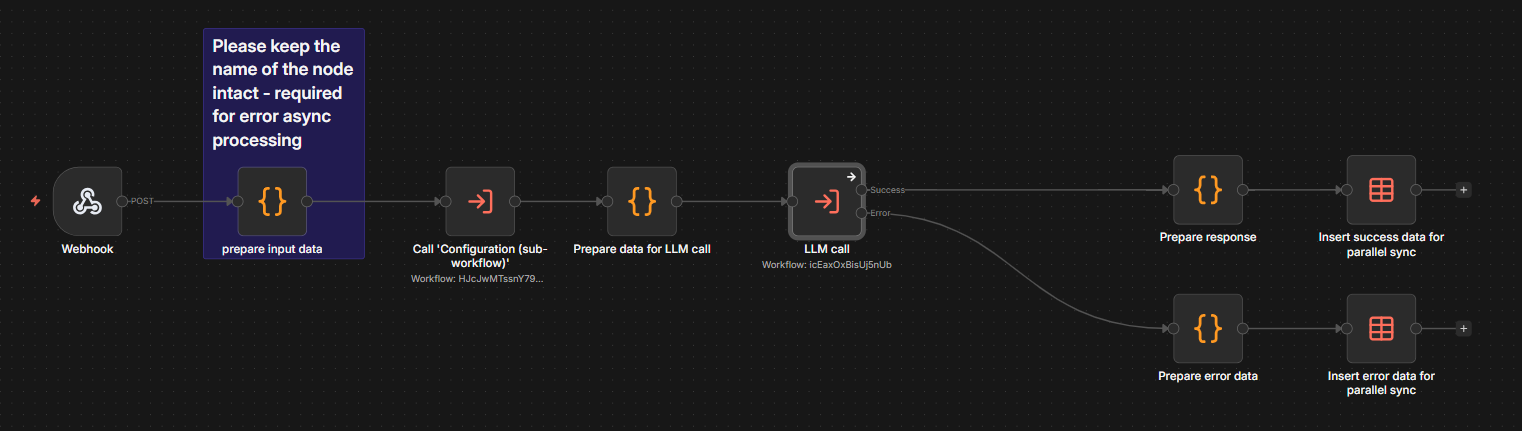
For each of the questions in the response, the reasoning behind choosing that question, as well as several connected topics, are returned.
Output Guardrails is the part of the post-processing stage that ensures that the answer generated by the LLM follows a certain set of rules enabling GraphRAG to provide safe and high-quality answers.
Below you can see the invocation from the Parallel Post Final Answer - Main workflow, where if the output guardrails do not pass, the workflow execution is immediately brought to an end. Only in case of success, all remaining messages – including the answer – are forwarded to the client:
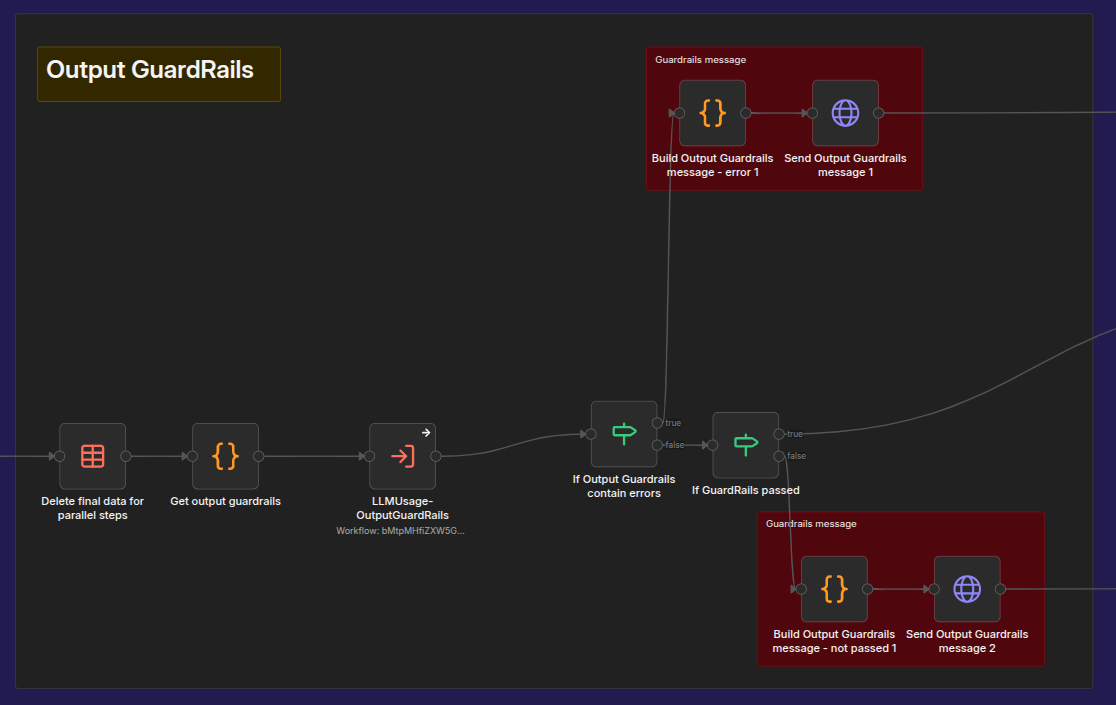
The logic behind the application of the guardrails rules can be found in the Step - Output Guardrails - Async workflow:
At the end of the post-processing phase of GraphRAG's question answering process, the token usage for each step using an LLM as well as the total sum of tokens used for that question is calculated.
To do this, all details of the ongoing workflow execution are fetched via the GraphRAG API and traced for requests to AI agents. This behavior can be found in the workflow Utils - Calculate LLM usage as show below.
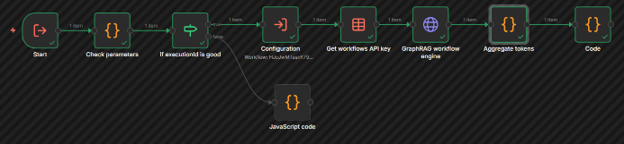
The Main workflow then generates and sends a TOKEN_USAGE_DETAILS_SSE message.