Add Data via Excel
Add Data via Excel
Learn how to add data to already existing taxonomies in Graph Modeling using Excel files.
In addition to Import Tabular Table, Excel Sheet or CSV File into Graph Modeling, the Excel import allows you to add data to existing concepts.
Make sure to observe the rules for importing Excel sheets into Graph Modeling.
In order to add to existing data, Enable Updates:
Open your Graph Modeling project.
In the main menu, click Project .
In the submenu select Import, in the expanding submenu select Excel Project Import.
The Excel Import dialogue opens, which lets you choose the path to the Excel file you created before. Make sure you check the box for Enable Updates.
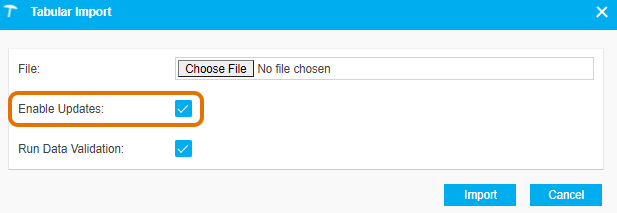
The Data Validator checks the data's validity. The check box next to Data Validator then is active by default. Uncheck it, if you don't want to use the assistant.
Confirm your selection with Import.
Adding data will produce the following results:
Graph Modeling will execute a check for every row in the sheet, if the concept already exists. In that case the data in the import file is added to the existing concept.
Attributes that can only be applied once e.g. skos:prefLabel or a custom attribute defined like that, cannot be updated.
Such data in your Excel import sheet will result in an error during import.
Using this procedure also will make sure that existing concepts will be reused to avoid the creation of duplicates.
Relations can only be created, if the related concept already exists in the project or has been created in a previous column in the Excel import sheet.
Note
The function in Graph Modeling is called add data, since existing concepts and concept schemes can be extended.
Graph Modeling will not update existing data by overwriting existing values.
Warning
Be aware that you cannot make any changes to your project (e.g. SKOS conversions, concept linking), if you are using the Data Validator and have not finalized the import by using Save or canceling it.
If you try to import data into a Graph Modeling project with an unfinished import present, a message will be displayed pointing to that fact.