View and Restore Snapshots of System Repositories
21/08/2026
You can access the system snapshots by navigating to the Snapshot Dashboard and clicking the System Snapshots tab (2). Sub-tabs corresponding to different system repositories are displayed on the left (3). You can switch between the different sub-tabs to manage the following repositories:
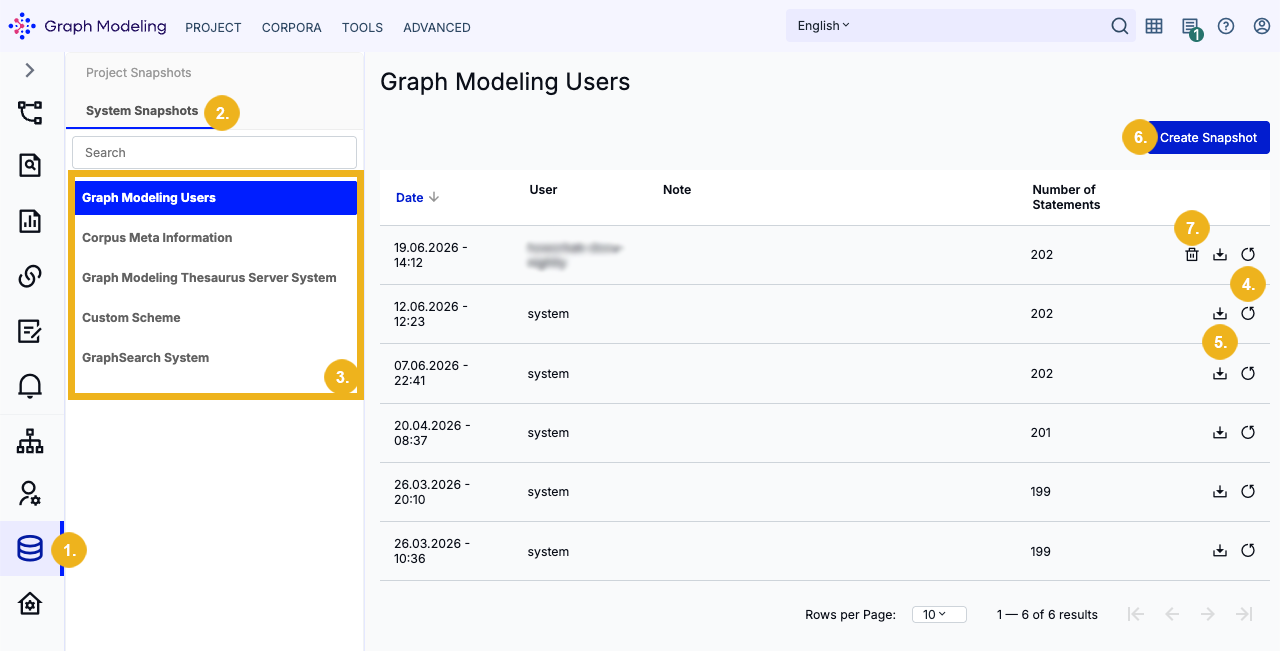
Graph Modeling Users holds all user information.
Corpus Meta Information holds all corpus management meta information.
Graph Modeling Thesaurus Server System holds all project meta information.
Custom Scheme holds all custom ontology and custom scheme data. For more information on how to properly recover custom schemes and ontologies, refer to Restoring Snapshots of Custom Ontologies and Custom Schemas.
GraphSearch System holds all GraphSearch metadata.
You can restore (4) and download (5) snapshots, as well as create them manually (6). Manual snapshots can be deleted with a click on the bin icon (7).
Caution
Be aware that restoring a snapshot will overwrite your current data with the saved backup.
Restoring Snapshots of Custom Ontologies and Custom Schemas
Important
Restoring a Custom Schema snapshot alone will not make previously deleted custom ontologies or custom schemas reappear in the UI because deleting an ontology/scheme also removes the user group association (hasOntology) stored in the Graph Modeling Users (pp_users) repository. Restoring only the schema repository leaves the data orphaned and invisible to the UI.
To fully restore deleted custom ontologies or custom schemas, you have to take and restore snapshots of both affected repositories in a specific order.