Creating Snapshots Manually
18/06/2026
The Graph Modeling snapshot mechanism allows you to create and save backups. You can manually create snapshots of your projects as well as each individual system repository (user data, corpus meta information, Thesaurus Server system, custom schemes and ontologies, and GraphSearch data). You can also add comments to manual backups in an optional Note field. These manual snapshots can be downloaded, restored, or deleted.
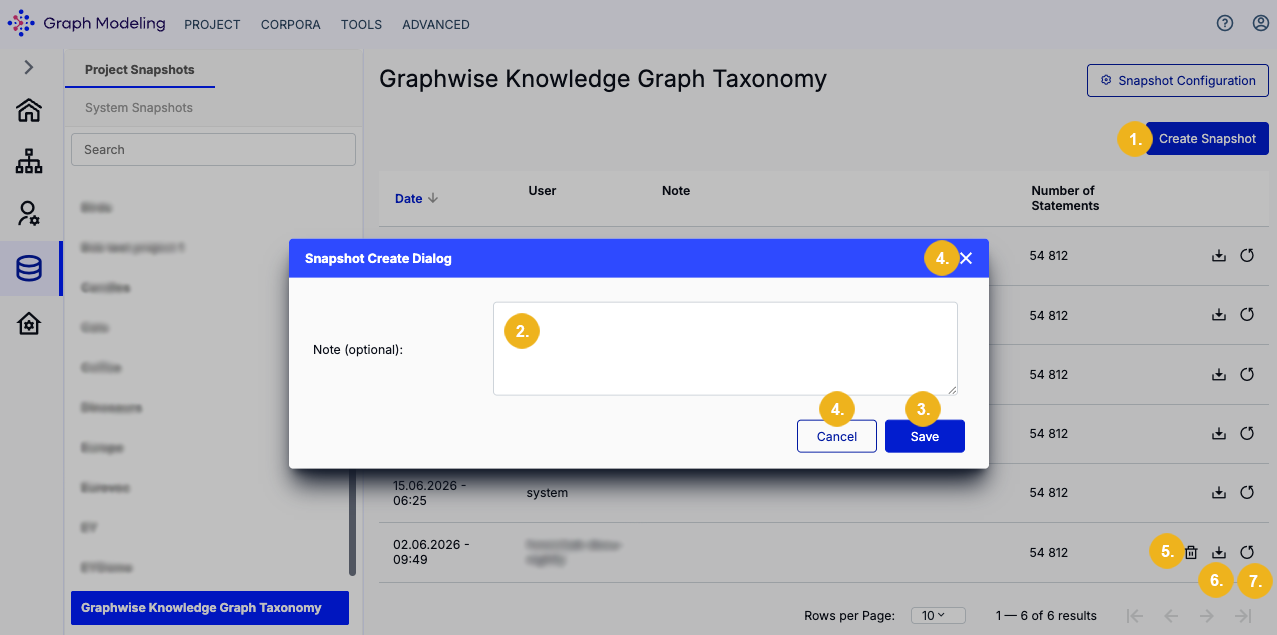
Pressing the Create Snapshot button (1) on the top right corner of the Snapshot Dashboard allows you to manually back up the selected project or system repository. After clicking this button a dialog appears where you can enter any optional description of the backup or any other optional remarks (2). Click Save (3) in this dialog to create the manual snapshot or select Cancel/X (4) to close this window without creating the snapshot.
The manually created snapshot will appear in the list of snapshots for your project or your system repository along with any remarks you have entered. You can delete a manual snapshot by clicking the bin icon (5) next to it. To download this snapshot as a TriG file, click the Download icon (6). You can restore a snapshot by selecting the Restore icon (7).
Important
We recommend to always create a backup (snapshot) before performing any operations which may affect data stored in a project, for instance before running a data validation or before any software upgrade and data migration.