View Existing Search Index Engine Configuration Details
18/12/2025
This section provides a short guide on how to view the details of an existing search index engine connection, specifically Elasticsearch.
After you have accessed the SMC, the Indices node inside the Systems node can be expanded.
Click the Indices node and select the respective node of the configured index.
The details of the configured connection will be listed on the right.
The image below shows the default search index engine connection configuration (Elasticsearch).
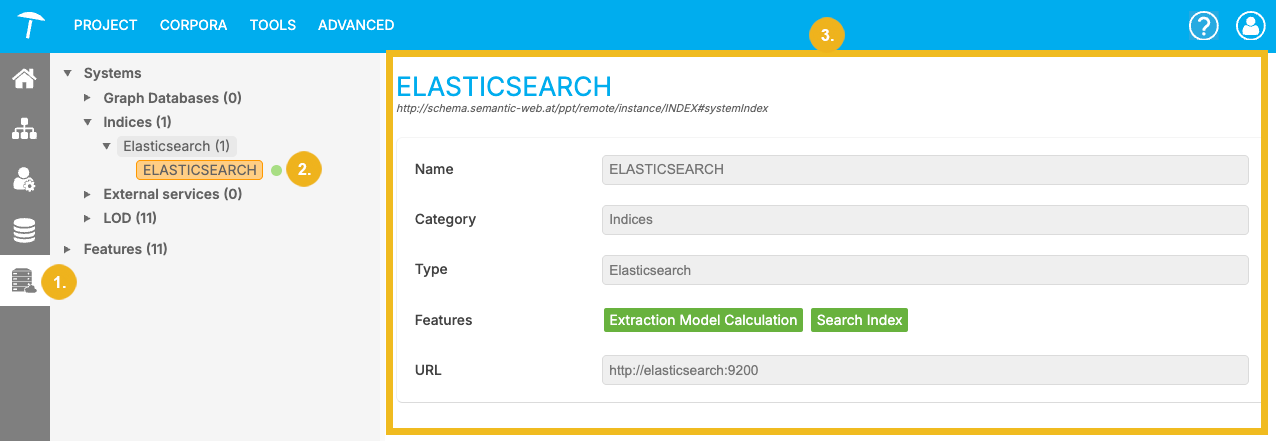
Available Details
Note
The Elasticsearch configuration details shown in this node are read-only. For more information on how to configure your Elasticsearch connection, refer to the Graph Modeling Configuration Properties documentation.
Name: Displays name for this configuration.
Category: This field displays the internal identifier for this configuration of the index category (typically "Index").
Type: The search index engine type. This field is fixed to Elasticsearch.
Features: The active features for this index configuration. This field displays the internally enabled features (e.g., "extraction model calculation" and "search index").
URL: You can view the URL for the server the index runs on. It can be local or remote.