Use an RSS Feed as Corpus Document Source
This section contains a short guide on how to upload documents to your corpus by crawling RSS feeds.
You can easily use the content of RSS feeds for your corpus in Graph Modeling.
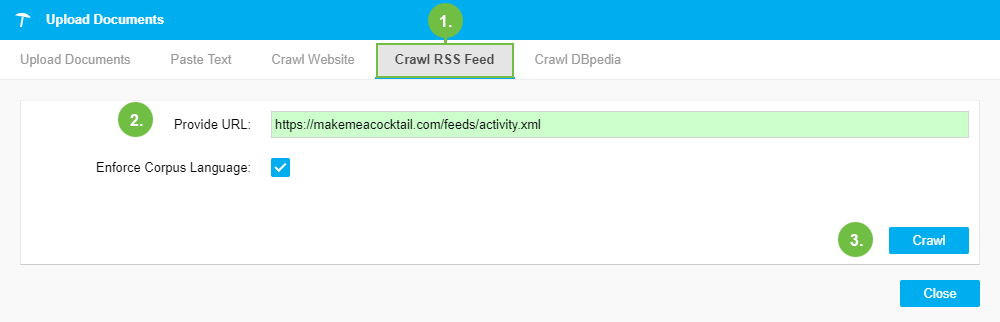
Select the Crawl RSS Feed tab in the Upload Documents dialogue.
In the Provide URL field enter the feed's URL.
Enforce Corpus Language: activate this check box to let Graph Modeling use the corpus language you defined during its creation, regardless of other feed languages. (Default: enabled)
Click Crawl to start the upload process.
The content from the provided feed and the linked pages are grabbed and stored as files to your corpus. When the upload is finished, a message about the upload's status will be displayed.
 |
You can view all documents uploaded to your corpus in the Corpus Documents tab.