The Snapshot Dashboard
21/08/2026
The Graph Modeling Snapshot Dashboard is where you can easily create, restore, and delete backups of your project and system repositories. While project snapshots capture specific project data, system snapshots hold global environment data including Graph Modeling user profiles, corpus metadata, thesaurus server system data, custom schemas and ontologies, as well as graph search data. You can manage all snapshots directly through the Graph Modeling UI.
Note
The Snapshot Dashboard is only available for users with the SuperAdmin or Admin role.
Snapshots of both projects and system repositories will be automatically created at the specified intervals. You can trigger a manual backup of projects and repositories at any time. These backups ca be used to roll back a project or system repository to the last working version in case something went wrong.
Important
We recommend to always create a backup (snapshot) before performing any operations which may affect data stored in a project, for instance before running a data validation or before any software upgrade and data migration.
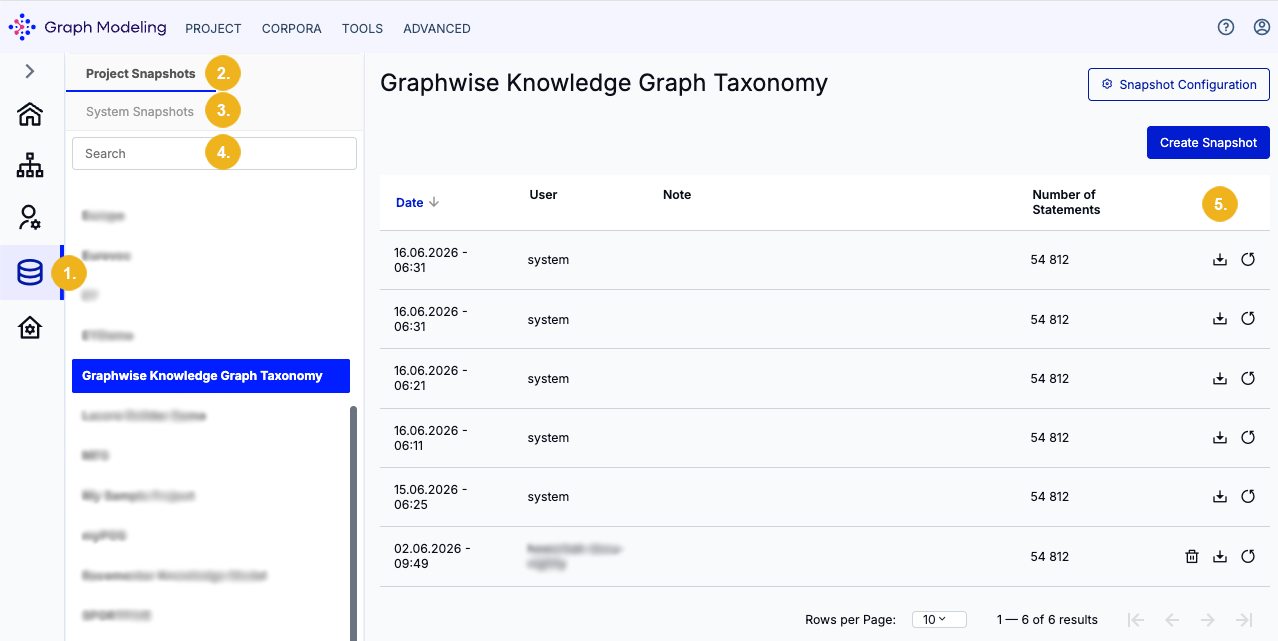
To access the Snapshot Dashboard click on its icon (1) on the Toolbar. The two tabs on the top left allow you to switch the display between Project Snapshots (2) (opens by default) and System Snapshots (3). Use the Search field (4) to find the desired project in the list of projects existing on your system. All available backups for the selected project are listed on the right showing details on date and time of snapshot creation, the user who created it, as well as a description. You can delete, download or restore backups using the icons shown on the very right (5).
Note
You can only delete manually created snapshots.