Deleting Manually Created Snapshots
20/08/2026
You can delete any manual snapshots of your Graph Modeling project or system repositories.
Note
Automatic snapshots (where system is shown in the User column on the Snapshot Dashboard) cannot be deleted. For more information on how to configure automatic snapshots, refer to The Snapshot Configuration Dialog.
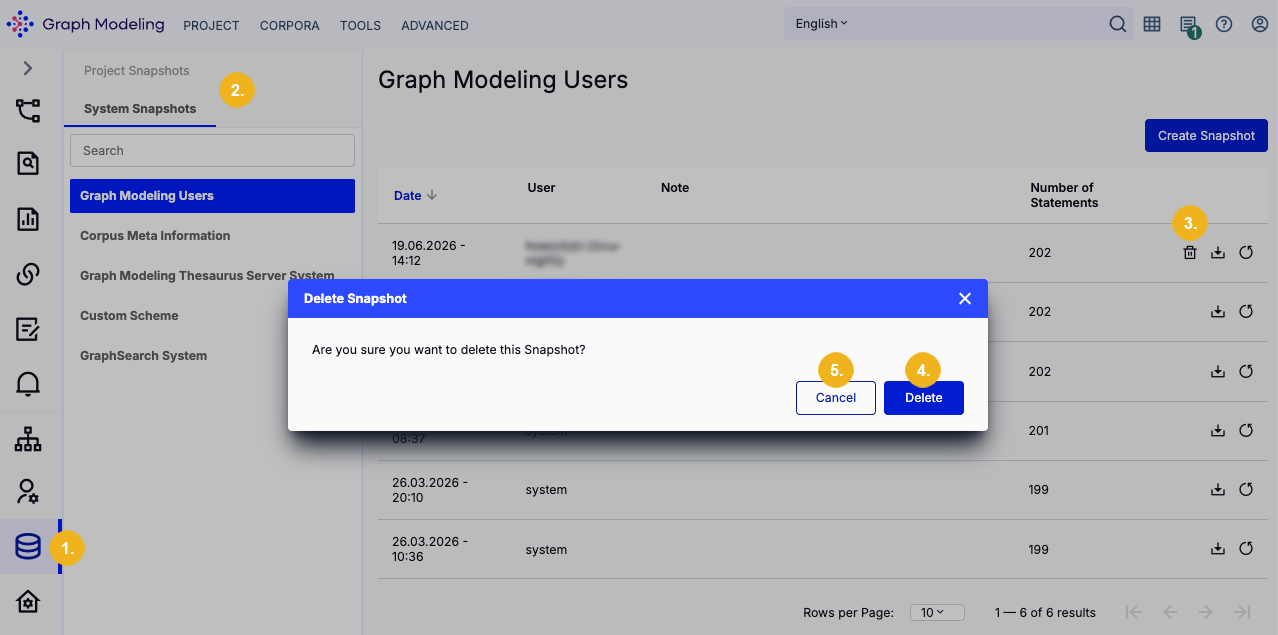
To delete a snapshot:
Open the Snapshot Dashboard (1).
On the left, select Project Snapshots or System Snapshots (2).
Select a project or system repository for which you want to delete snapshots.
Click the bin icon (3) to open the Delete Snapshot dialog.
On the Delete Snapshot dialog you will be prompted to confirm the deletion with a click on the Delete (4) button. To abort this operation click Cancel (5).