The Snapshot Configuration Dialog
09/06/2026
The Snapshot Configuration dialog can be access it via the Snapshot Dashboard (1) and is only available for Project Snapshots (2). You can open the dialog by clicking on the Snapshot Configuration button (3).
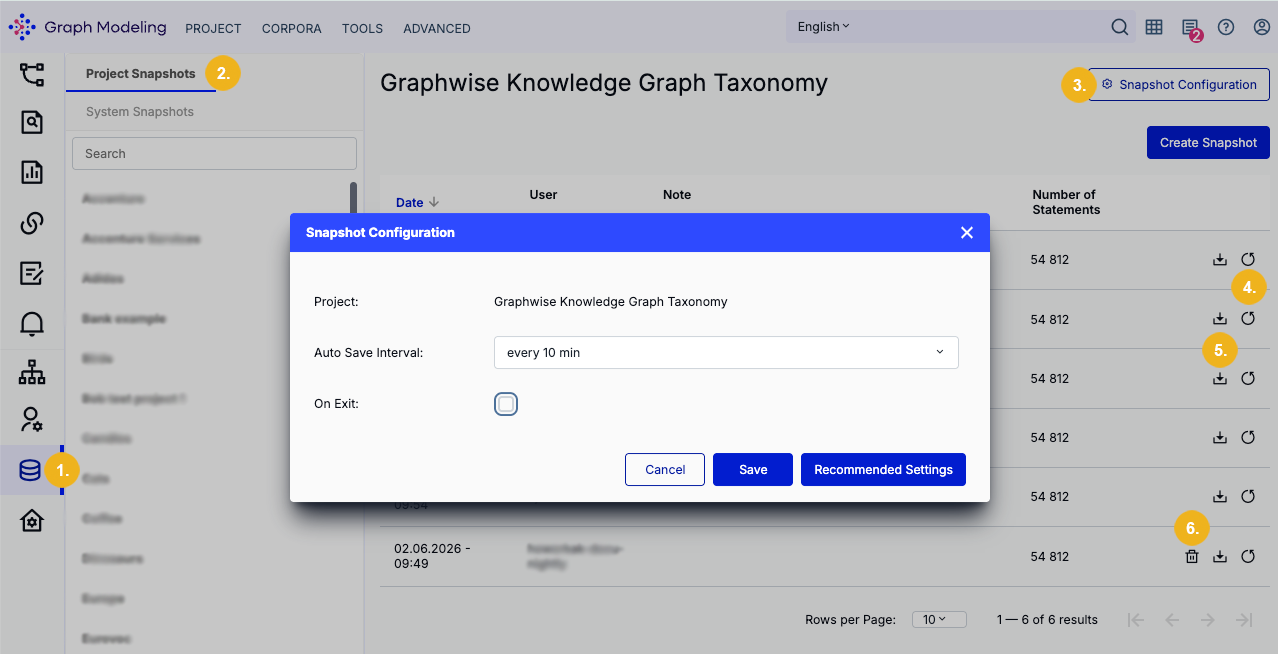
On the Snapshot Dashboard you can restore a selected backup (4). You can also download a project snapshot in TriG format by clicking the corresponding Download button (5). Only manual snapshots can be deleted with a click on the bin icon (6).
The Snapshot Configuration dialog presents the following configuration options:
Project: the Graph Modeling project you have selected from the list on the left. If you have an opened project it will be selected by default.
Auto Save Interval: specify the interval at which the automatic backup of the selected project will be created while this project is open in Thesaurus Management. You can choose from the following interval options:
disabled
every 5 min
every 10 min
every 15 min
every 30 min
On Exit: When this checkbox is ticked a backup will be created each time you close a Graph Modeling project. It is unticked by default.
Recommended Settings: clicking on this button restores the default settings for the snapshot configuration (every 10 min; auto-snapshot on exit disabled). Clicking this button will automatically close the dialog.
Save: Save and close the project snapshot configuration. Use the Close button to close this dialog without saving your changes.
Important
Snapshots are auto-created at the specified interval while the project is open in Thesaurus Management as well as during Graph Modeling upgrades. The sixth auto-created snapshot will automatically overwrite the oldest automatically created backup. Automatic snapshots cannot be manually deleted.