Overview
04/05/2026
GraphRAG version 1.1.0
GraphRAG combines knowledge graph technology with Large Language Models (LLMs) to deliver explainable and graph-grounded answers to user questions. The workflows described in this guide orchestrate this interaction by controlling how queries are interpreted, how graph context is retrieved, and how LLM calls are made and can be customized.
A workflow in GraphRAG is the primary element of automated business logic. The GraphRAG product is built on several dozen workflows, each encapsulating specific logic and automation.
Because it is impossible to provide a one-size-fits-all solution, the GraphRAG implementation is based on a suggested standard solution, which can be modified and adjusted to address different project needs.
In order to add or modify existing workflows, the GraphRAG product must first be installed and configured. The configuration includes, at a minimum, pointing GraphRAG at running Graph Modeling and GraphDB MCP servers.
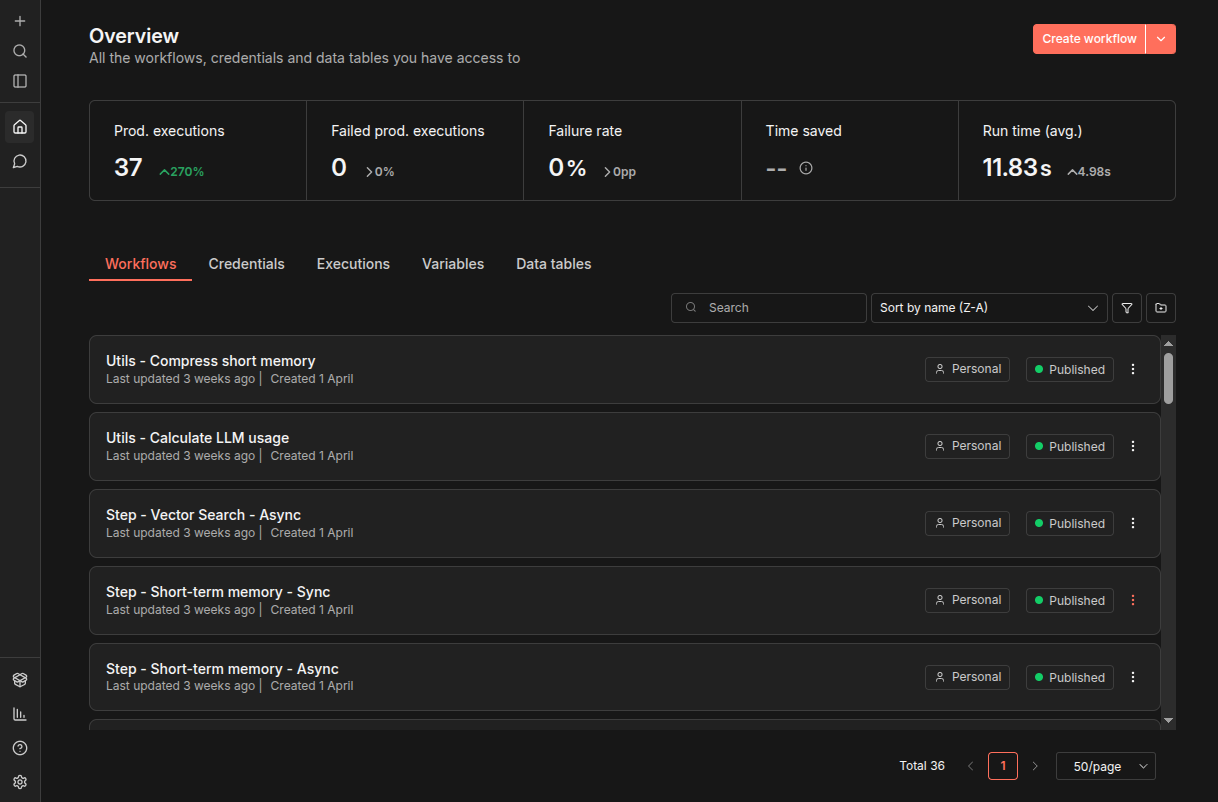
When you first sign in to GraphRAG Workflows, you will see the Workflows tab and its list of available workflows, along with other tabs that provide additional information and configuration options. Across the top of the screen are various statistics about recent usage of the workflows. In the lower- and upper-left are icons that offer additional features; tooltips for each tell you what they do.
![]() |
You can create a new workflow with the orange Create workflow button in the upper right and you can click any listed workflow to show it on the main screen where you can edit and execute it. This guide explains how you can use and customize the workflows provided with GraphRAG to combine your knowledge graphs with LLMs to build a system that provides grounded answers to questions submitted to it.
GraphRAG was never meant to be a black box. It was designed and built with these goals in mind:
Full transparency: Every action and decision is visible and traceable. All information is provided to the end user. Every answer can be explained and traced back.
Ease of customization: You can turn steps on and off, add additional steps, and inject custom information. The basic implementation is a starting point, not a finished product.
GraphRAG uses the SSE (Server Side Events) approach to achieve full transparency along with immediate return of any information.
When a user asks a question, GraphRAG opens an SSE channel for the duration of the answer. It uses this channel to provide information about the answering process:
Which step was executed and what is the result
All the components of the answer such as the answer itself, the concepts found in the answer, and the follow-up question
The full token usage details – how many tokens were used for each step
Other additional information that might be required
All SSE messages share the same structure:
{
"messageId": "f1715679-35b5-498d-895e-8afabf90056d",
"payload": { ... },
"messageType": "MESSAGE_TYPE",
"conversationId": "952fbe0b-1168-493c-ade2-fc0b2c22ba66",
"questionId": "141a3a39-b46b-4cfd-abbf-13dec1efb9b2",
"createTime": 1772616107375
}
The payload structure differs depending on the message type. The following message types are supported:
Type | Description |
|---|---|
| Start of conversation |
| End of conversation; SSE channel closed |
| Details of a step’s execution |
| The final answer |
| Sources used to generate the answer |
| Follow-up questions |
| Concepts found in the answer |
| Results of input and output guardrails |
| Any project-specific custom messages |
| Full token usage across all steps |
| Internal info (for example, Main workflow execution ID) |
SSE messages are sent as Build + Send node pairs in workflows, typically with a colored sticky note describing their purpose.
![]() |
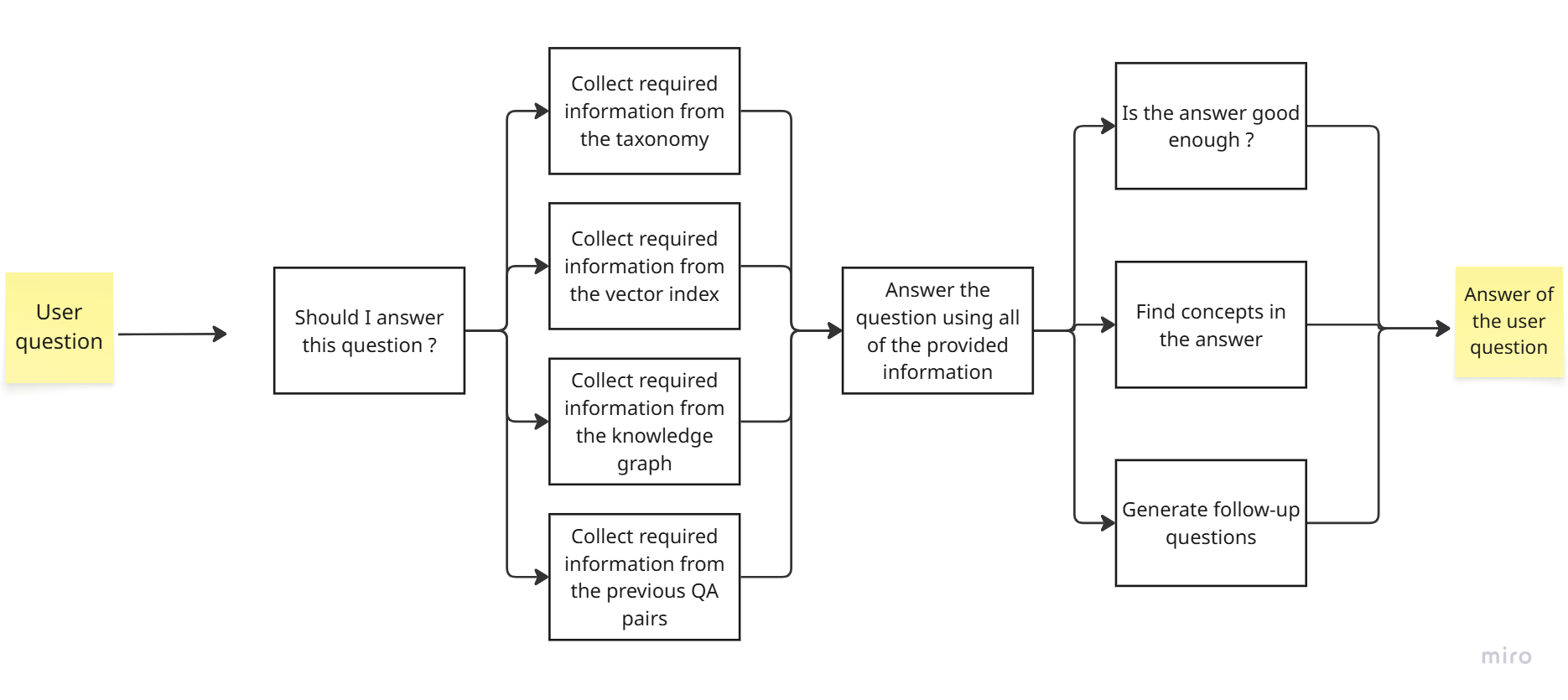
These four stages represent the default configuration, which is customizable.
Stage | Purpose |
|---|---|
1. Pre-processing | Decide whether to proceed; also runs input guardrails; may include additional checks and syncs. |
2. Data Gathering & Context Engineering | Collect information from all sources: taxonomies, vector indices, knowledge graphs, various types of data sources, conversation and chat histories. Can be extended to include other sources of data. |
3. Main Answer | At this stage all collected data is prepared for processing and the answer is generated. |
4. Post-Answer Processing | Analyze the answer (output guardrails), extract concepts from the final answer, and generate follow-up questions. |
To keep the Main workflow manageable, each stage delegates to sub-orchestrator workflows.
The table below lists all workflows in the GraphRAG deployment.
Note
The terms "sync" and "async" in a workflow name refer to whether that workflow runs synchronously (blocks the execution of subsequent workflow steps until it is finished) or asynchronously (does not block the execution of further steps while it runs).
Workflow | Role |
|---|---|
Main | Orchestrator — receives question, coordinates all four stages |
Configuration | Centralized configuration (not activated; called as sub-workflow) |
Step - Input Guardrails - Main | Input guardrails orchestrator |
Step - Input Guardrails - Sync | Input guardrails rule logic |
Step - Short-term memory - Sync | Conversation context preparation |
Parallel - Main | Data-gathering parallel orchestrator |
Parallel - Steps Batching | Batches collected data for SSE messaging |
Parallel - Steps Messaging | Per-step SSE message formatting |
Step - PoolParty Concept Enricher - Async | Concept enrichment (async entry point) |
Step - PoolParty Concept Enricher - Sync | Concept enrichment (sync logic) |
Fetch Concept Details | Enriches concept list (also standalone API) |
Step - PoolParty Expansion - Async | Concept expansion |
Step - Vector Search - Async | Vector store search |
Step - GraphDB MCP - Async | GraphDB knowledge graph queries via MCP |
Step - Final Answer - Sync | Final answer generation |
Parallel Post Final Answer - Main | Post-answer parallel orchestrator |
Step - Follow-ups - Async | Follow-up question generation |
Step - Output Guardrails - Async | Output guardrails rule logic |
Step - Answer Concept Enricher - Async | Concept enrichment on answer text |
LLM Call | Centralized LLM invocation (primary + fallback) |
Utils - Calculate LLM usage | Token usage calculation |
Error Sync | Error handler for Main workflow |
Error - Async | Error handler for parallel sub-workflows |

