Extend Your Taxonomy
03/04/2026
With the Extend your Taxonomy feature you can use Large Language Models (LLMs) for the automated generation of narrower concepts, definitions, and (multilingual) alternative labels. This tool supports both individual and bulk suggestions while maintaining enterprise-grade security standards and providing quality-verification indicators for supported languages.
Note
Although this feature supports all languages configured in the Graph Modeling thesaurus, suggestion quality is rigorously verified for English, German, French, Spanish, and Dutch. Unverified languages are denoted by a status icon.
The Extend your Taxonomy tab only appears in the Details View of concepts. For the automated extension of project nodes and concept schemes as well as the generation of taxonomies from scratch, refer to the Taxonomy Builder.
Tip
Visit our help page Configuring External LLM Services for more information on how to set up and configure LLM-based features such as Extend your Taxonomy and the Taxonomy Builder.
After you have logged into your Graph Modeling instance and opened an existing project you can access the automated extension tool in the following ways:
Select a concept in the taxonomy tree (1) to open its Details View and navigate to the Extend your Taxonomy tab (2).
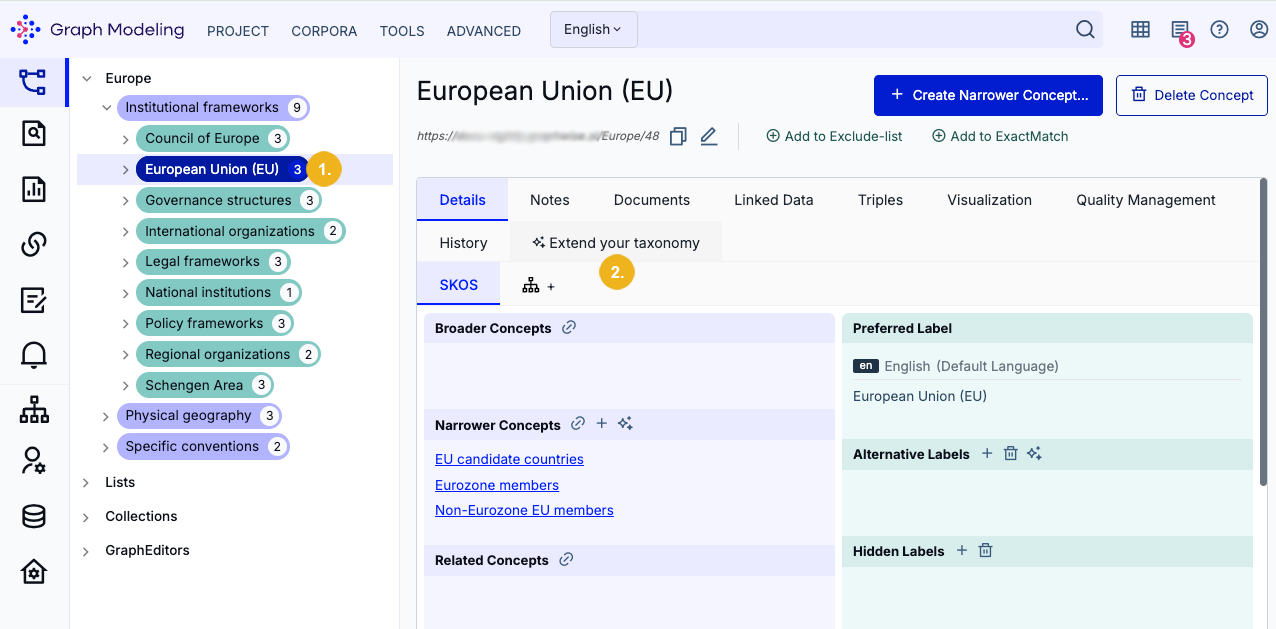
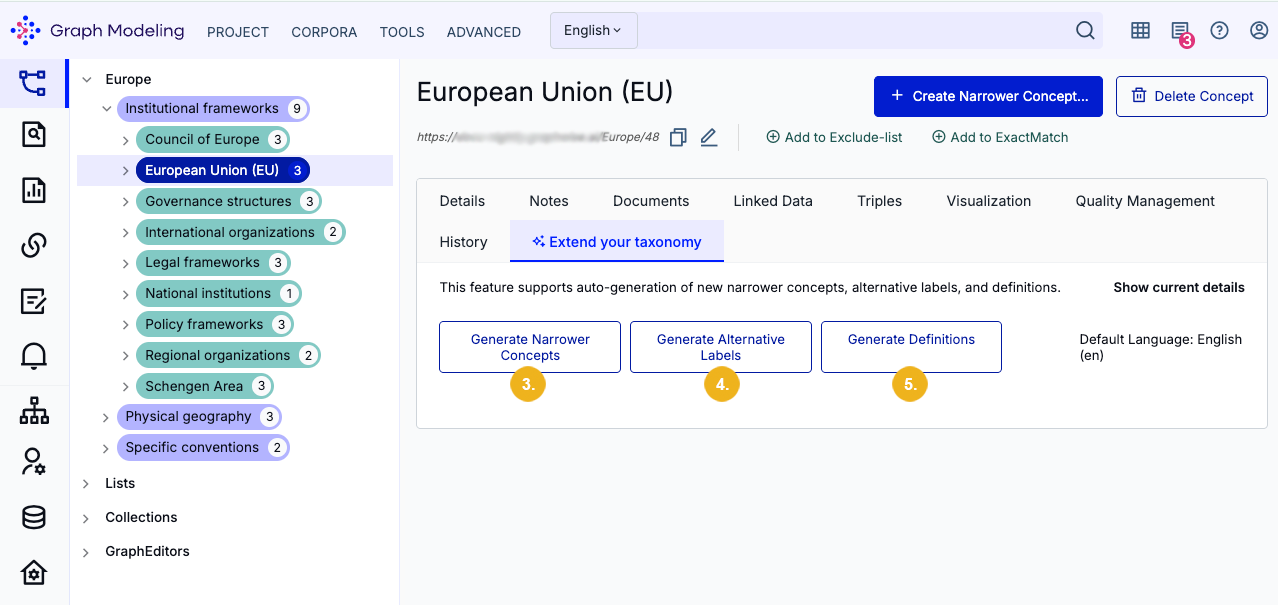
There you can select one of three options: Generate Narrower Concepts (3), Generate Alternative Labels (4), and Generate Definitions (5).
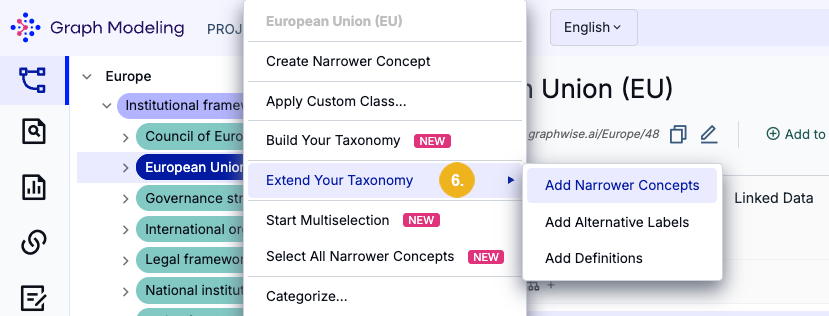
Right-click a concept in the taxonomy tree. Hover over the Extend Your Taxonomy context menu item (6) and then select one of the three sub-menu options: Add Narrower Concepts, Add Alternative Labels, and Add Definitions.
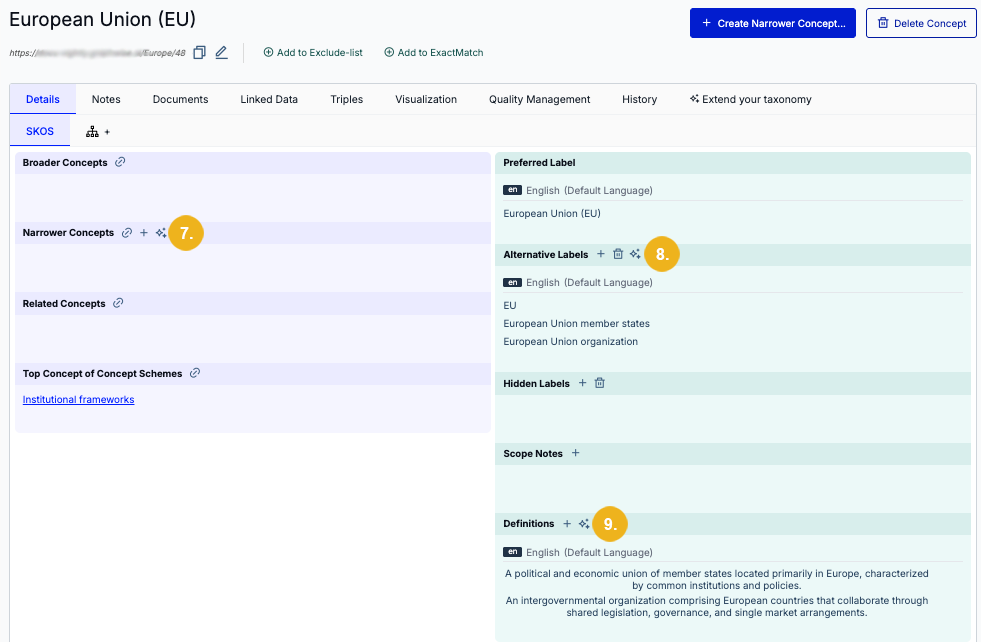
While on a concept's Details View, click one of the Generate (Sparkle) icons in the Narrower Concepts (7), Alternative Labels (8), or Definitions (9) section headers.
The concept suggestions generated within the Extend your Taxonomy tab are kept in temporary storage. While working on a specific concept, you may navigate away from the concept and return to access these generated suggestions at a later time.
Important
Generated content only remains in temporary storage within the same session. This means closing the project or refreshing the page will delete all generated content in the Extend your Taxonomy tab.
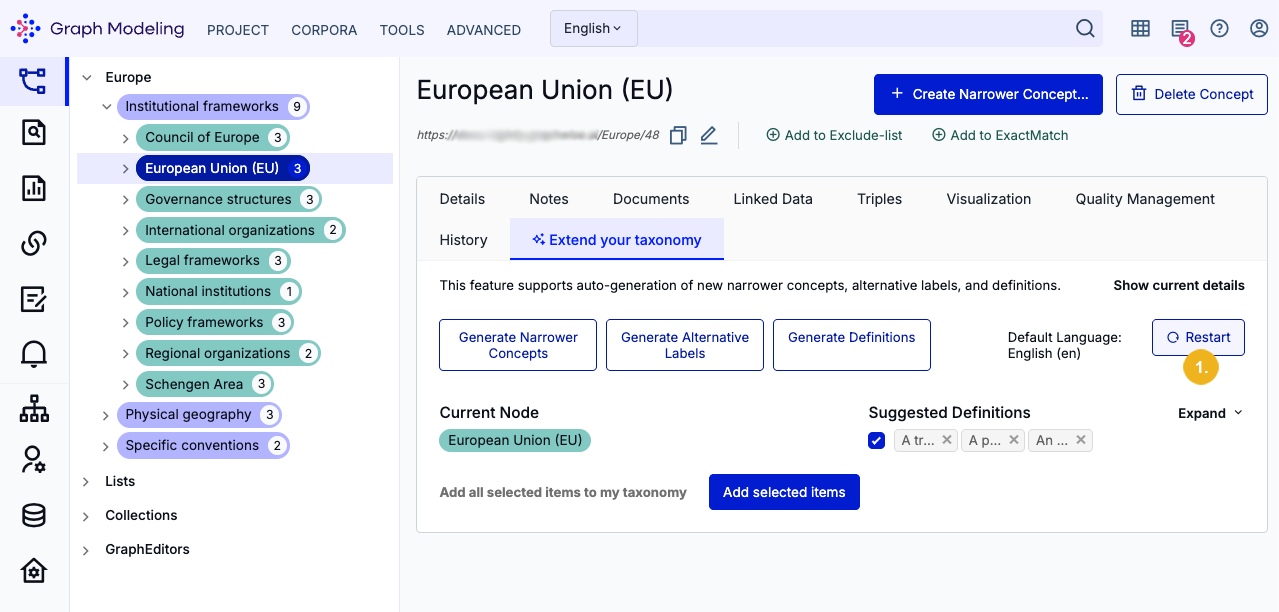
Once you have generated narrower concepts, alternative labels, or definitions you can use the Restart button (1) to regenerate all of the previously generated items. Note that every time you generate these items the provided suggestions may vary due to the nature of how the underlying LLM works and you may receive different results every time you rerun this service.
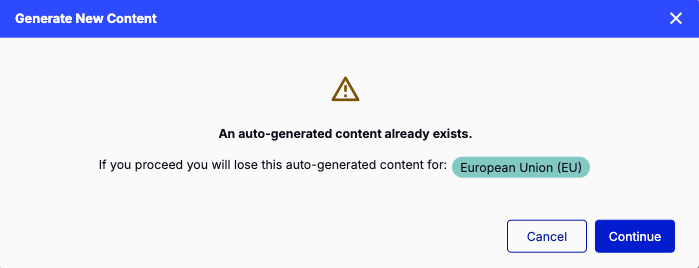
If you attempt to generate suggestions for a different concept, a message will appear, prompting you to either proceed with your previously selected concept by clicking Cancel. Alternatively, confirm that you wish to discard all previous suggestions and begin working on a new concept for which the tool will generate content by clicking Continue.
In our example we will use the concept European Union (EU) (1) which originally has just a few alternative labels but neither any narrower concepts nor any definitions.
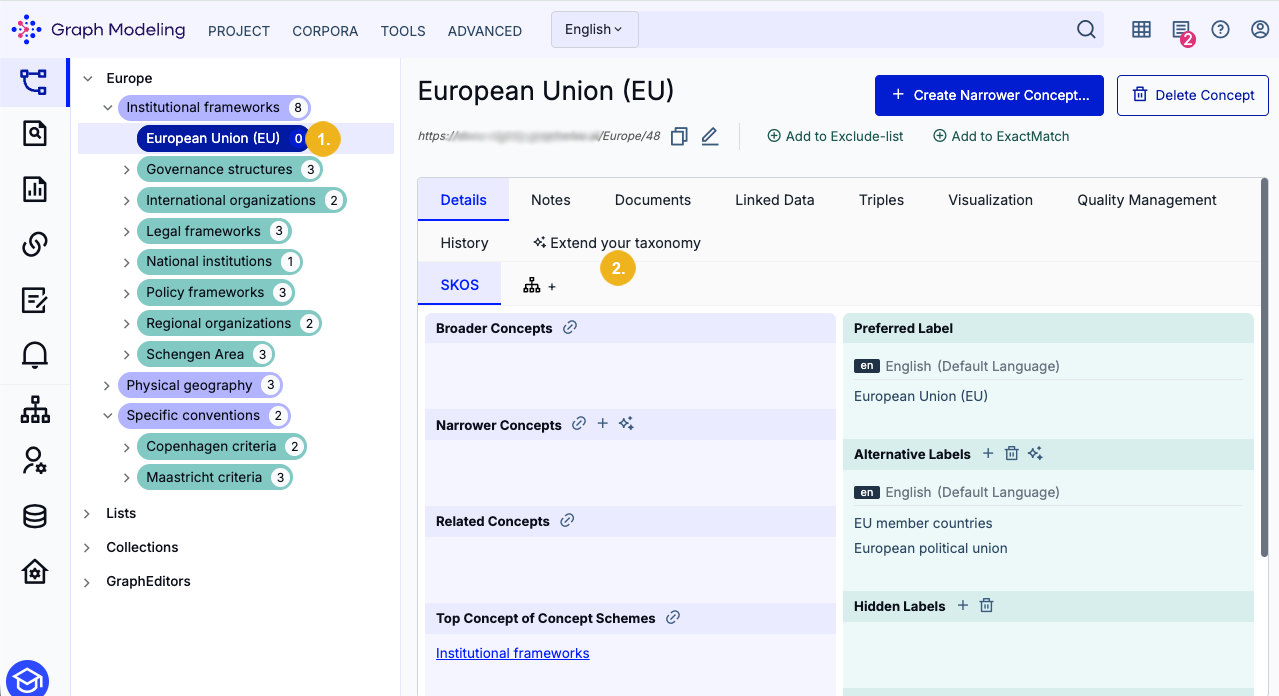
On the Details view of this concept (1) we will click on the Extend your Taxonomy tab (2) to display the generation options for the selected concept.
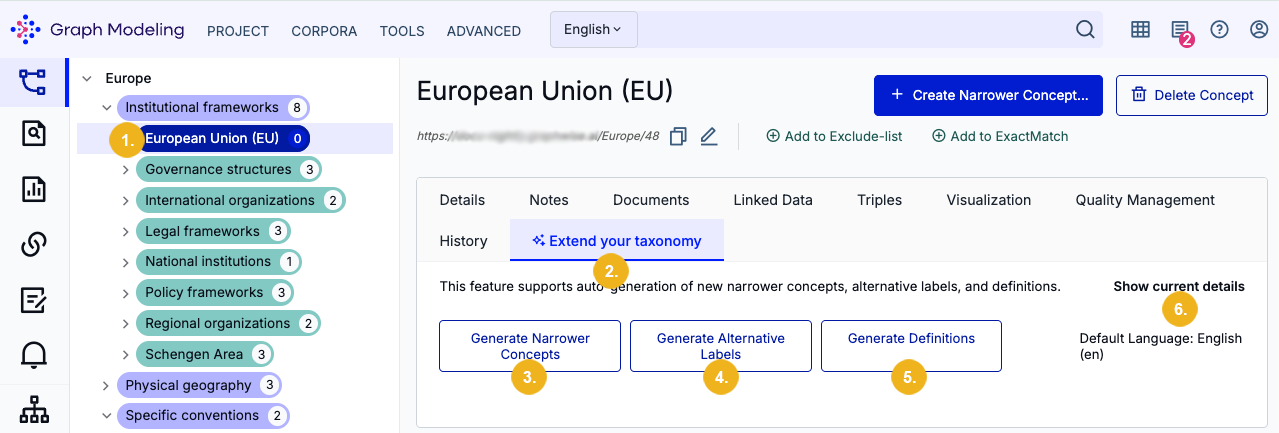
You can see the highlighted concept (1) which is also shown at the top of this page. The selected Extend your Taxonomy (2) tab is now highlighted as well. The three available buttons are Generate Narrower Concepts (3), Generate Alternative Labels (4) and Generate Definitions (5) which you can use to generate all the desired information related to the selected concept.
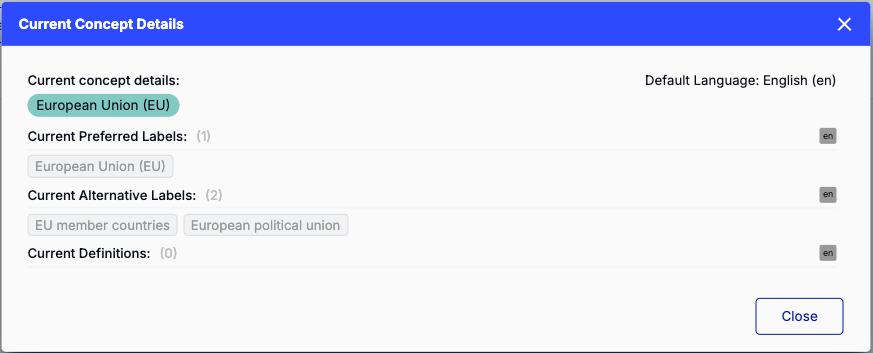
Click Show current details (6) to open a dialog displaying all current information regarding preferred labels, alternative labels, and definitions for the selected concept.
In our example we will generate both alternative labels (1) and definitions (2) at the same time by clicking their respective buttons. After some time we will see the suggestions provided by the LLM assisted feature.
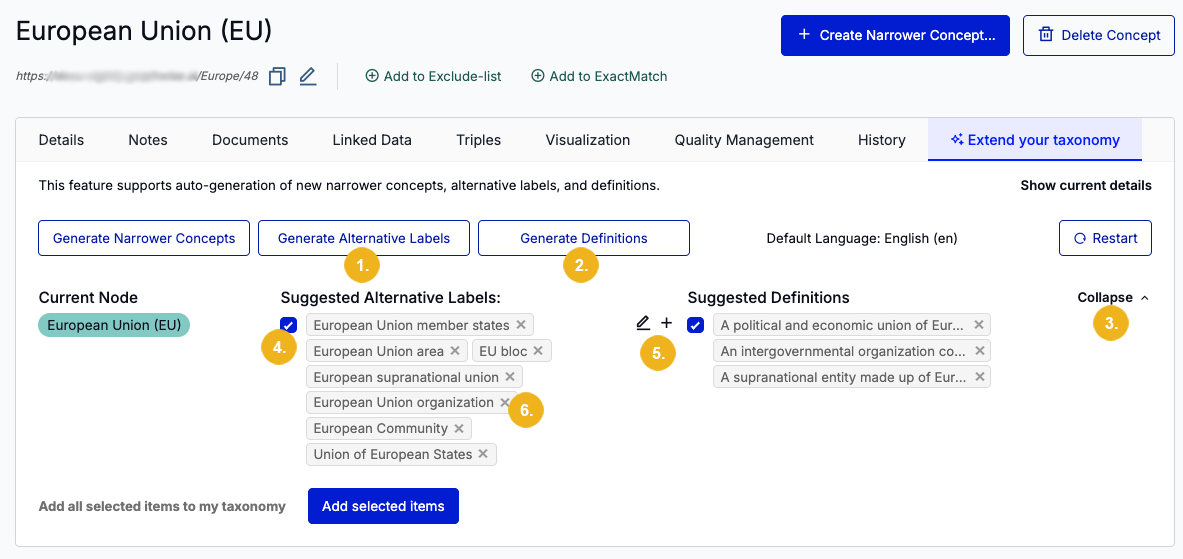
The top right section shows the button Collapse (3). Clicking this button will only show those items fitting into the first line, whereas an expanded view only shows all generated items. There is a checkbox (4) before any generated alternative labels and definitions. After having generated suggested items, these checkboxes are automatically ticked.
These checkboxes have to be ticked to refine your taxonomy with the selected suggestions. If you untick any of these checkboxes, none of the suggestions will be added to your taxonomy for the selected concept.
When you hover over the Suggested alternative labels list you can see a + and a pen icon (5). Use the pen icon to open a new dialog where you can edit all alternative labels respectively all definitions within a single operation. If you want to exclude any of the suggested alternative labels you only need to click on the X (6) shown at the end of each entry.
We will now click the pen icon (5) to open the Edit Alternative Labels window where you can see all alternative labels suggested for the selected concept.
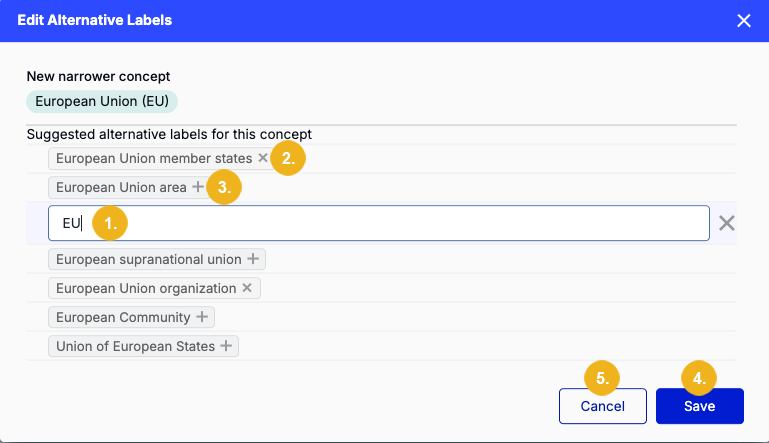
Here you can edit any alternative label. Simply hover over the label you want to edit to display a pen icon which can be selected to make it an editable field (1). Here, all alternative labels in the list can also be deselected by clicking the X icon (2); or selected by clicking the + icon (3). After making desired modifications you can either save them with a click on Save (4) or abort them by selecting the Cancel (5) button.
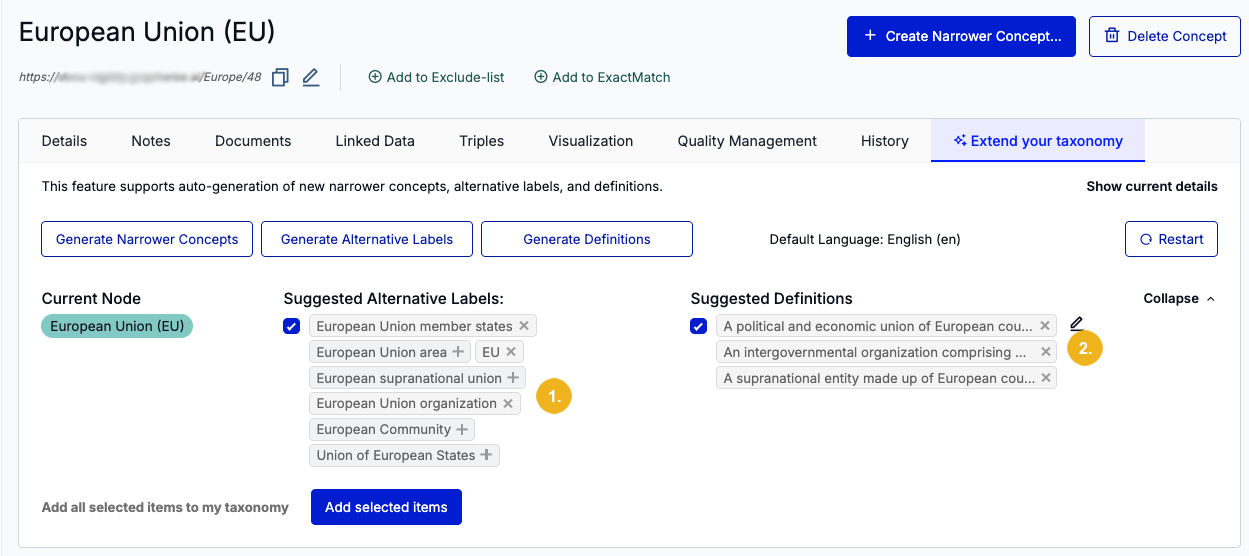
After having saved the modifications in the Edit Alternative Labels dialog they are shown in the Expand your Taxonomy tab (1). Next, we will hover over the suggested definitions and click the pen icon (2) to open the Edit Definitions dialog.
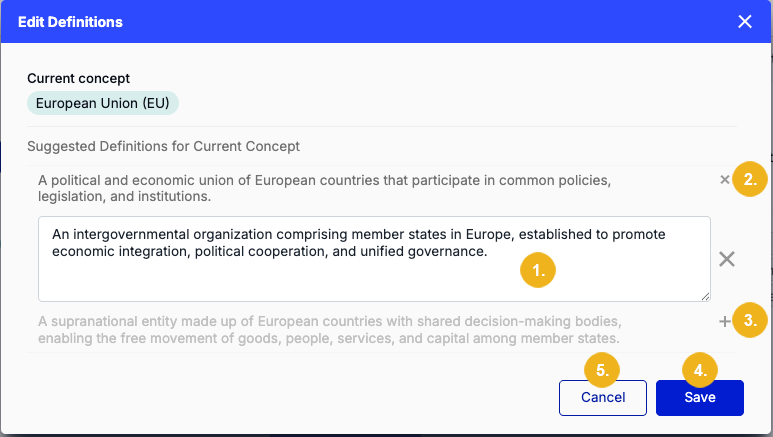
Here, you can also edit (1) any suggested definitions in the list by selecting the pen icon next to them; and remove definitions by clicking the X icon (2). Removed definitions will be grayed out and can be re-added by selecting the + icon (3). Click on Save (4) to finalize your modifications or Cancel (5) to exit out of the window.
Note
Only selected suggested alternative labels and definitions can be added to your taxonomy. Any grayed out items will be discarded after you have clicked the Add selected items button on the Expand your Taxonomy tab.
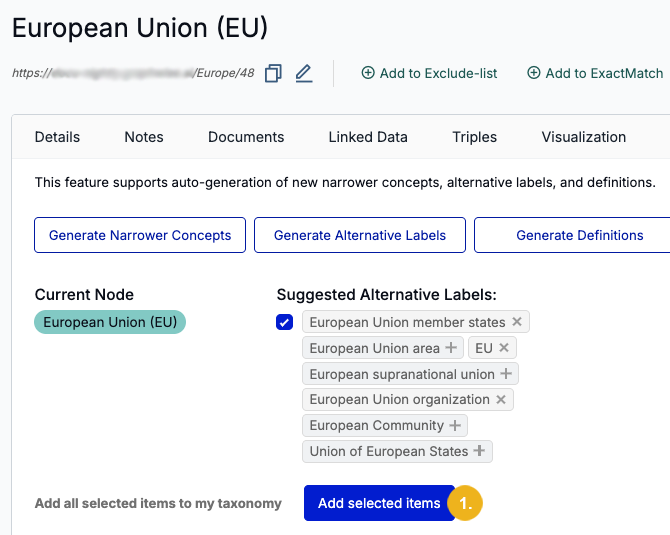
Click Add selected items (1) once you are done generating and modifying suggestions for the concept's alternative labels and definitions. Doing so will open a dialog summarizing all modifications.

Click Add items (1) to finalize the action, or Cancel (2) to exit out of the dialog.
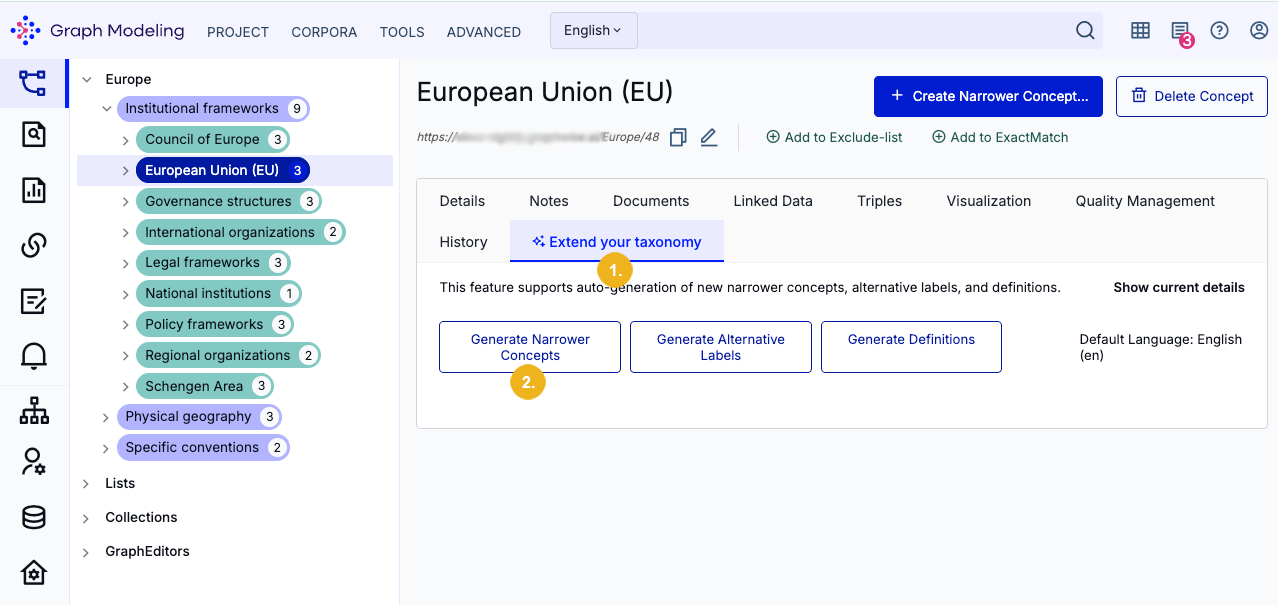
To generate narrower concepts, select the concept (in our example European Union (EU)) and click on the Extend your Taxonomy tab (1). Then click on the Generate Narrower Concepts button (2). Alternatively, access this button via the concept's context menu or the Generate (Sparkle) icon in the Narrower Concepts area in the concept's Details View, as described in the section on how to access the Extend your Taxonomy tab.
The generated suggestions for the narrower concepts appear as a list.
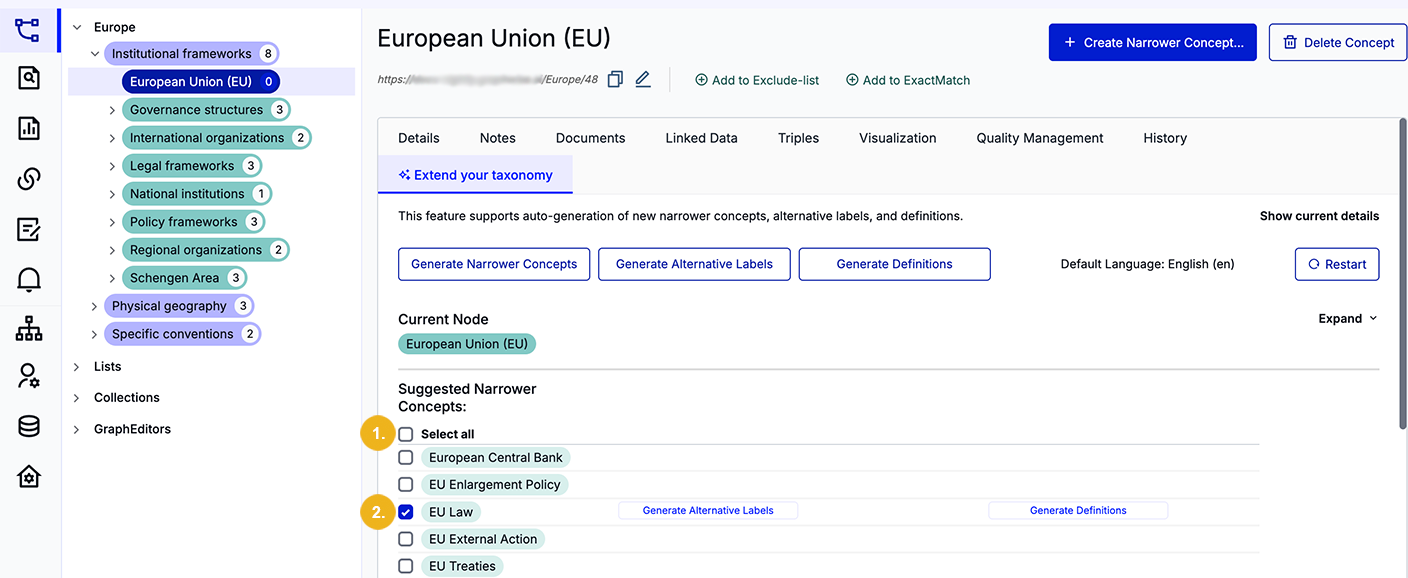
At the top of the list is a Select all (1) checkbox. If you want to select all suggestions, then click on this checkbox. After doing so, this button changes to Deselect all and the ticks are set for all visible suggestions.
You can however also select narrower concept suggestions individually (2). At least one of the suggestions need to be selected to refine your taxonomy.
The next section in this workflow guide will showcase how to generate alternative labels and/or definitions for your generated narrower concepts. However, if you want to proceed without any additional metadata for your generated narrower concepts, simply click Add selected items (3) at the bottom of the page.
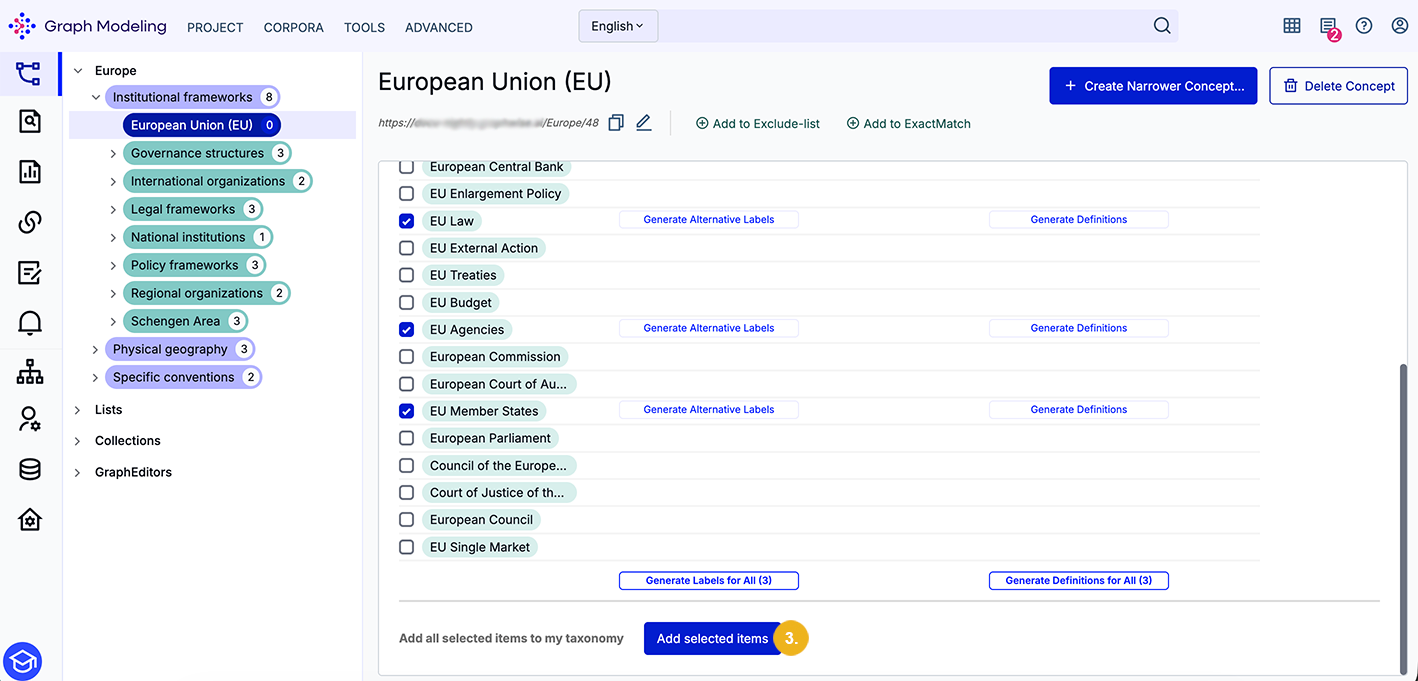
Doing so will open a dialog summarizing your selected narrower concepts. You can finalize this action by clicking Save, or exit by selecting Cancel.
Note
Alternative labels and definitions for the suggested narrower concepts can be generated on the Extend your Taxonomy tab using the respective buttons, or in the tree view using the context menu displayed for the respective selected narrower concept (Add Alternative Labels, Add Definitions).
Bulk operations for multiple selected narrower concepts can be carried out directly on the Extend your Taxonomy tab.
Before adding the suggested narrower concepts to your taxonomy you may want to also generate their alternative labels or definitions, individually or in bulk.
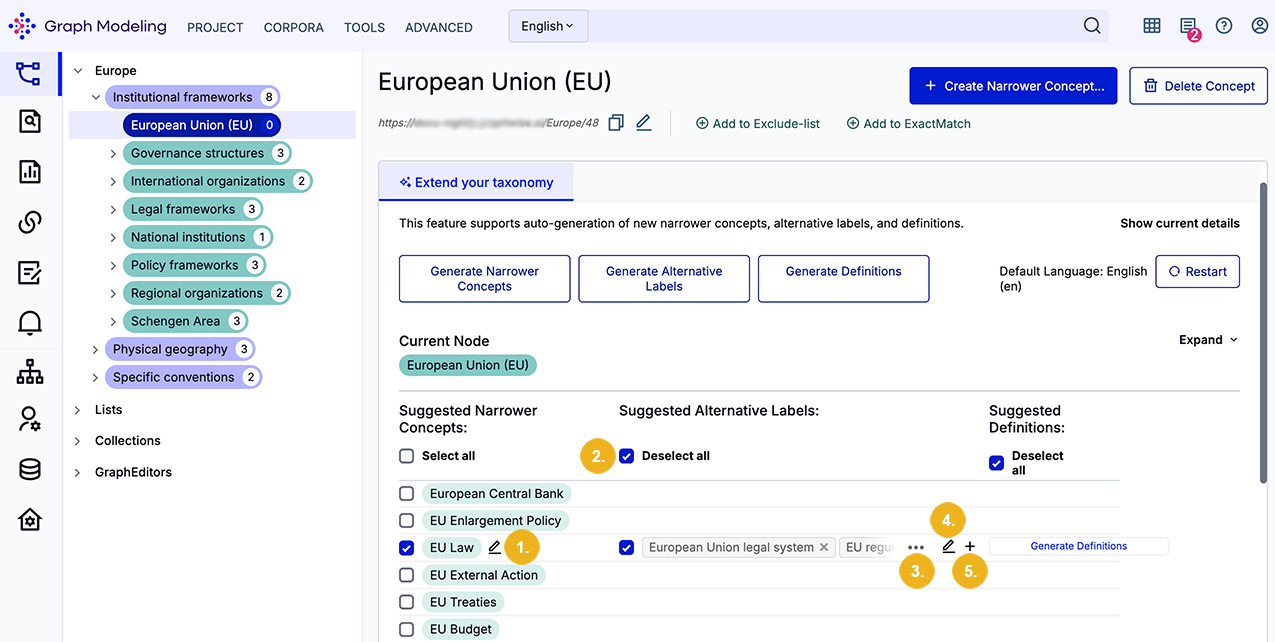
When you hover over a selected suggestion you will see a pen icon (1). Use it to edit the name of the suggested narrower concept. The second column shows Suggested alternative labels with a ticked Deselect all checkbox (2) and a list of alternative labels with a ticked leading checkbox. As long as this checkbox remains ticked for each of the suggested narrower concepts and it contains at least one selected alternative label, then this information will be added to your taxonomy for the selected original concept after clicking the Add selected items button at the bottom of this page. The leading checkbox in front of the list of the suggested alternative labels is ticked by default after these suggestions have been generated.
Note
Keep in mind that after you edit or remove suggestions for alternative labels or definitions, they will only be added to the taxonomy in the end if their leading checkmark is ticked.
At the end of the first line of the selected alternative labels you can see the following icons:
three dots (3) used to expand the list and show all suggestions,
the pen icon (4) used to edit and select all desired alternative labels from the suggestions list,
and a + icon (5) used to generate another set of alternative labels (thereby doubling the amount of suggestions).
Clicking the pen icon (4) will open the Edit Alternative Labels window.
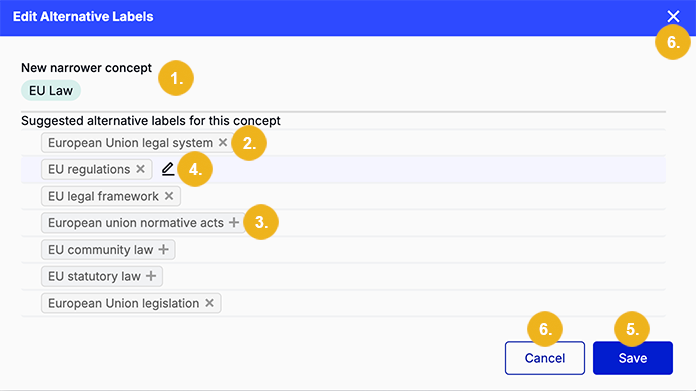
Here, the generated New narrower concept (1) is displayed at the top. Suggested alternative labels for this concept have a trailing X icon (2) which can be clicked to remove the label from the list. Removed alternative labels have a trailing + icon (3) which can be selected to add the label to the list again. When you hover over an alternative label and then click on the pen icon (4 next to it, you can edit the label in an editable input field. Click Save (5) to apply or Cancel (or X) (6) to discard any modifications of the suggested alternative labels.
Definitions for each generated narrower concepts can be generated and modified in a similar way.
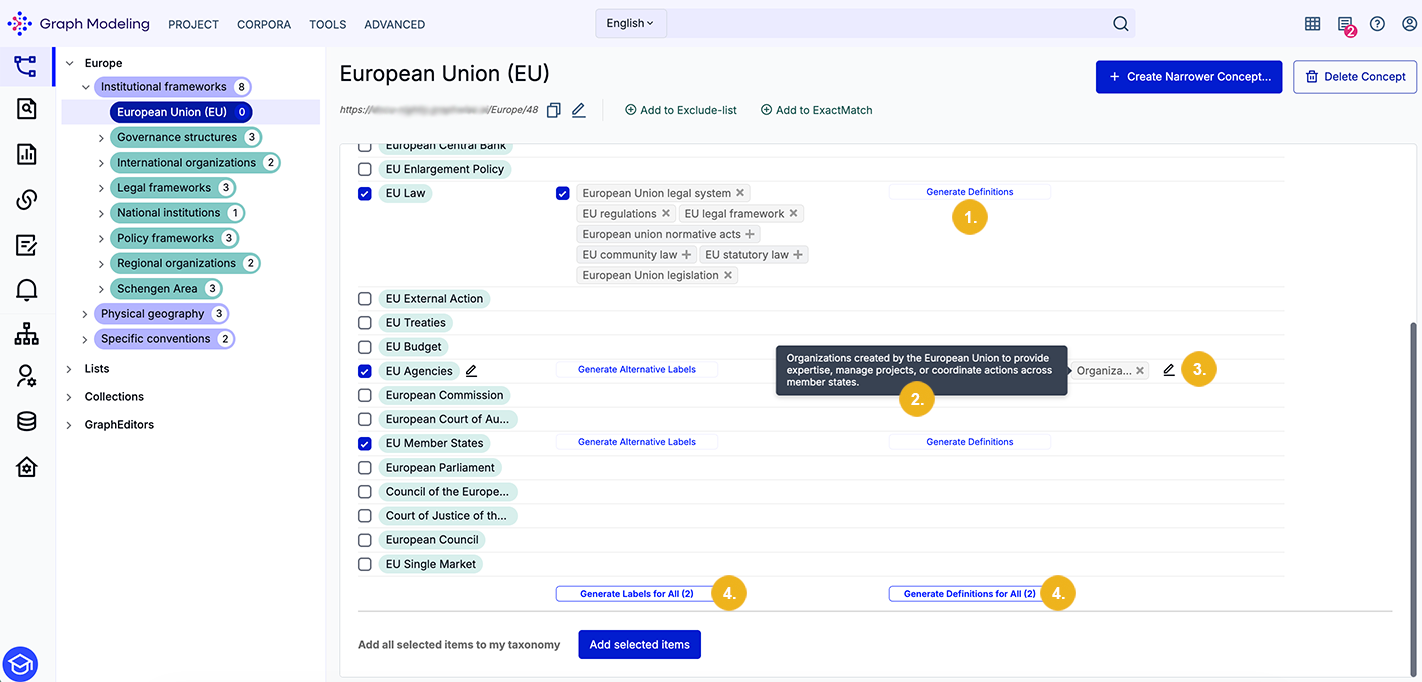
For each selected suggested narrower concept, a Generate Definitions button (1) appears in the second column. Click the button to generate a list of suggested definitions for that selected narrower concept. Again, each definition can be removed and re-added by using their respective X and + icons. Hover your cursor over a generated definition to see its full text (2).
Note
Buttons for bulk operations (Generate Labels for All, Generate Definitions for all (4)) will only appear if at least two of the suggested narrower concepts have been selected (i.e. their checkboxes have been ticked).
Click the pen icon (3) next to the list of suggested definitions to open a dialog which lets you edit each definition individually.
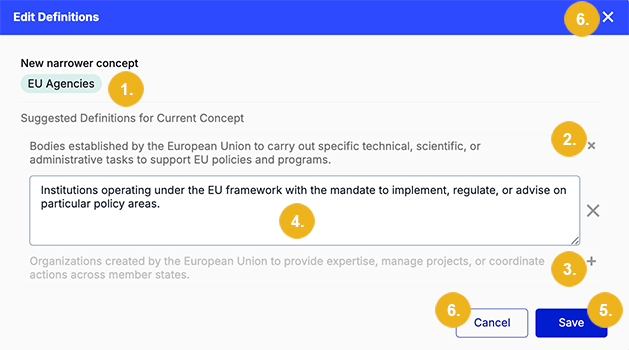
The example above shows this dialog where the New narrower concept (1) is displayed at the top. An X icon (2) appears next to a selected definition which can be clicked to deselect it. A deactivated definition has a trailing + icon (2) and clicking on it adds the definition back to the list. The example also shows that an editable field (4) is active for one of the definitions. If you want to keep the changes you have just made, click Save (5). Use the Cancel (6) button or the X icon (6) in the top right corner of this window to discard them.
After you have made the desired editing and selected the desired new narrower concepts along with their alternative labels and definitions click on the Add selected items button at the bottom of the page to open the following window:
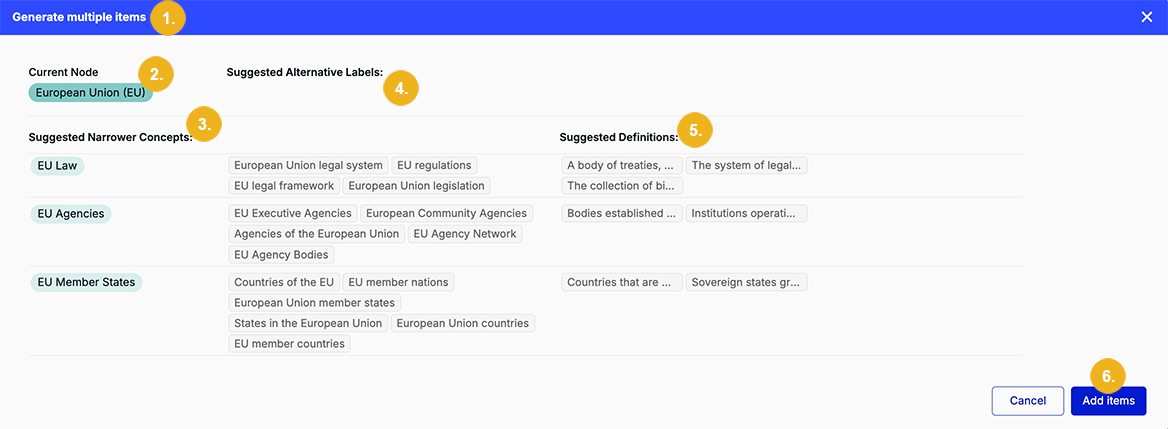
This Generate multiple items (1) window shows the current node (2) (i.e. the concept for which the narrower concepts (3) along with their alternative labels (4) and definitions (5) have been suggested. If you are happy with the details shown click Add items (6) to refine your taxonomy and show the Details view tab of the originally selected tab or Cancel to abort this operation and return to the Extend your Taxonomy tab now showing all data generated by the LLM assisted feature.
Our refined taxonomy looks as follows:
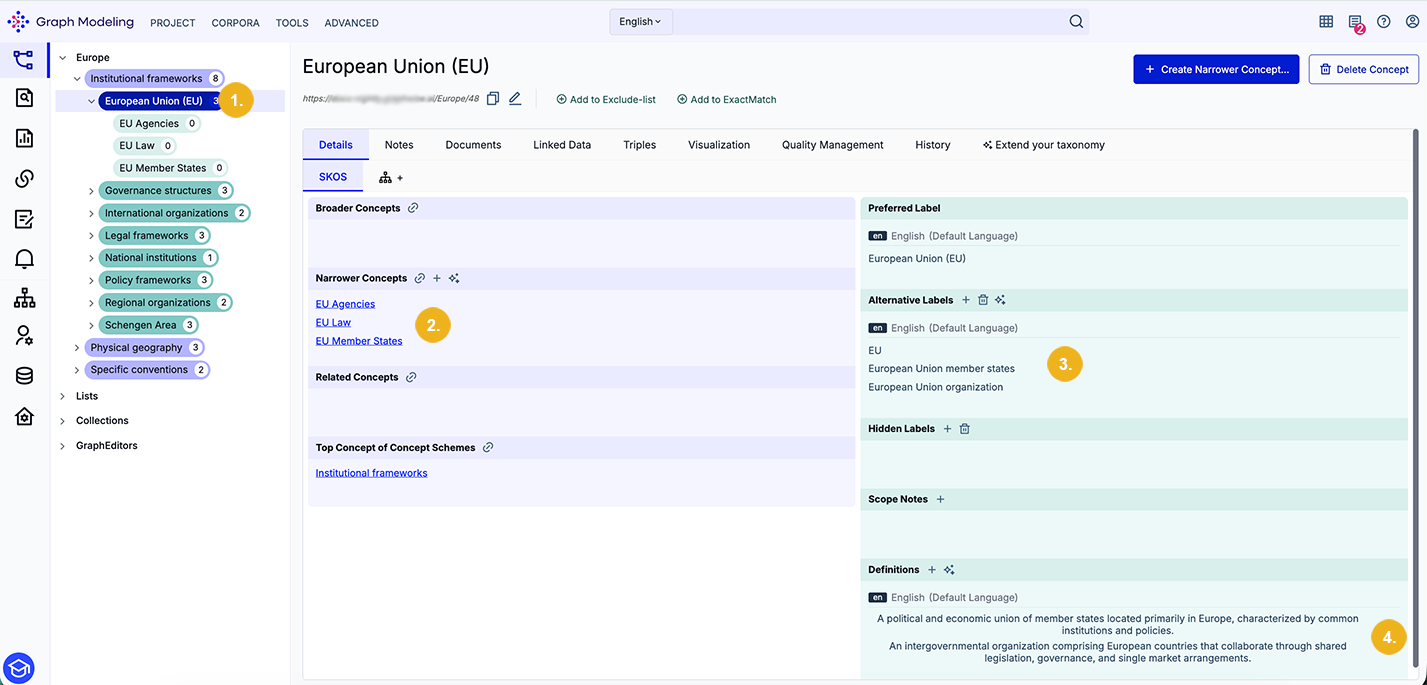
The concept we have selected (1) now has 3 narrower concepts (this is shown both on the tree view on the left (1) and also in the Narrower Concepts sections (3). The number of alternative labels (2) has also increased and the Definitions (4) section now shows the newly generated definitions.
If you want to edit the newly added information you can delete the added narrower concepts using the context menu on the tree view. To edit Alternative Labels (2) simply click on the pen icon in front of each label. When you hover over one of the alternative labels with your mouse you will see three symbols - the pen icon (click on it to edit the respective label), then a bin symbol (to delete the respective label with a single click) and the swap icon (click on it to swap the preferred label and replace it with the selected alternative label). The entries contained in the Definitions (4) section will only show two icons with a mouse-over; a pen icon (click on it to edit the respective definition) and a bin symbol (clicking it deletes the respective definition).