The Graph Modeling Applications Menu
05/05/2025
This section contains a short guide on the Graph Modeling grid menu icon  (also referred to as the Applications Menu) and the available functions there.
Note
The Applications Menu is a project-dependent UI element, which means that it is only visible after a project has been opened.
You can find the Applications Menu (1) in the upper right-hand corner of Graph Modeling's interface. Click on it to display the sub-menu items, consisting of several Graph Modeling applications and external services:
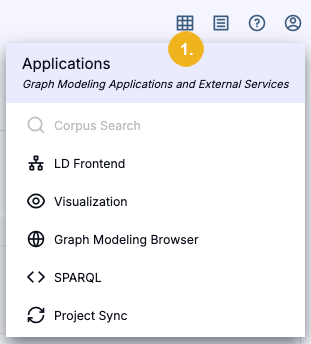
The following functions are available here:
Use Corpus Search to open an interface for testing the search inside your project for a possible application based on it. If this icon is greyed out, you might have to set up Corpus Search first. For details refer to: Create a Corpus Search Interface Within Graph Modeling
Click LD Frontend to access the Linked Data Frontend of the project.
Clicking Visualization will open a new browser tab or window displaying a graphical representation as pie chart of the project's thesaurus.
Access the Graph Modeling Browser where you can find the SPARQL Endpoint and the Wiki Frontend of the project.
Select SPARQL here to access the SPARQL Endpoint directly.
Click Project Sync to open the Mirror App which allows you to synchronize Graph Modeling projects.
Important
Project Sync only appears as an application menu option if it has been set up in as an external service.
Note
If one or more buttons you need are grayed out, contact your administrator.