Merging Concepts by Drag and Drop
16/09/2026
Let's assume you have two concepts that are actually the same. For example, one concept's preferred label is actually a synonym of another concept. You can merge those concepts in the following way:
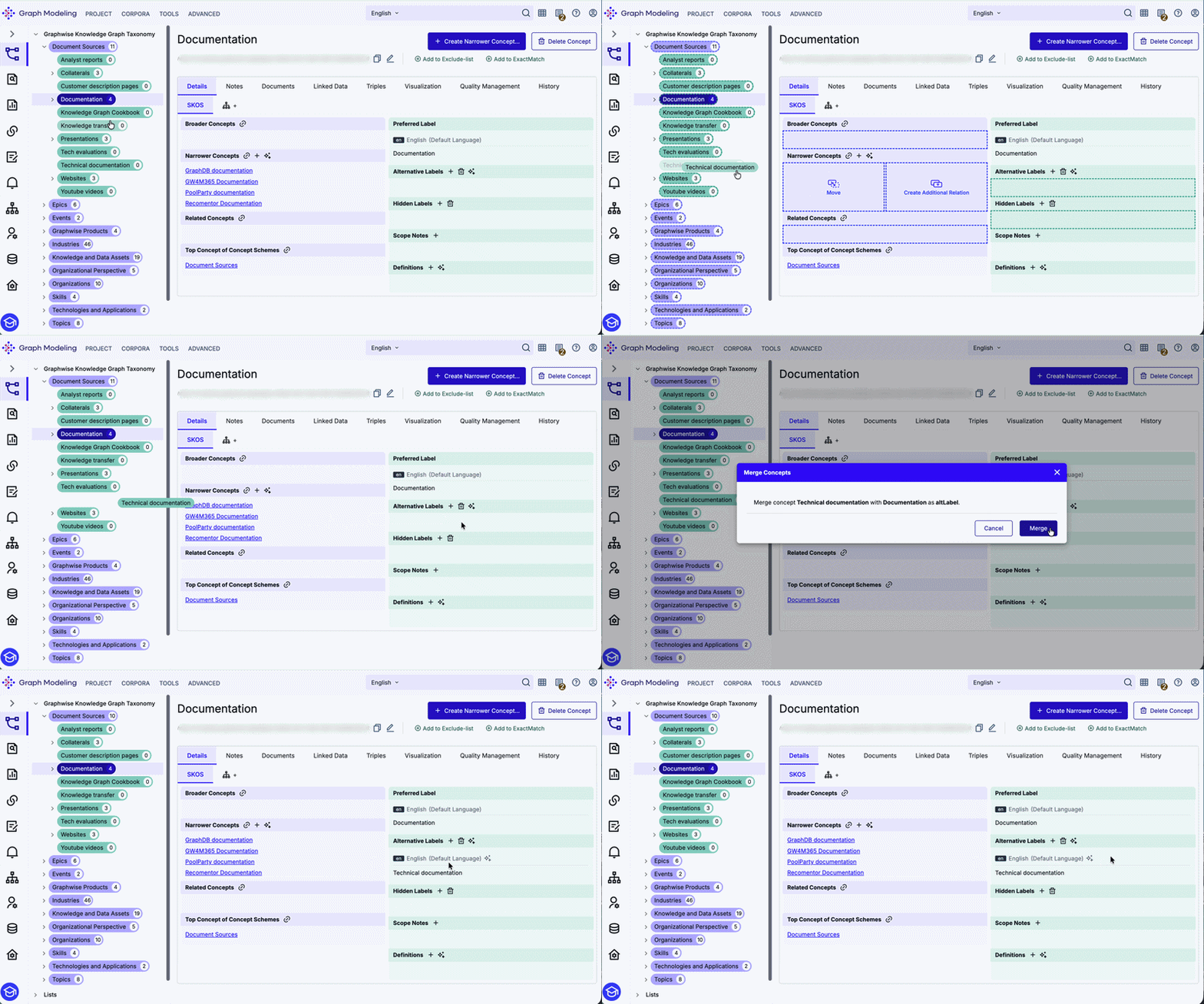
Select the concept with the preferred label you want to keep.
Simply drag the synonymous concept to the Alternative Label or Hidden Label area of the concept you want to keep.
Click Merge in the confirmation dialog. By confirming the message the two concepts are merged, automatically removing the obsolete concept from the project. The consolidated concept inherits all relations from the removed one.
Note
If you have accidentally created two concepts with the same Preferred Label you can also merge them by dragging one concept to the Alternative Label or Hidden Label area of the other.
When you merge a concept, the following information will be generated to indicate that the concept is deprecated:
<URI-of-Concept> rdfs:label "Concept preferred language"@<lang>
<URI-of-Concept> owl:deprecated true
<URI-of-Concept> dcterms:isReplacedBy <URI-of-MergeTarget>

<lang> ... default language of project
So you can retrieve merged concepts via the SPARQL endpoint and you can make them available in the LD frontend.