Taxonomy Builder: Add Details
07/08/2026
The Add Details tab in the Taxonomy Builder allows you to enrich your concepts with labels and definitions. You can use this workflow step to generate metadata for:
Pre-existing concepts: Enrich concepts already present in your taxonomy (without using the Build Hierarchy tab first).
Generated concepts: Enrich candidate concepts created during the Build Hierarchy stage.
A mix of pre-existing and generated concepts: Enrich a combination of pre-existing and newly generated concepts (ideal when expanding an existing taxonomy).
Note
The background color of a concept in the list of Candidate Concepts indicates its origin and type: Generated concepts have a gray background color, whereas pre-existing top concepts and concepts are dark/light green.
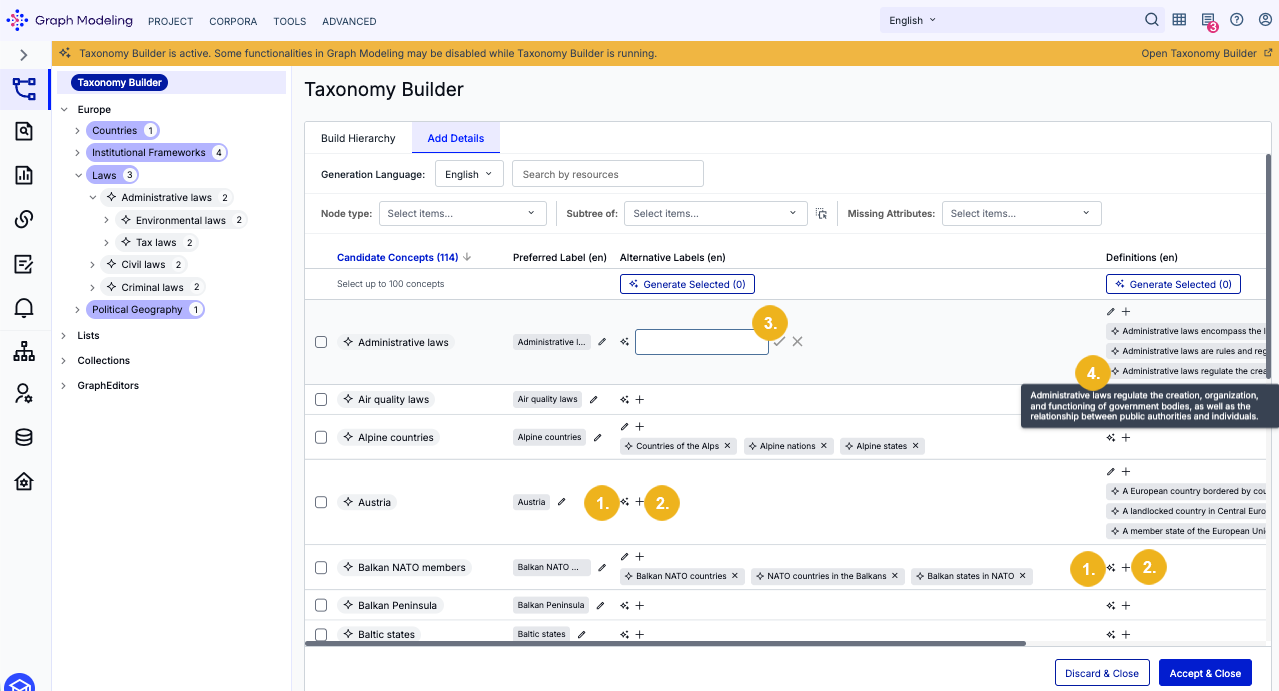
Click the Sparkle (Generate) icon (1) to generate alternative labels and definitions for an individual concept. Selecting the '+' icon (2) allows you to manually enter your own alternative label or definition inside of a text field (3). Hover over a generated definition or label to expand and view the full text (4).
Note
Clicking the Sparkle icon generates up to three alternative labels and three definitions in a single operation. If you need additional alternative labels or definitions for a concept, simply click the Sparkle icon again to run another generation step.
Note
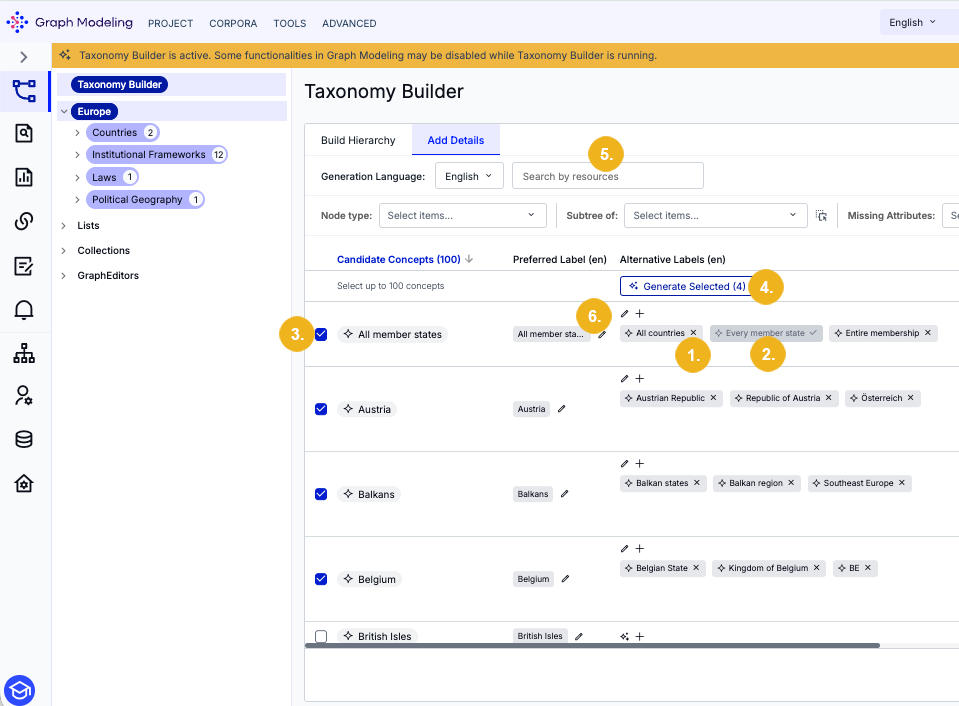
All generated content is selected by default. To reject a suggestion, click the X icon (1) next to it. If a suggestion has been deselected it will be grayed out. You can click on it again to re-add it (2).
To generate alternative labels and definitions in bulk select one or more candidate concepts via their leading checkbox (3) and then select the Generate Selected button (4). You can also search for specific concepts and top concepts in the Candidate Concepts list in the Search by resource search field (5).
The Add Details tab also allows you to directly edit the preferred label of any concept in the Candidate Concepts list. To do so click the pen icon (6) next to the preferred label you wish to edit to open an editing dialog:
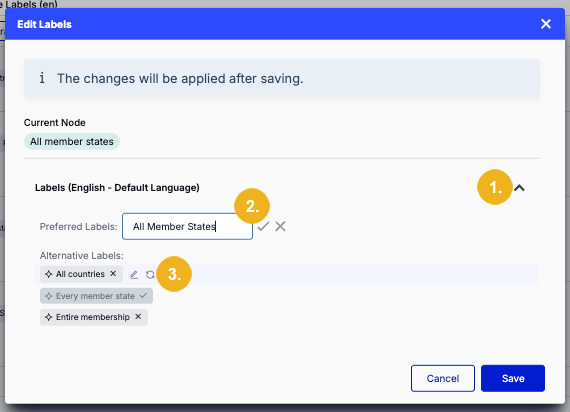
Expand the language section you wish to edit (1). Click the pen icon, make your changes, and then select the checkmark icon next to the input field (2). Alternatively, you can use the replace icon (3) corresponding to any pre-existing or generated alternative label to use it as the preferred label. Alternative labels can also be edited in this dialog via a trailing pen icon.
Click Save to apply your changes, or Cancel to exit without saving.
You can refine the candidate concepts list using three filters:
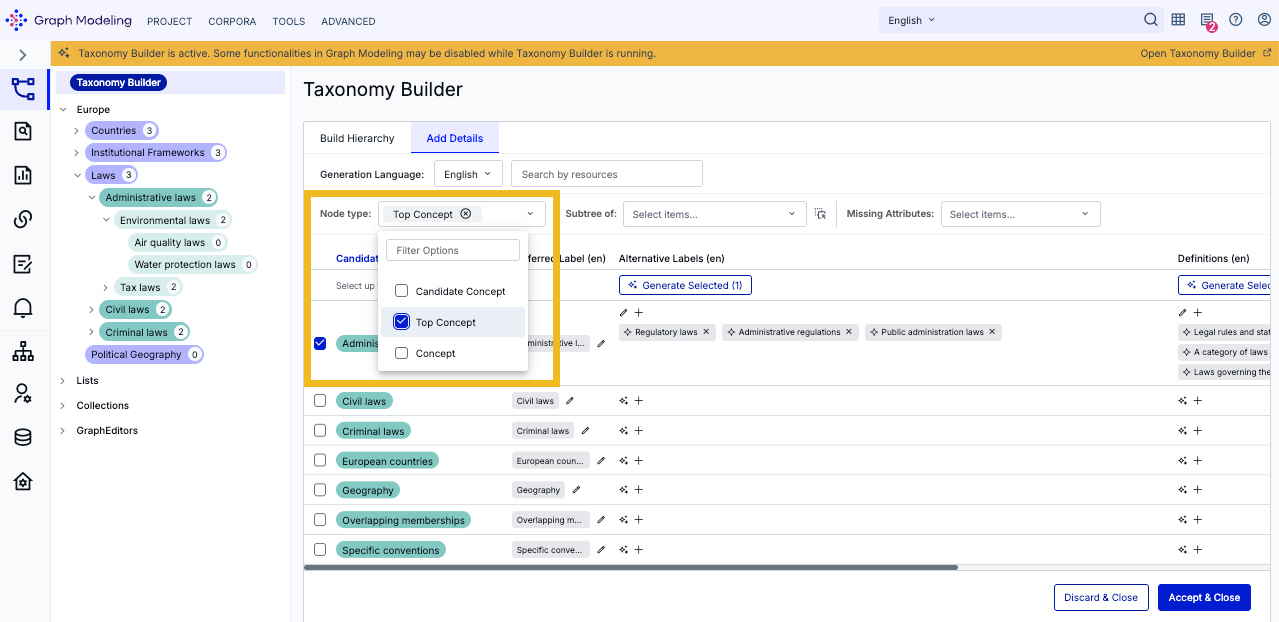
Node type: Filter the list by checking Candidate Concept, Top Concept, or Concept. You can select multiple types simultaneously to refine your view.
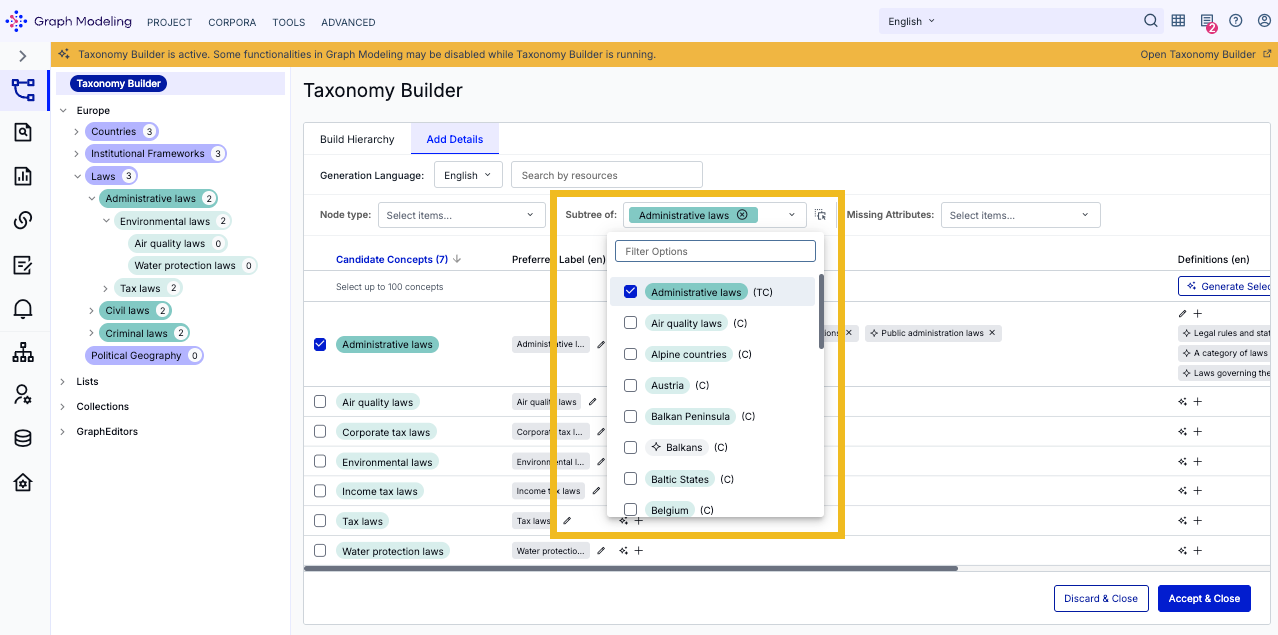
Subtree of: Restrict the list to display only the child concepts of specific nodes. Target nodes by dragging and dropping them from the left-hand taxonomy tree, or by selecting them from the Select items... dropdown menu.
In the dropdown, pre-existing nodes are color-coded in shades of green, while generated concepts feature a gray background with a Sparkle icon. Node types are also indicated by a shorthand suffix: (C) for concept and (TC) for top concept.
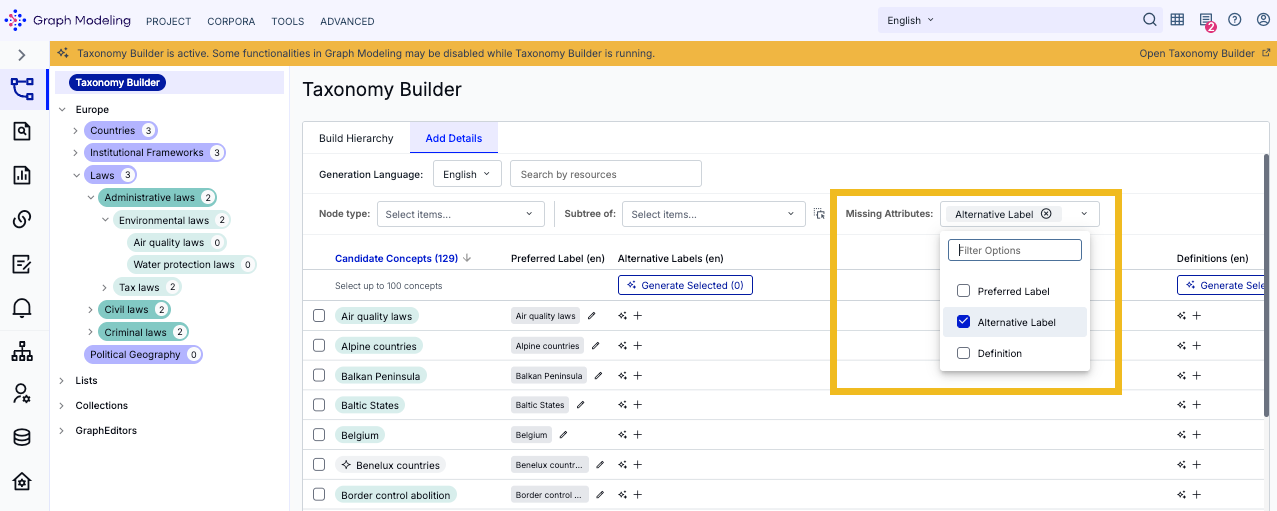
Missing Attributes: Identify gaps in your taxonomy by filtering for concepts missing specific metadata. Choose Preferred Label, Alternative Label, or Definition from the Select items... dropdown menu. You can also filter for multiple missing attributes at once.
Tip
Filters are restrictive and based on the currently selected language. For example, selecting a specific Node type will restrict the list to show only those matching node types. Conversely, selecting the attribute Preferred Label under Missing Attributes will filter the list to show only the concepts that do not have a preferred label in your selected language.
Note
All filters are persistent. If you refresh the page, your selected filters will remain active.
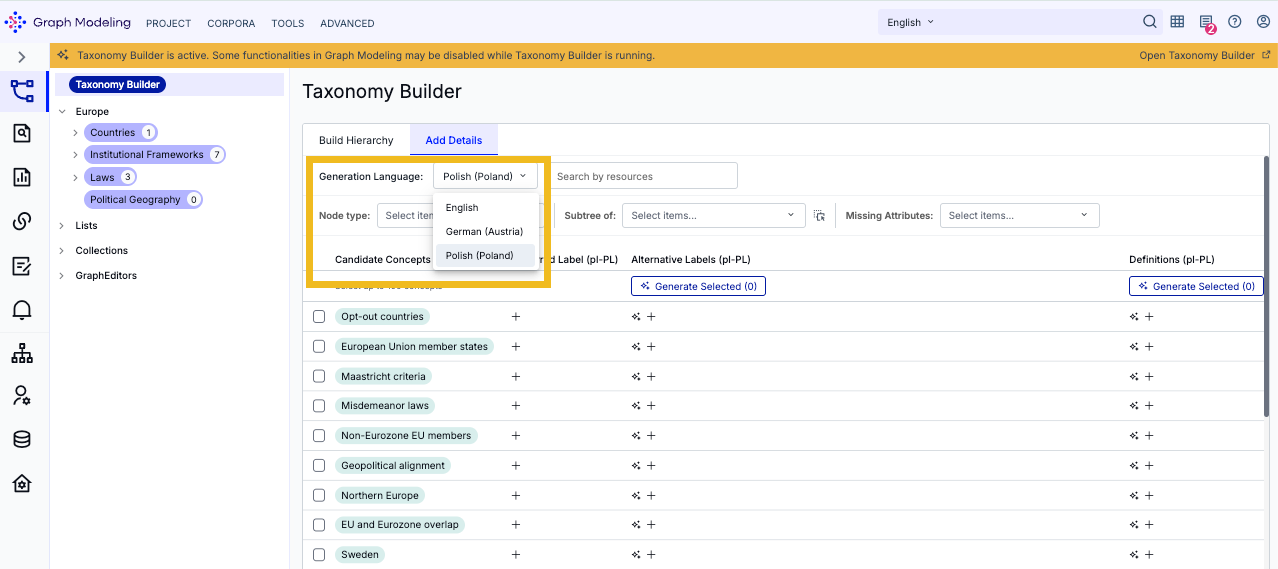
Starting with version 10.3, you can localize preferred labels, alternative labels, and definitions into multiple languages. By default, your project's default language is active in the Generation Language dropdown menu. To begin localizing, expand this dropdown and select your target language.
Note
Multilingual localization requires your Graph Modeling project to have additional languages configured in addition to the default language. These can be added either during project creation or at any point in the project’s Details View.
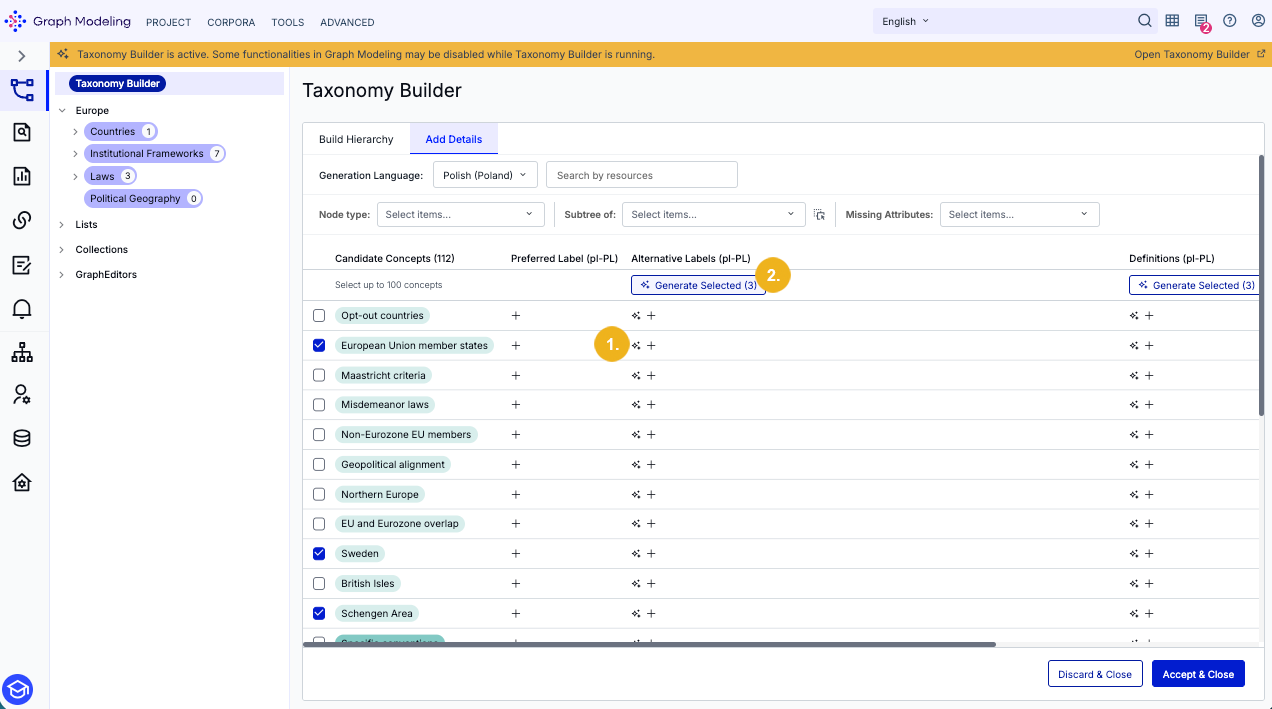
Click the Sparkle icon (1) in the alternative labels column next to the concept you want to localize. Alternatively, multi-select concepts and then click the Generate Selected button (2) to localize them in bulk. A dialog will open asking if you would like to generate preferred labels for that language (in addition to alternative labels):
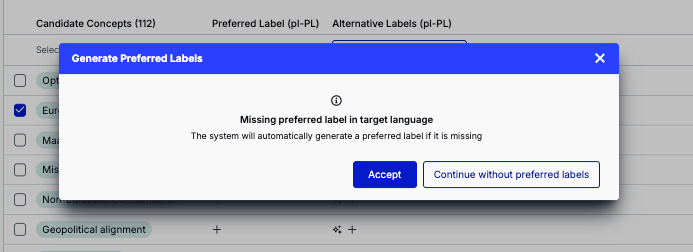
Continue without preferred labels: Generates three alternative labels in the target language only.
Accept: Generates a new preferred label in the target language alongside three alternative label suggestions.
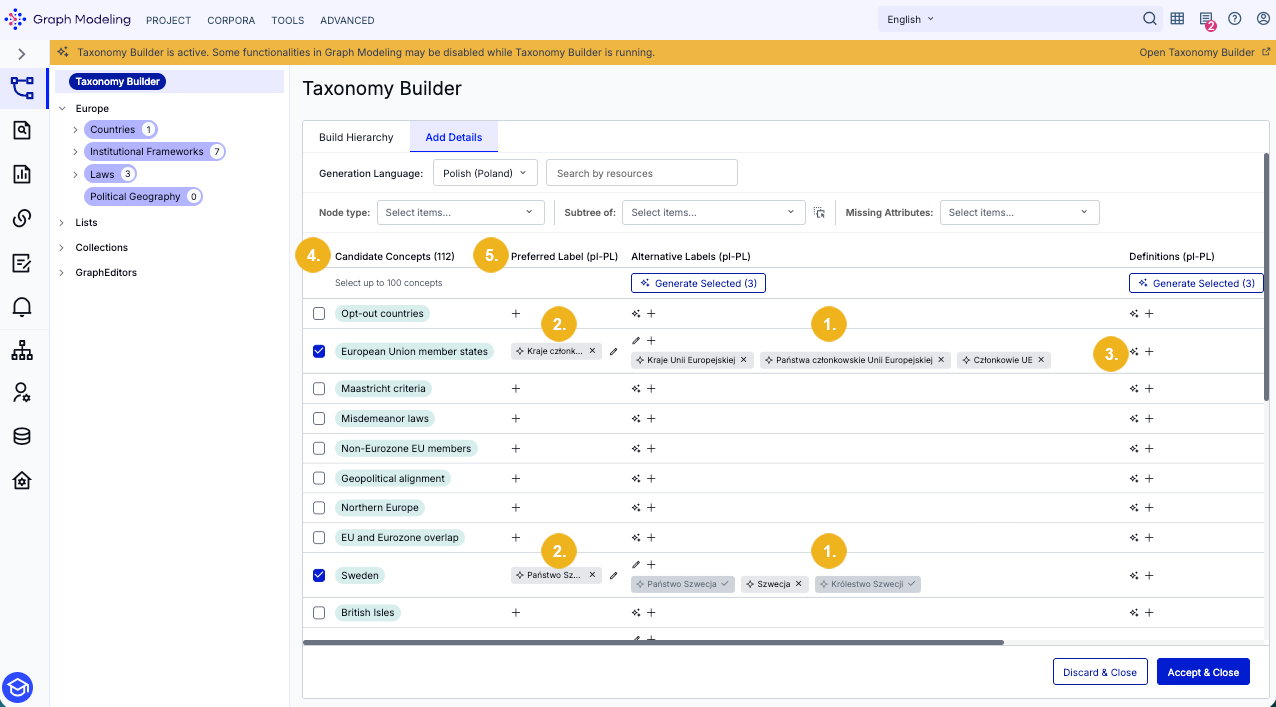
The image above shows the three suggested alternative labels (1) and one preferred label (2) for each selected candidate concept, which can be refined just like in the default language.
All other details can be managed exactly as they are in the default language. To generate localized definitions, click the Sparkle icon (3) in the definitions column next to the concept you wish to target.
Tip
You can sort the candidate concepts list either by the original candidate concept's preferred label or by its localized preferred label. Click one of the list headers Candidate Concepts (4) or Preferred Label (5) to toggle between these sorting orders. Click the same header again to switch between ascending or descending order.
Once you have finished fine-tuning your concepts, select Accept & Close to apply all selected, newly generated content to your taxonomy. Alternatively, click Discard & Close to exit the Taxonomy Builder and discard all previously generated data.
Note
We are currently working to expand the Taxonomy Builder's capabilities with the following features:
Expansion from Documents: The Taxonomy Builder will gain the ability to expand an existing taxonomy based on a user-provided corpus.
Adding Attributes and Relations: Integration of LLM and corpus-based methods to generate SKOS relations and ontology-based attributes/relations.