AEM Auto-Tagging
15/09/2029
Graphwise for Adobe Experience Manager 1.0
This section explains how to configure and run auto-tagging in Adobe Experience Manager (AEM). Auto-tagging supports Pages and Content Fragments by automatically applying taxonomy terms based on content analysis. Content paths configured for synchronization are registered as annotation locations. Tagging schedules can be configured to meet operational requirements. As content changes metadata is updated during regular processing to help maintain accurate tags and prevent conflicts or duplicates.
Note
Auto-tagging is an optional feature and operates separately from taxonomy synchronization, which can be used on its own.
You can add new auto-tag configurations that will receive automatic tags.
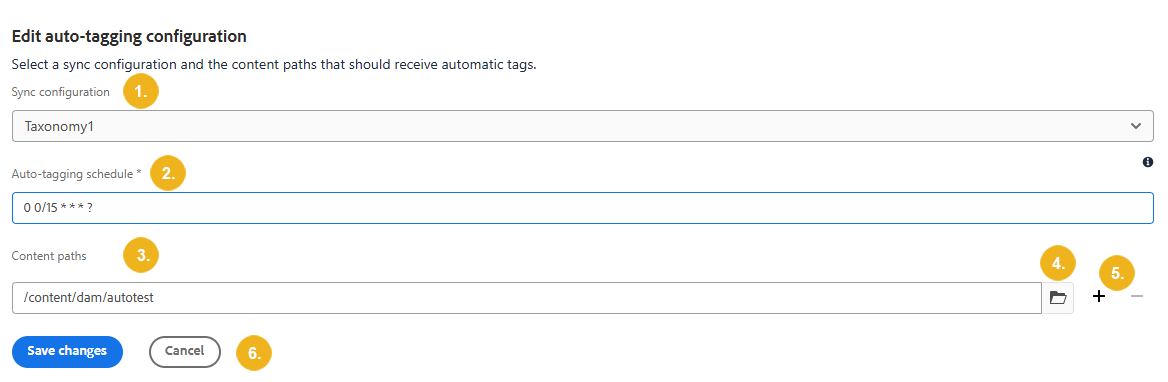
Select the Taxonomy under Sync configuration (1). This will define the Graphwise project and concept scheme used for tagging.
Define the Auto-tagging schedule (2) using a Quartz cron expression. The default schedule runs every 15 minutes (for example, 0 0/15***?). Invalid expressions are rejected.
Select the Content path (3). You can enter this manually or select the folder icon (4.) and navigate to the correct file. Select the plus icon to add another content path or the minus to remove (5.).
Select Save changes or Cancel (6).