Credential Mapping
02/10/2026
GraphRAG 1.3.0
After configuring the graphrag client in the Keycloak instance of the Graph Modeling server you want to connect to using a single OAuth2 credential, you have to add the relevant details under Credentials - Graphwise in the n8n dashboard.
Login to your instance of the n8n-based workflow management dashboard.
Select the Credentials (1) tab to display the available credentials.
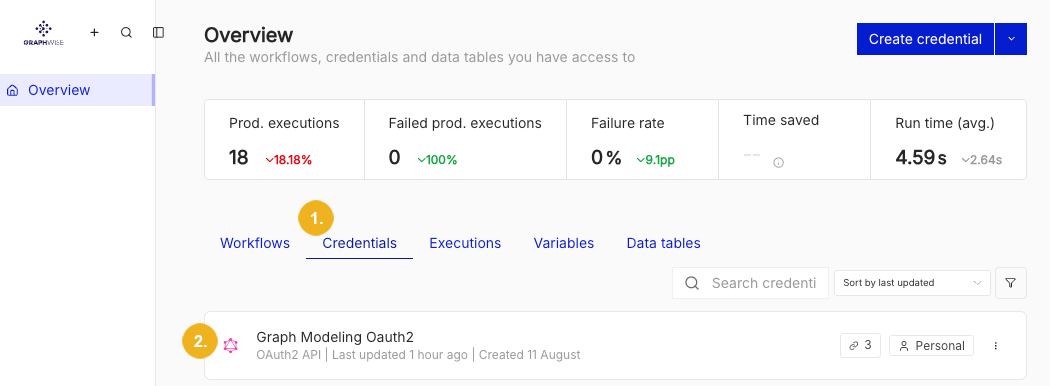
Navigate to Graph Modeling Oauth2 record (2).

To open the record either click on its name (1) or use the overflow menu (2) to display the Open menu item. A window opens where you can configure the required settings.
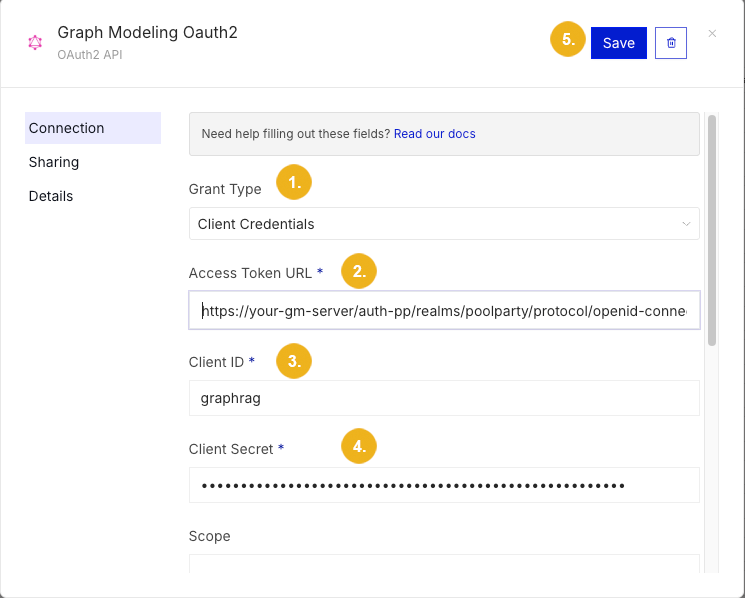
Now populate the record by specifying the following settings:
Select Client Credentials in the Grant Type (1) pull-down.
Specify the URL for the Access Token URL* (2).
This entry may look like this:
https://your-graph-modeling-server.com/auth/realms/poolparty/protocol/openid-connect/token.Enter
graphragin the Client ID* (3) field.Paste the client secret which was set in Keycloak for your graphrag client into the Client Secret* (4) field.
Click Save (5) to confirm and save the settings.
Credential mapping is now complete and you should be able to use your client.
Tip
You can verify the correct setup of the Keycloak client for GraphRAG either by asking a question via the UI and checking whether concepts are successfully extracted and displayed in the returned answer, or by directly calling the /conceptDetails endpoint of the Conversations Service.