Delete Graph Modeling Taxonomy from Term Store
17/06/2026
Important
This feature is currently in beta and will be updated in future releases. We apologize for any inconvience.
Note
We are currently updating images across the site as part of an ongoing branding refresh. Some pages may still contain older screenshots or graphics. We apologize for any inconsistencies and are working to update all images as soon as possible.
To delete a synchronized term group from the Term Store, use the Graphwise for SharePoint Administration application.
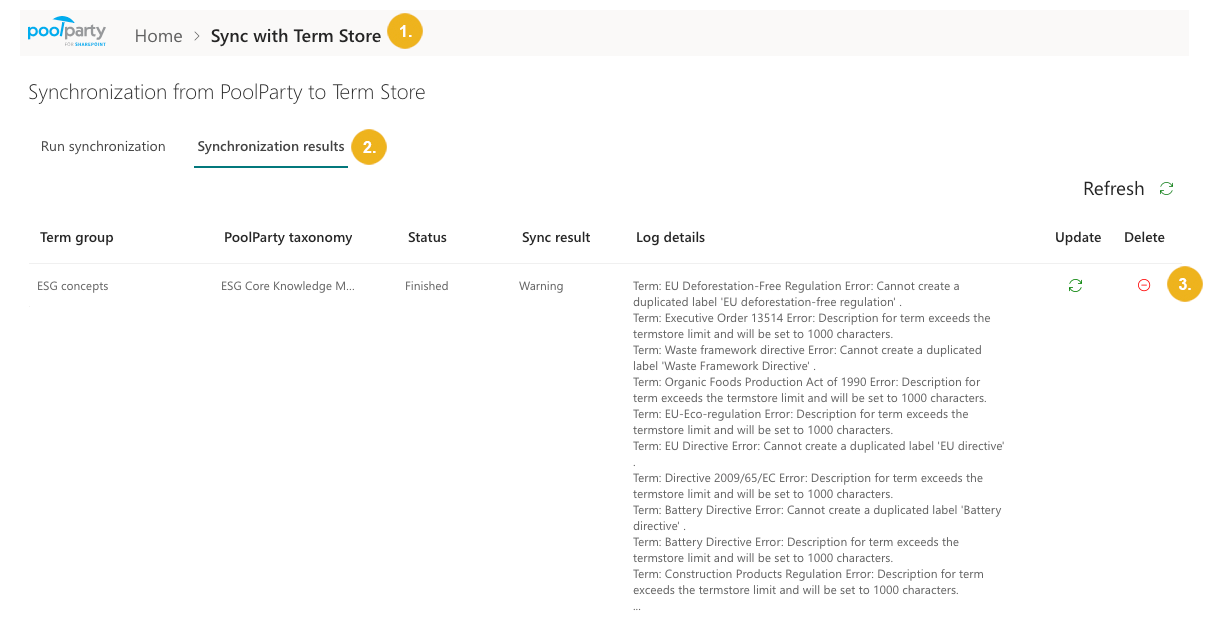
On the Graphwise for SharePoint Administration page, select Sync with Term Store.
Go to the Synchronization results tab.
Tip
The log details on the Synchronization results tab are truncated (shown with an ellipsis) if they are too long. To view the full log, double-click the row.
Select the Delete icon next to the the synchronization you want to remove from Term Store.
A success message appears.