Managing Your Conversations - an Overview
3106/08/2026
GraphRAG version 1.3
This button is located in the upper left area of the screen. With a click on it (1) you instantly clear the chat panel (the displayed chat) to start a new conversation.

The Recent conversations panel is located on the left. There you will find all the previously asked questions. As soon as you send your very first question to the app, it will appear there.
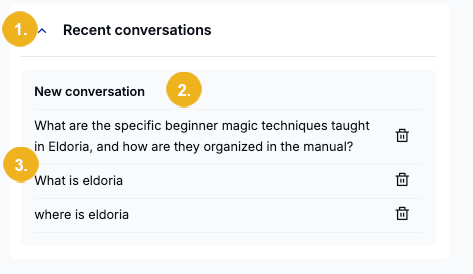
To open respectively close this panel click on the arrow (1) on the left. The panel lists the chat history.
The first entry on this list is the New conversation (2) button. Use it to clear the chat panel and start a fresh conversation. Underneath you will see a list of all recorded conversations (3) followed by a bin symbol.
Tip
The names shown on this list are the initial questions from each of your previous conversations.
If a conversation contains follow-up questions, these will be nested under the initial question and displayed when you select the respective initial question.
To have a follow-up question along with its answer shown in focus simply click on it.
Use the bin symbol if you want to delete any chat from this list.
Tip
For more details on how to use the Recent conversations panel and delete any list entries refer to the article describing how to use the Recent conversations functionality.