Deploying to Azure
29/07/2026
Connectors 1.1//GW4M365
This section explains how to deploy the Graphwise platform to Microsoft Azure. Learn about the deployment requirements and the steps required to deploy the core, controllers, and platform. Expand each section for detailed instructions.
This section provides the instructions on how to deploy the core in Azure.
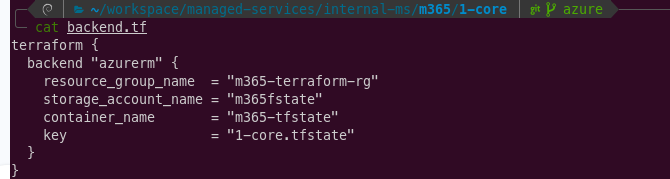
Go to 1-core and configure backend.tf file, as shown below.
Note
You can change the variable names to your preference, provided the Resource Group and Storage Account are already created.
Create a terraform.tfvars file and fill with the required variables. Refer to the following example:
subscription_id = "1b2efd58-0bc0-4b87-961c-41d010f018fe"
aks_terraform_runner_principal_id = "b6259179-6b46-472d-acb0-d9183ee5847d"

name     = "m365-test-rg"
location = "West Europe"
domain   = "m365.example.com"

dns_zone_name = "m365.example.com"

aks_cluster_admins_ids = [
  "99f529b4-c559-404f-885a-a89d528f3095", # Test User in gw4m365tst tenant
  "6014bfe2-c95c-4bb2-b65c-2ba6d0acdd88"  # Vik
]

aks_system_pool_vm_size             = "Standard_D4ds_v6" # 4 vCPU, 16G Memory
aks_api_server_authorized_ip_ranges = ["92.247.152.210/32", "212.25.36.115/32", "94.26.62.6/32"]
key_vault_terraform_runner_cidrs    = ["92.247.152.210/32", "212.25.36.115/32", "94.26.62.6/32"]
storage_network_authorized_ips      = ["92.247.152.210", "212.25.36.115", "94.26.62.6"]
appgw_ingress_cidrs                 = ["0.0.0.0/0"]
vnet_flow_log_enabled               = false
appgw_tls_mode = "cert_manager"
prevent_deletion = false
owner_organization_id = "m365"
backups_storage_account_replication_type = "ZRS"
Note
You must already control a domain, in this case m365.example.com, so that you can insert the required
NameServers.Run
terraform applyand save the output, as it contains necessary parameters for both 2-controllers and 3-platform.
This section provides instructions on how to deploy the platform in Azure.
Go to 3-platform and set up the backend.tf file.
Move to terraform.tfvars.
subscription_id       = "1b2efd58-0bc0-4b87-961c-41d010f018fe"
owner_organization_id = "m365"
resource_group_name   = "m365-test-rg"

name   = "m365-example-test"
domain = "m365.example.com"

# Outputs from step 1-core
aks_name                     = "m365-test-aks"
aks_oidc_issuer_url          = "https://westeurope.oic.prod-aks.azure.com/97e15a02-0053-4efd-91ee-14cc8c6c124e/99c07e04-6a16-4893-9343-7b49a676792c/"
key_vault_id                 = "/subscriptions/1b2efd58-0bc0-4b87-961c-41d010f018fe/resourceGroups/m365-test-rg/providers/Microsoft.KeyVault/vaults/m365-test-kv-88ad"
backups_storage_account_name = "m365testbckps"
subnet_private_ids = [
  "/subscriptions/1b2efd58-0bc0-4b87-961c-41d010f018fe/resourceGroups/m365-test-rg/providers/Microsoft.Network/virtualNetworks/m365-test-vnet/subnets/m365-test-private-subnet"
]

# TLS
ingress_tls_mode                         = "cert_manager"
ingress_cert_manager_cluster_issuer_name = "letsencrypt-prod"

# Keeper Secrets Manager
keeper_credential_path = "./config.json"

keeper_uid_graphdb_license                            = "I2-ePD_Nr0QQikSQ7GpXKw"
keeper_uid_poolparty_license                          = "Uhdv82LojbVrTOGaofP4eQ"
keeper_uid_containers_auth                            = "k_1042FaUA-AkupKTWwQhA"
keeper_uid_keycloak_admin_password                    = "yyTDa9XkjBteYve1KWNxXg"
keeper_uid_keycloak_poolparty_client_secret           = "_iL75kOix2OeZD7mWPGGjw"
keeper_uid_poolparty_superadmin_password              = "5-mcFBpGc35m2QFU1KIOMA"
keeper_uid_graphrag_n8n_license                       = "diAbnt8sM-84mIqcxzY66w"
keeper_uid_graphrag_n8n_encryption_key                = "eK-LQ8a8TnbapcG8E9yXZQ"
keeper_uid_graphrag_conversation_sensitive_properties = "dkLtYWLBzHdA9D8IZZr40w"
keeper_uid_m365_connectors_license                    = "wncRvIbgbXUpy66riYAaCg"
keeper_uid_m365_connectors_entra_client_secret        = "DG7dmSjEzb2wlbxO214MVw"

# Node pool VM sizes
keycloak_node_pool_vm_size      = "Standard_D2ps_v6"
elasticsearch_node_pool_vm_size = "Standard_D4ps_v6"
graphdb_node_pool_vm_size       = "Standard_D4ps_v6"
poolparty_node_pool_vm_size     = "Standard_D4ps_v6"
graphrag_node_pool_vm_size      = "Standard_D4ps_v6"

# Feature flags
graphrag_enabled             = true
poolparty_adf_enabled        = true
poolparty_graphviews_enabled = true
poolparty_mirrorapp_enabled  = false
poolparty_workbench_enabled  = true
graphdb_enabled              = true
poolparty_enabled            = true
keycloak_enabled             = true
elasticsearch_enabled        = true

# Node pool scaling
keycloak_node_pool_scaling_config = {
  min_size     = 1
  desired_size = 1
  max_size     = 3
}

elasticsearch_node_pool_scaling_config = {
  min_size     = 1
  desired_size = 1
  max_size     = 3
}

graphdb_node_pool_scaling_config = {
  min_size     = 1
  desired_size = 1
  max_size     = 3
}

poolparty_node_pool_scaling_config = {
  min_size     = 1
  desired_size = 1
  max_size     = 3
}

graphrag_node_pool_scaling_config = {
  min_size     = 2
  desired_size = 2
  max_size     = 4
}

# Replicas
keycloak_replicas              = 1
keycloak_postgres_replicas     = 1
elasticsearch_replicas         = 1
graphdb_replicas               = 1
graphdb_proxy_replicas         = 1
graphrag_chatbot_replicas      = 1
graphrag_components_replicas   = 1
graphrag_n8n_postgres_replicas = 1

# Storage
graphdb_storage_size           = "150Gi"
graphdb_proxy_storage_size     = "10Gi"
poolparty_storage_size         = "50Gi"
keycloak_postgres_storage_size = "15Gi"
elasticsearch_storage_size     = "150Gi"

# Resources
graphdb_resources = {
  requests = { memory = "12Gi" }
  limits   = { memory = "12Gi" }
}

graphdb_proxy_resources = {
  requests = { memory = "1Gi" }
  limits   = { memory = "1Gi" }
}

poolparty_resources = {
  requests = { memory = "12Gi" }
  limits   = { memory = "12Gi" }
}

graphrag_n8n_resources = {
  requests = { memory = "6Gi" }
  limits   = { memory = "6Gi" }
}

# Backups
graphdb_backups_schedule              = "0 1 * * *"   # every day at 1am
keycloak_postgres_backup_schedule     = "0 0 1 * * *" # every day at 1am
elasticsearch_backups_schedule        = "0 0 1 * * ?" # every day at 1am
graphrag_n8n_postgres_backup_schedule = "0 0 1 * * *" # every day at 1am

# Container registry
containers_registry = "maven.ontotext.com"
# platform_helm_chart_timeout = 300

tags = {
  "environment"         = "GWP Suite"
  "organizational-unit" = "DND"
}

m365_connectors_enabled = true

# Entra ID (Azure AD) identity brokering — replace placeholders with real values
m365_connectors_entra_tenant_id = ""
m365_connectors_entra_client_id = ""
m365_connectors_entra_client_secret = ""

# SharePoint tenant URL — templates the SPFx client redirect URIs and web origins
m365_connectors_sharepoint_tenant_url = "https://gw4m365tst.sharepoint.com" # "https://<tenant>.sharepoint.com"

# n8n enterprise license for the M365 instance. Leave unset to run n8n in community mode.
m365_connectors_tenant_id = 2

# Owner account for the M365 connectors n8n instance (provisioned via n8n REST owner-setup)
m365_connectors_n8n_owner = {
  email      = "m365-owner@example.com"
  password   = "S0meS3cret!"
  first_name = "M365"
  last_name  = "Owner"
}

m365_connectors_context_path = "/n8n/"

poolparty_additional_cors_allowed_origins = ["https://gw4m365tst.sharepoint.com"]
#poolparty_base_url = "https://m365.publicvm.com/PoolParty"


graphrag_n8n_tenant_id = 2
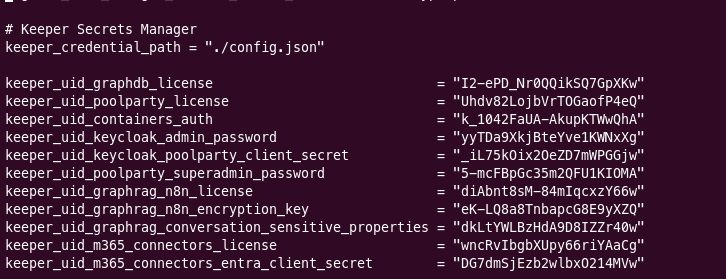
Ensure Keeper configuration is present locally.
Note
The IDs shown correspond to Keeper secrets located in the Development directory under TES. If you use different secrets, ensure to update the below UIDs.
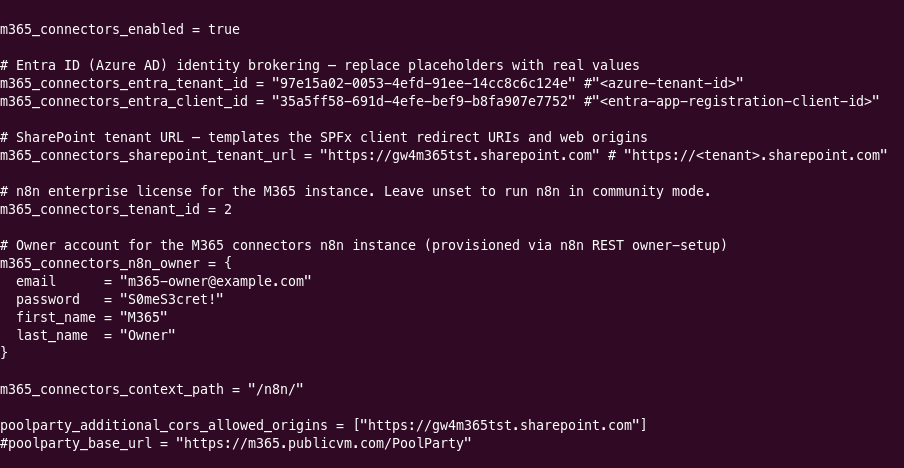
Replace the following with values from the SharePoint Automation script output:
m365_connectors_entra_Idm365_connectors_entra_client_idm365_connectors_entra_client_secret
Replace
poolparty_additional_cors_allowed_originswith the GWP base url to set up the CORS whitelist rules.Replace
m365_connectors_sharepoint_tenant_urlwith the correct SharePoint tenant, the format is https://<tenant_name>.sharepoint.com.Select
terraform apply.