- Graphwise Platform Documentation
- Semantic Analytics
- Graphwise Extractor User Guide
- Refreshing the Extraction Model
Refreshing the Extraction Model
29/10/2026
How the model is refreshed depends on the engine:
Engine | Refresh Behavior |
|---|---|
Elasticsearch (default) | Refreshed manually. Triggers a refresh after changing the thesaurus. |
Lucene | Refreshes itself on first use after a thesaurus change. No manual step is needed in normal use. |
Both engines can also be refreshed on demand from Graph Modeling or through the API. This is typically required when changes are made outside normal editing. For example, after restoring a project from a snapshot, after a large import, after switching the search index, or when tagging results look out of date and you want to force a refresh.
Note
A refresh only updates engines included in your license. Because the Lucene engine requires a separate license, it will not be refreshed or listed on installations lacking that license.
You can trigger an extraction model refresh via the Graph Modeling UI. The action requires the Corpus Write permission on the project, and appears in the menu only for users who hold it.
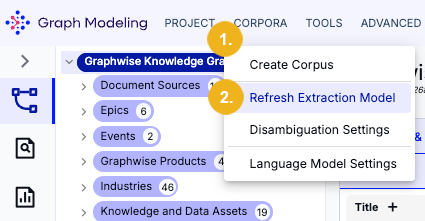
Navigate to the CORPORA menu (1) within your open project.
Click Refresh Extraction Model in the drop-down menu (2).
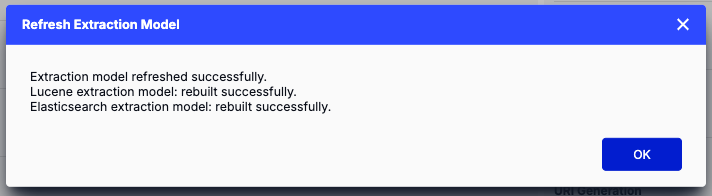
A progress bar is shown while the refresh is in progress. When the refresh is complete, a summary report displays the status of available extraction engine separately:
Note
From Graph Modeling 10.4 this action refreshes both extraction engines. In earlier versions it only refreshed the Elasticsearch engine. This action might take longer since it requires a greater workload than before.
Tip
If a refresh fails for one engine, the Refresh Extraction Model dialog will still mark the other engine as successful. Once the failed engine is available again, refresh it. Re-running the refresh for an engine that has already succeeded is harmless.
From Semantic Analytics version 10.4.0 the following API endpoint can be used to refresh the extraction engine, where {project} is the project's UUID:
POST {{url}}/extractor/api/indexbuilder/{project}/refreshThis call requires an empty request body and Corpus Write permission for the project.
The outcome of this call is reported via the the following fields:
status:SUCCESSorFAILEDfor each engine.timestamp: The date and time at which the engine finished refreshing (UTC).message: A readable summary or the reason the refresh failed.
The call can return the following HTTP status codes for each extraction model:
HTTP Status Code | Status Field | Reasoning |
|---|---|---|
|
| Request handled. Rebuild succeeded across every reported engine. |
|
| Request handled. At least one reported engine failed. The response body details the result for each engine. |
|
| Request rejected. User lacks the required Corpus Write permission. No rebuild body returned. |
|
| Project does not exist. No rebuild body returned. |
|
| Unhandled service error. The server encountered a fault independent of individual backend engine execution. |
Note
Only engines that are included in your license will be shown in the report irrespective of their status.
Partially Failed Results
The engines are independently refreshed, so a failure in one does not affect the other. This is particularly important when Elasticsearch is unavailable:
{
"project": <project-ID>,
"lucene": { "status": "SUCCESS", "timestamp": <date-time>, "message": "Rebuilt 1 locale: en" },
"elastic": { "status": "FAILED", "timestamp": <date-time>, "message": "The Elasticsearch service is unavailable." }
}Note
A project that has never been indexed is treated as a standard first build rather than an error. The API call returns SUCCESS for brand-new or freshly imported projects.
Projects with no configured concepts or languages will also succeed because there is simply nothing to build and the response message will indicate this.
POST | GET {{url}}/PoolParty/api/indexbuilder/{project}/refreshThis endpoint remains functional and retains its original request/response format to support existing scripts. However, it is deprecated. Use the new build endpoint instead. For full details, see the Web Service Method: Build an Extraction Model reference.
The following Extractor Refresh Settings can be configured in Graph Modeling 10.4 or later:
Property | Description | Default | Mandatory or Optional? |
|---|---|---|---|
| Read timeout (in milliseconds) for the call the thesaurus makes to the Extractor's refresh endpoint. This call waits for both engines, so it must stay comfortably above |
| Optional |
| Path of the Extractor's refresh endpoint; |
| Optional |
| Read timeout (in milliseconds) for the call the Extractor makes to the thesaurus to refresh the Elasticsearch model. A full refresh of a large project can run for several minutes. |
| Optional |
| Path of the internal thesaurus route that refreshes the Elasticsearch model; |
| Optional |
Note
Both relative paths resolve against url.base.context which defaults to the server URL derived from the configured address and port. If it is blank and the path is relative, the refresh fails with a configuration error naming that property.
Connect timeouts (5 seconds) and retry behavior (no retries) are fixed and not configurable.